ItemFramer
🟡 Updated this year🖼️ Gallery (1 images)
🔍 Analysis
- 👍 0.3% endorsement rate
- 🏆 #786 of 2025 datapack mods in this game by downloads
📋 About This Mod
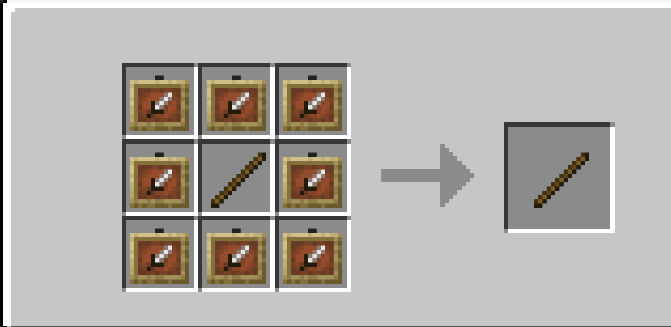
# ItemFramer ### By: FerranV ## Description: This is a datapack that adds a custom item that makes it so you can make item frames invisible by simply right clicking on it. * **Obtaining the ItemFramer item**: <details> <summary>Recipe:</summary> * You can simply craft it like this: !(https://github.com/user-attachments/assets/875b2657-c7dc-4702-a1e4-30e9cda8bff6)\ * (item frames and glow item frames are interchangeable) </details> * Trigger command (disabled by default): type `/trigger ItemFramer` in chat to obtain the ItemFramer item, this command is disabled by default and can be enabled through typing `/function itemframer:admin/toggle_trigger` as an operator in chat or in console. * **Usage**: * Shift+Right_click on an item frame while holding the *ItemFramer* item to reset the rotation of the item inside. * Right_click on an item frame while holding the *ItemFramer* item to make the item frame invisible. * Left_click on an item frame while holding the *ItemFramer* to lock the item frame meaning that you can no longer rotate or take the item out of the item frame until the item frame is unlocked again. <details> <summary>Changelog:</summary> * v2.1.0_26.2(+mod): Added support for the 26.2 version of Minecraft * v2.1.0_26.1-26.1.2(+mod): Added support for the 26.1-26.1.2 versions of Minecraft * v2.1.0_1.21.9-1.21.11(+mod): Added support for the 1.21.9-1.21.11 versions of Minecraft * v2.1.0 * Bugs: * Optimised code a bit to produce a little less lag. * Fixed crafting recipe not working * New Features: * Added a command to toggle the `/trigger command` from being able to be used by players (see "Obtaining the ItemFramer item") * From now on I will be packaging the datapacks as mods for easier installation on modded instances. * 1.21.7_v2.0.1: Added support for the 1.21.7 and 1.21.8 versions of Minecraft. * 1.21.6_v2.0.1: Added support for the 1.21.6 version of Minecraft. * V2.0.1: Fixed a bug where the ``/trigger ItemFramer`` command wouldn't always be available to everyone. * V2.0.0: Added support for Minecraft 1.21.4. * V1.2.0: You can now shift+right_click on an item frame using the *ItemFramer* item to reset the rotation of the item inside the item frame. * V1.1.0: You can now left_click on an item frame with the *ItemFramer* item to lock the item frame. This makes it so that you cannot rotate the item or take out the item out of the item frame until you unlock it again. * V1.0.0: First release, you can right_click on any item frame that has an item in it with the custom *ItemFramer* item to make the item frame invisible </details> ## Setting it up: #### Step by step Guide: * Adding it to a new world: * **Step 1**: Press ``Create New World`` and then ``More`` !(https://github.com/user-attachments/assets/744d5d73-6880-47df-afd0-8aa33476e424) * **Step 2**: Press ``Data Packs`` !(https://github.com/user-attachments/assets/611d2aaf-60d2-4eb7-ac83-d42aa00c7db4) * **Step 3**: Press ``Open Pack Folder`` and drop the ``.zip`` in there !(https://github.com/user-attachments/assets/39b6703b-3cf5-4407-8a69-289708bb7f14) * **Step 4**: Now the datapack should appear in the list. Just simply press the arrow to insert it into your world and hit ``Done`` to complete !(https://github.com/user-attachments/assets/06f84190-27f0-430a-82c3-e5b5d9950073) ## * Adding it to an existing world: * **Step 1**: Locate your ``saves`` folder * **Step 2**: Open folder of the world you want the datapack to be in * **Step 3**: Locate the ``datapacks`` folder inside your world folder * **Step 4**: Drop the ``.zip`` download into the datapacks folder ## ### Not working? * Try typing ``/reload`` (in singleplayer) and if on a server also try restarting the server * Try typing ``/datapack enable "file/<folder name here>"`` In console or in chat as an operator (this means that the datapack wouldn't be enabled previously)
# ItemFramer ### By: FerranV
## Description: This is a datapack that adds a custom item that makes it so you can make item frames invisible by simply right clicking on it.
Obtaining the ItemFramer item:
You can simply craft it like this: !(https://github.com/user-attachments/assets/875b2657-c7dc-4702-a1e4-30e9cda8bff6)\ (item frames and glow item frames are interchangeable)
Trigger command (disabled by default): type `/trigger ItemFramer` in chat to obtain the ItemFramer item, this command is disabled by default and can be enabled through typing `/function itemframer:admin/toggle_trigger` as an operator in chat or in console. Usage: Shift+Right_click on an item frame while holding the ItemFramer item to reset the rotation of the item inside. Right_click on an item frame while holding the ItemFramer item to make the item frame invisible. Left_click on an item frame while holding the ItemFramer to lock the item frame meaning that you can no longer rotate or take the item out of the item frame until the item frame is unlocked again.
v2. 1. 0_26. 2(+mod): Added support for the 26. 2 version of Minecraft
v2. 1. 0_26. 1-26. 1. 2(+mod): Added support for the 26. 1-26. 1. 2 versions of Minecraft
v2. 1. 0_1. 21. 9-1. 21. 11(+mod): Added support for the 1. 21. 9-1. 21. 11 versions of Minecraft v2. 1. 0 Bugs: Optimised code a bit to produce a little less lag. Fixed crafting recipe not working New Features: Added a command to toggle the `/trigger command` from being able to be used by players (see "Obtaining the ItemFramer item") From now on I will be packaging the datapacks as mods for easier installation on modded instances.
1. 21. 7_v2. 0. 1: Added support for the 1. 21. 7 and 1. 21. 8 versions of Minecraft.
1. 21. 6_v2. 0. 1: Added support for the 1. 21. 6 version of Minecraft. V2. 0. 1: Fixed a bug where the ``/trigger ItemFramer`` command wouldn't always be available to everyone.
V2. 0. 0: Added support for Minecraft 1. 21. 4.
V1. 2. 0: You can now shift+right_click on an item frame using the ItemFramer item to reset the rotation of the item inside the item frame.
V1. 1. 0: You can now left_click on an item frame with the ItemFramer item to lock the item frame. This makes it so that you cannot rotate the item or take out the item out of the item frame until you unlock it again. V1. 0. 0: First release, you can right_click on any item frame that has an item in it with the custom ItemFramer item to make the item frame invisible
## Setting it up:
#### Step by step Guide: Adding it to a new world:
Step 1: Press ``Create New World`` and then ``More`` !(https://github.com/user-attachments/assets/744d5d73-6880-47df-afd0-8aa33476e424)
Step 2: Press ``Data Packs`` !(https://github.com/user-attachments/assets/611d2aaf-60d2-4eb7-ac83-d42aa00c7db4) Step 3: Press ``Open Pack Folder`` and drop the ``.zip`` in there !(https://github.com/user-attachments/assets/39b6703b-3cf5-4407-8a69-289708bb7f14) Step 4: Now the datapack should appear in the list. Just simply press the arrow to insert it into your world and hit ``Done`` to complete !(https://github.com/user-attachments/assets/06f84190-27f0-430a-82c3-e5b5d9950073)
Adding it to an existing world: Step 1: Locate your ``saves`` folder
Step 2: Open folder of the world you want the datapack to be in
Step 3: Locate the ``datapacks`` folder inside your world folder
Step 4: Drop the ``.zip`` download into the datapacks folder ##
### Not working?
Try typing ``/reload`` (in singleplayer) and if on a server also try restarting the server
* Try typing ``/datapack enable "file/
📊 Mod Details
- Game
- Minecraft Data Packs
- Author
- FerranV
- Version
- v2.1.0
- Downloads
- 1,644
- Endorsements
- 5
- Category
- datapack
- Created
- 9/4/2024
- Updated
- 6/21/2026
- Game Versions
- 26.2
- Tags
- utility
🔧 How to Install Minecraft Data Packs Mods
Download from Modrinth. Use Prism Launcher or drop into your mods folder.
📖 Full step-by-step install guide for Minecraft Data Packs →
Visit the official mod page for specific installation instructions for this mod.
🎮 Need cheat codes or console commands? Check ur gaming wiki for Minecraft Data Packs commands, item IDs, and more.
❓ Frequently Asked Questions
Which Minecraft Data Packs versions does ItemFramer support?
The author lists 26.2. Other versions may work but are untested by the author.
What is the latest version of ItemFramer?
Version v2.1.0, published 2026-06-21 with 1,644 downloads recorded at the source.
Keep browsing — more Minecraft Data Packs mods await