Health Indicator
⚪ Last updated 2024🖼️ Gallery (1 images)
🔍 Analysis
- 👍 0.1% endorsement rate
- 🏆 #117 of 1805 datapack mods in this game by downloads
📋 About This Mod
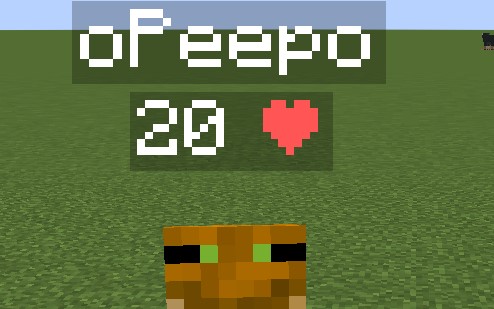
### DESCRIPTION This data pack displays every player's health above their head. This can be useful on pvp servers, or any multiplayer server where you need to see other players' health for whatever reason. !(https://cdn.modrinth.com/data/cached_images/afc56b332c60b1dfa750b63cdf151982ccf35c04.png) ### INSTALLATION GUIDE go to your saves folder located here on Windows: ``` C:\Users(your name)\AppData\Roaming\.minecraft\saves ``` put the zipped file in the data packs folder, and either restart your world or execute /reload ### UNINSTALLATION GUIDE run this command `/function hp:uninstall`, and then delete the data pack. Make sure to not reload (/reload or by restarting your world) after running the uninstall command until the data pack is deleted! ### OTHER THINGS TO NOTE - Keep in mind the number shown are health points and not hearts, 1 heart = 2 health points. - this data pack only displays PLAYER health, not MOB health. - for feedback, bug reports, or other help, join the (https://discord.gg/kk3j3ct6xk) from the links section of this page!
### DESCRIPTION This data pack displays every player's health above their head. This can be useful on pvp servers, or any multiplayer server where you need to see other players' health for whatever reason.
!(https://cdn.modrinth.com/data/cached_images/afc56b332c60b1dfa750b63cdf151982ccf35c04.png)
### INSTALLATION GUIDE
go to your saves folder located here on Windows: ``` C:\Users(your name)\AppData\Roaming\.minecraft\saves ``` put the zipped file in the data packs folder, and either restart your world or execute /reload
### UNINSTALLATION GUIDE
run this command `/function hp:uninstall`, and then delete the data pack. Make sure to not reload (/reload or by restarting your world) after running the uninstall command until the data pack is deleted!
### OTHER THINGS TO NOTE
- Keep in mind the number shown are health points and not hearts, 1 heart = 2 health points.
- this data pack only displays PLAYER health, not MOB health.
- for feedback, bug reports, or other help, join the (https://discord.gg/kk3j3ct6xk) from the links section of this page!
📊 Mod Details
- Game
- Minecraft Data Packs
- Author
- o-Peepo
- Version
- 4
- Downloads
- 495,662
- Endorsements
- 371
- Category
- datapack
- Created
- 1/19/2024
- Updated
- 8/22/2024
- Game Versions
- 1.21, 1.21.1, 1.21.2, 1.21.3, 1.21.4
- Tags
- game-mechanics, management, utility
🔧 How to Install Minecraft Data Packs Mods
Download from Modrinth. Use Prism Launcher or drop into your mods folder.
📖 Full step-by-step install guide for Minecraft Data Packs →
Visit the official mod page for specific installation instructions for this mod.
🎮 Need cheat codes or console commands? Check ur gaming wiki for Minecraft Data Packs commands, item IDs, and more.
❓ Frequently Asked Questions
Which Minecraft Data Packs versions does Health Indicator support?
The author lists 1.21, 1.21.1, 1.21.2, 1.21.3, 1.21.4, 1.21.5. Other versions may work but are untested by the author.
What is the latest version of Health Indicator?
Version 4, published 2024-08-22 with 495,662 downloads recorded at the source.
Keep browsing — more Minecraft Data Packs mods await