Hatchable
🟡 Updated this year🖼️ Gallery (1 images)
🔍 Analysis
- 🏆 #875 of 2046 datapack mods in this game by downloads
📋 About This Mod
## Hatchable ### What it does Hatchable automatically hatches dropped eggs shortly before they would despawn. By default, eggs hatch into baby chickens when resting on blocks such as Hay, Mud, Packed Mud or Mud Bricks. Its hatch mapping system can also make any configured item hatch into any configured entity. ### Default Behavior By default: * Items are checked after 5900 ticks. * Each egg has an 80% chance to hatch. * Spawned chickens are babies. * Hatching is blocked when 50 entities from `#hatchable:density_entities` are already within 20 blocks. * All eggs hatch their respective chicken variant. When the chance fails or the density limit is reached, that item disappears instead of hatching. Items in a stack are handled one at a time. ### Customization Use `/function hatchable:_config` to configure: * Hatch chance. * Minimum item age. * Spawned entity age. * Density limit and range. * Ordered hatch mappings. * Hatch particles and sound. * Debug categories and message subscriptions. Each global hatching value has a Force option. When enabled, mappings cannot override that value. Settings are divided into General, Feedback and Debug screens. Each setting can be reset individually, or the entire configuration can be restored to its defaults. ### Hatch Mappings Hatch Mappings are ordered rules that decide where, when and what hatches. A rule can use: * `items` for item IDs or item tags. * `hatchers` for block IDs or block tags. * `predicate` for an additional referenced predicate. * `entity` for the entity type to spawn. * `entity_data` for data merged into the spawned entity. * `chance`, `minimum_item_age`, `entity_age`, `density_limit` and `density_range` for rule-specific behavior. Every selector present in a rule must match. Matching rules compose from top to bottom: later scalar values take priority, while `entity_data` compounds merge. A successful hatch needs a final resolved `entity`. ### Inherited Item Data Hatchable can copy compatible data from the item into the entity it creates. A matching `minecraft:entity_data` component can provide base summon data. Entity-specific components can also carry variants, sound variants, collars, colors, sizes and patterns into the final entity. Composed mapping data is applied afterward, so `entity_data` can override inherited values. ### Tags Edit `#hatchable:hatchers` to change the default blocks on which items can hatch. Edit `#hatchable:density_entities` to change which nearby entities count toward the density limit. The `#hatchable:eggs`, `#hatchable:chicken/eggs` and chicken-variant tags organize the default mappings. Hatch eligibility itself is controlled by Hatch Mappings, so custom items do not need to be added to `#hatchable:eggs` when a mapping already matches them. ### Uninstallation Use `/function hatchable:uninstall` to remove its persistent data if you ever need to remove the datapack.
## Hatchable
### What it does
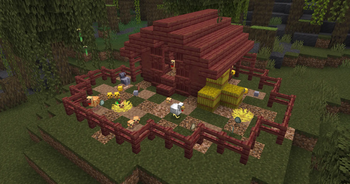
Hatchable automatically hatches dropped eggs shortly before they would despawn. By default, eggs hatch into baby chickens when resting on blocks such as Hay, Mud, Packed Mud or Mud Bricks.
Its hatch mapping system can also make any configured item hatch into any configured entity.
### Default Behavior
By default:
Items are checked after 5900 ticks. Each egg has an 80% chance to hatch. Spawned chickens are babies. Hatching is blocked when 50 entities from `#hatchable:density_entities` are already within 20 blocks. All eggs hatch their respective chicken variant.
When the chance fails or the density limit is reached, that item disappears instead of hatching. Items in a stack are handled one at a time.
### Customization
Use `/function hatchable:_config` to configure:
Hatch chance. Minimum item age. Spawned entity age. Density limit and range. Ordered hatch mappings. Hatch particles and sound. Debug categories and message subscriptions.
Each global hatching value has a Force option. When enabled, mappings cannot override that value.
Settings are divided into General, Feedback and Debug screens. Each setting can be reset individually, or the entire configuration can be restored to its defaults.
### Hatch Mappings
Hatch Mappings are ordered rules that decide where, when and what hatches.
A rule can use:
`items` for item IDs or item tags. `hatchers` for block IDs or block tags. `predicate` for an additional referenced predicate. `entity` for the entity type to spawn. `entity_data` for data merged into the spawned entity. `chance`, `minimum_item_age`, `entity_age`, `density_limit` and `density_range` for rule-specific behavior.
Every selector present in a rule must match. Matching rules compose from top to bottom: later scalar values take priority, while `entity_data` compounds merge.
A successful hatch needs a final resolved `entity`.
### Inherited Item Data
Hatchable can copy compatible data from the item into the entity it creates.
A matching `minecraft:entity_data` component can provide base summon data. Entity-specific components can also carry variants, sound variants, collars, colors, sizes and patterns into the final entity.
Composed mapping data is applied afterward, so `entity_data` can override inherited values.
Edit `#hatchable:hatchers` to change the default blocks on which items can hatch.
Edit `#hatchable:density_entities` to change which nearby entities count toward the density limit.
The `#hatchable:eggs`, `#hatchable:chicken/eggs` and chicken-variant tags organize the default mappings. Hatch eligibility itself is controlled by Hatch Mappings, so custom items do not need to be added to `#hatchable:eggs` when a mapping already matches them.
### Uninstallation Use `/function hatchable:uninstall` to remove its persistent data if you ever need to remove the datapack.
📊 Mod Details
- Game
- Minecraft Data Packs
- Author
- Smidul
- Version
- 1.1.0
- Downloads
- 415
- Endorsements
- 2
- Category
- datapack
- Created
- 3/24/2026
- Updated
- 7/25/2026
- Game Versions
- 1.21, 1.21.1, 24w33a, 24w34a, 24w35a
- Tags
- game-mechanics, mobs, utility
🔧 How to Install Minecraft Data Packs Mods
Download from Modrinth. Use Prism Launcher or drop into your mods folder.
📖 Full step-by-step install guide for Minecraft Data Packs →
Visit the official mod page for specific installation instructions for this mod.
🎮 Need cheat codes or console commands? Check ur gaming wiki for Minecraft Data Packs commands, item IDs, and more.
❓ Frequently Asked Questions
Which Minecraft Data Packs versions does Hatchable support?
The author lists 1.21, 1.21.1, 24w33a, 24w34a, 24w35a, 24w36a. Other versions may work but are untested by the author.
What is the latest version of Hatchable?
Version 1.1.0, published 2026-07-25 with 415 downloads recorded at the source.
Keep browsing — more Minecraft Data Packs mods await