Hostile Neural Networks: Extra Data Models
🟡 Updated this year🖼️ Gallery (4 images)
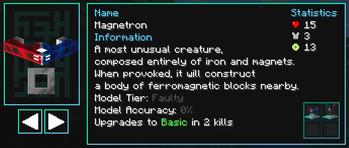
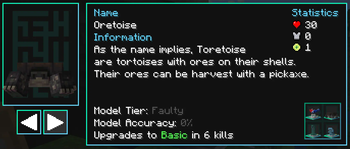
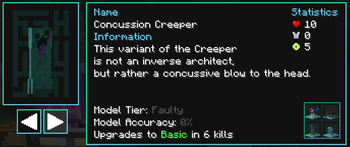
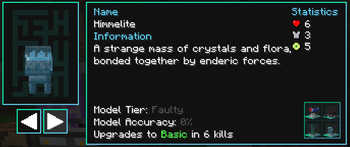
🔍 Analysis
- 👍 0.0% endorsement rate
- 🏆 #1057 of 1805 datapack mods in this game by downloads
📋 About This Mod
This datapack adds more Data Models to (https://www.curseforge.com/minecraft/mc-mods/hostile-neural-networks) and tweaks some of the existing ones.
There's a good chunk of mod support (full list can be viewed (https://github.com/vizthex123/ExtraDataModels/blob/main/CFAssets/support_table.md), with a basic overview below), and you can suggest more on the (https://github.com/vizthex123/ExtraDataModels/issues) or (https://discord.com/invite/NtwzA6X).
Designed for my (https://curseforge.com/minecraft/modpacks/hi-tech-revolution) modpack.
_Also includes trivia for all of them (the paragraph of text that appear in the Deep Learner) if you install the resource pack! Grab it alongside the (https://modrinth.com/datapack/extra-data-models/versions).**_
_Suggest mods I should add support for on the (https://github.com/vizthex123/ExtraDataModels/issues), or on the (https://discord.com/invite/NtwzA6X)!**_
_Note: Since I made this for a 1. 20 modpack, I'll start adding support starting on that version (but will still (back)port any changes I make - they just might take a bit longer to release)._
# Installation Instructions
1) After downloading the datapack, get (https://modrinth.com/mod/open-loader). If you want the trivia entries, download the latest version of the (https://modrinth.com/datapack/extra-data-models/versions) as well. It's attached to every datapack version, and works across all supported Minecraft versions.
2) Place the datapack into `config/openloader/data`
3) Optional: Enable the trivia pack in the game's settings. _If you downloaded it manually, you can place it into `config/openloader/resources` and it will auto-enable itself._
4) Optional: Load your world and check one of the models from the datapack to view its trivia entry. _If the datapack isn't loaded, this resource pack won't do anything!_
5) When updating the datapack, repeat step 2 - just override the .zip with the new one and it'll update everything. _Same applies for manually updating the resource pack._
If you downloaded the trivia pack through a launcher, just enable it in-game (and make sure it's (https://modrinth.com/mod/default-options) if you plan to publish your modpack)
There are two ways to install this pack: Using (https://modrinth.com/mod/open-loader) and the CurseForge App (other launchers might work, but I don't use them so idk) or by using (https://modrinth.com/mod/paxi).
Paxi is the preferred method since it works like Open Loader did on 1. 20 & earlier. Open Loader's devs changed the way packs are loaded and neglected to update either project page lol, but DeadPixels-512 figured out how it works so I've gone ahead and updated the instructions for it.
1) Download (https://modrinth.com/mod/paxi) and (https://modrinth.com/datapack/extra-data-models/versions?g=1. 21. 1)
2) Place the datapack into `config\paxi\datapacks`
3) When updating the datapack, repeat step 2 - just override the .zip with the new one and it'll update everything. Same applies for manually updating the resource pack.
4) Optional: Enable the trivia pack in the game's settings. If you downloaded it manually, you can place it into `config/paxi/resourcepacks` and it will auto-enable itself.
5) Optional: Load your world and check one of the models from the datapack to view its trivia entry. If the datapack isn't loaded, this resource pack won't do anything!
If you downloaded the trivia pack through a launcher, just enable it in-game (and make sure it's (https://modrinth.com/mod/default-options) if you plan to publish your modpack)
### Open Loader
1) Make sure the CurseForge App is installed. Other launchers should work if they have a section to download datapacks, though - that's the important part for this.
2) Download (https://modrinth.com/mod/open-loader), and in the instance for the modpack download the datapack (you can just search for `vizthex` to quickly find it, or copy & paste the project ID off of the CF page)
3) If you're using another launcher, make sure Open Loader's config file is set to load packs from wherever it's installed. It should just use vanilla's `datapacks` folder, which it covers by default - but if not, you'll have to add it yourself.
4) Optional: Enable the trivia pack in the game's settings. If you downloaded it manually, you can place it into wherever Open Loader stores stuff now (they forgot to update the CF page and tell us lol) and it should auto-enable itself.
5) Optional: Load your world and check one of the models from the datapack to view its trivia entry. If the datapack isn't loaded, this resource pack won't do anything!
📊 Mod Details
- Game
- Minecraft Data Packs
- Author
- vizthex
- Version
- 4.4.2
- Downloads
- 8,859
- Endorsements
- 3
- Category
- datapack
- Created
- 5/28/2024
- Updated
- 8/14/2026
- Game Versions
- 1.21.1
- Tags
- mobs, technology, utility
🔧 How to Install Minecraft Data Packs Mods
Download from Modrinth. Use Prism Launcher or drop into your mods folder.
📖 Full step-by-step install guide for Minecraft Data Packs →
Visit the official mod page for specific installation instructions for this mod.
🎮 Need cheat codes or console commands? Check ur gaming wiki for Minecraft Data Packs commands, item IDs, and more.
❓ Frequently Asked Questions
Which Minecraft Data Packs versions does Hostile Neural Networks: Extra Data Models support?
The author lists 1.21.1. Other versions may work but are untested by the author.
What is the latest version of Hostile Neural Networks: Extra Data Models?
Version 4.4.2, published 2026-08-14 with 8,859 downloads recorded at the source.
Keep browsing — more Minecraft Data Packs mods await