Ecosy
🟡 Updated this year🖼️ Gallery (5 images)

🔍 Analysis
- 🏆 #1234 of 1745 datapack mods in this game by downloads
📋 About This Mod
# 🚀 Mattyou Studios™ — Economy System Installation Guide Thank you for downloading this official economy framework release from **Mattyou Studios™**. Please follow the steps below carefully to extract, install, and activate the system on your Minecraft server. --- ## 📋 Prerequisites Before installation, ensure your server setup matches these requirements: * **Server Software:** Paper, Purpur, or Spigot. * **Required Plugin:** The latest version of the **Skript** plugin must be installed and active on your server. --- ## 🛠️ Step-by-Step Installation ### Step 1: Extracting the Files 1. Download and open the **`Ecosy.zip`** package. 2. Inside, you will find the following 5 core modules: * 📂 `admin-system.sk` — Server administration controls. * 📂 `Money.sk` — Base currency and balance management. * 📂 `sell.sk` — Item selling engine. * 📂 `shop.sk` — The main server shop interface. * 📂 `utils.sk` — Essential utility functions. 3. Extract/drag all 5 of these `.sk` files to a temporary folder on your desktop. *(Note: You can ignore `pack.mcmeta` and `README.txt`).* ### Step 2: Transferring to Your Server 1. Access your Minecraft server files via an FTP client (like FileZilla) or your server hosting web panel. 2. Navigate to the exact folder path: `👉 /plugins/Skript/scripts/` (if not existed install the skript plug-in to you're server and restart it) 3. Drop all 5 extracted `.sk` files directly into this **`scripts`** folder. ### Step 3: Activating the Modules In-Game 1. Log into your Minecraft server as an operator (`/op`). 2. To load and activate the entire system instantly, execute this command in chat: `👉 /sk reload all` *(Alternatively, you can reload modules individually, for example: `/sk reload shop` or `/sk reload Money`).* --- ## ⚖️ License & Terms This ecosystem is legally protected under the (https://mattyou2.github.io/projects/Ecosy/license/). * You **are permitted** to use this network system on your server and customize configurations (such as modifying shop item names, price values, or local messaging). * You **are strictly prohibited** from copying, cloning, or distributing this code package under your own name or brand, or utilizing these code files within other publicly released scripts. *For official support or inquiries, please check our primary Mattyou Studios™ community channels.*
# 🚀 Mattyou Studios™ — Economy System Installation Guide
Thank you for downloading this official economy framework release from Mattyou Studios™. Please follow the steps below carefully to extract, install, and activate the system on your Minecraft server.
## 📋 Prerequisites Before installation, ensure your server setup matches these requirements: Server Software: Paper, Purpur, or Spigot. Required Plugin: The latest version of the Skript plugin must be installed and active on your server.
## 🛠️ Step-by-Step Installation
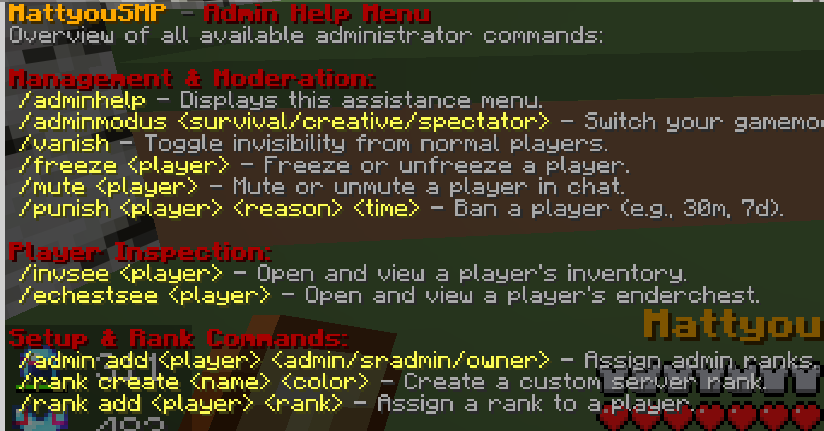
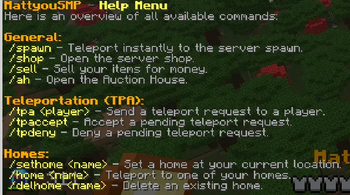
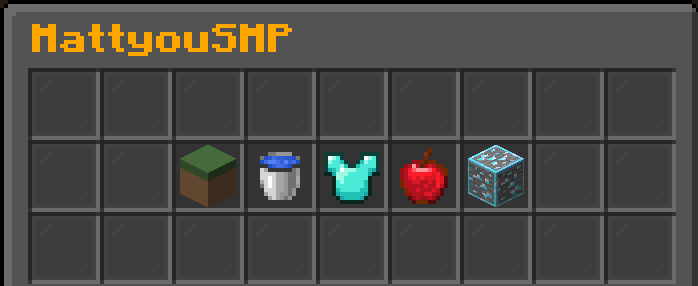
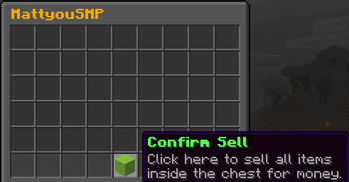
### Step 1: Extracting the Files 1. Download and open the `Ecosy.zip` package. 2. Inside, you will find the following 5 core modules: 📂 `admin-system.sk` — Server administration controls. 📂 `Money.sk` — Base currency and balance management. 📂 `sell.sk` — Item selling engine. 📂 `shop.sk` — The main server shop interface. 📂 `utils.sk` — Essential utility functions. 3. Extract/drag all 5 of these `.sk` files to a temporary folder on your desktop. (Note: You can ignore `pack.mcmeta` and `README.txt`).
### Step 2: Transferring to Your Server 1. Access your Minecraft server files via an FTP client (like FileZilla) or your server hosting web panel. 2. Navigate to the exact folder path: `👉 /plugins/Skript/scripts/` (if not existed install the skript plug-in to you're server and restart it) 3. Drop all 5 extracted `.sk` files directly into this `scripts` folder.
### Step 3: Activating the Modules In-Game 1. Log into your Minecraft server as an operator (`/op`). 2. To load and activate the entire system instantly, execute this command in chat: `👉 /sk reload all` (Alternatively, you can reload modules individually, for example: `/sk reload shop` or `/sk reload Money`).
## ⚖️ License & Terms This ecosystem is legally protected under the [Mattyou Studios™ Proprietary License](https://mattyou2.github.io/projects/Ecosy/license/). You are permitted to use this network system on your server and customize configurations (such as modifying shop item names, price values, or local messaging). You are strictly prohibited from copying, cloning, or distributing this code package under your own name or brand, or utilizing these code files within other publicly released scripts.
For official support or inquiries, please check our primary Mattyou Studios™ community channels.*
📊 Mod Details
- Game
- Minecraft Data Packs
- Author
- MattyouMC
- Version
- 1.0-Alpha
- Downloads
- 20
- Endorsements
- 1
- Category
- datapack
- Created
- 6/21/2026
- Updated
- 6/8/2026
- Game Versions
- 1.21.11
- Tags
- economy, management, utility
🔧 How to Install Minecraft Data Packs Mods
Download from Modrinth. Use Prism Launcher or drop into your mods folder.
📖 Full step-by-step install guide for Minecraft Data Packs →
Visit the official mod page for specific installation instructions for this mod.
🎮 Need cheat codes or console commands? Check ur gaming wiki for Minecraft Data Packs commands, item IDs, and more.
❓ Frequently Asked Questions
Which Minecraft Data Packs versions does Ecosy support?
The author lists 1.21.11. Other versions may work but are untested by the author.
What is the latest version of Ecosy?
Version 1.0-Alpha, published 2026-06-08 with 20 downloads recorded at the source.
Keep browsing — more Minecraft Data Packs mods await