Debug Entity Data
🟡 Updated this year🖼️ Gallery (3 images)
🔍 Analysis
- 🏆 #1174 of 1745 datapack mods in this game by downloads
📋 About This Mod
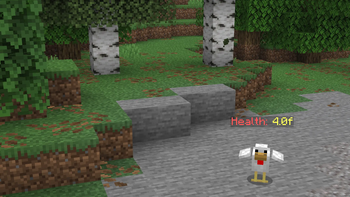
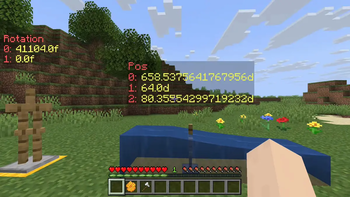
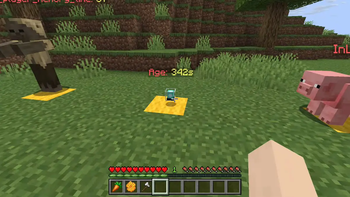
# Debug Entity Data ## Showcase video (https://img.youtube.com/vi/DDQeth5Lmgk/maxresdefault.jpg)](https://youtu.be/DDQeth5Lmgk) ## Installing Download the latest release from the (https://github.com/YoavTC/debug-entity-data/releases), or from these alternative sites: - (https://modrinth.com/datapack/debug-entity-data) - (https://www.curseforge.com/minecraft/data-packs/debug-entity-data) open your Minecraft world directory and place the downloaded pack inside the datapack directory. If the world is loaded, execute `/reload` or quit and rejoin. ## How to use Execute the function : ```mcfunction /function ded:bind ``` This will output a list of close entities to the chat. Click the message of the one you want, and a dialogue will appear. In the dialogue, input the NBT data path that you want to debug. You can see all valid data paths by doing `/data get entity <ENTITY>`. If you sneak+interact with the debug display you get the option to either rebind it to another path, or remove the display.
# Debug Entity Data
## Showcase video
[!(https://img.youtube.com/vi/DDQeth5Lmgk/maxresdefault.jpg)](https://youtu.be/DDQeth5Lmgk)
## Installing
Download the latest release from the (https://github.com/YoavTC/debug-entity-data/releases), or from these alternative sites:
- (https://modrinth.com/datapack/debug-entity-data)
- (https://www.curseforge.com/minecraft/data-packs/debug-entity-data)
open your Minecraft world directory and place the downloaded pack inside the datapack directory. If the world is loaded, execute `/reload` or quit and rejoin.
## How to use
Execute the function :
```mcfunction /function ded:bind ```
This will output a list of close entities to the chat. Click the message of the one you want, and a dialogue will appear.
In the dialogue, input the NBT data path that you want to debug. You can see all valid data paths by doing `/data get entity
If you sneak+interact with the debug display you get the option to either rebind it to another path, or remove the display.
📊 Mod Details
- Game
- Minecraft Data Packs
- Author
- yoav_tc
- Version
- 2.0
- Downloads
- 22
- Endorsements
- 0
- Category
- datapack
- Created
- 5/22/2026
- Updated
- 8/6/2026
- Game Versions
- 26.2
- Tags
- utility
🔧 How to Install Minecraft Data Packs Mods
Download from Modrinth. Use Prism Launcher or drop into your mods folder.
📖 Full step-by-step install guide for Minecraft Data Packs →
Visit the official mod page for specific installation instructions for this mod.
🎮 Need cheat codes or console commands? Check ur gaming wiki for Minecraft Data Packs commands, item IDs, and more.
❓ Frequently Asked Questions
Which Minecraft Data Packs versions does Debug Entity Data support?
The author lists 26.2. Other versions may work but are untested by the author.
What is the latest version of Debug Entity Data?
Version 2.0, published 2026-08-06 with 22 downloads recorded at the source.
Keep browsing — more Minecraft Data Packs mods await