Customizable Elevators
🟡 Updated this year🖼️ Gallery (10 images)
🔍 Analysis
- 👍 0.9% endorsement rate
- 🏆 #214 of 767 adventure mods in this game by downloads
📋 About This Mod
### Search for important errors and bugs for survival, help with translations is required (currently only Russian, English, Polish and Russian Pre-Reform).
## ⚙️ Installation For the datapack to WORK, you need to install the (https://modrinth.com/datapack/midwut) core datapack!
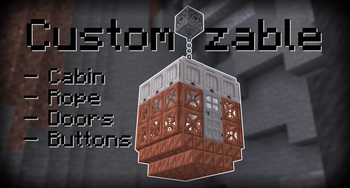
## 📖 About With this data pack, you can turn ordinary blocks into a working elevator! All elevator elements consist of your blocks.
### Features: - Clone movement of blocks and teleportation of entities in/above/below the elevator; - Handling all possible errors during the creation and operation of the elevator; - The elevator speed is adjustable; - Support for your texts on buttons(signs);
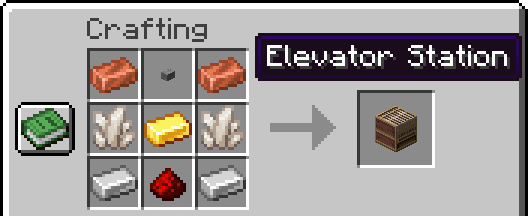
# ## 🧊 Blocks & Crafts ### New block — Elevator Station The player will receive a recipe in the recipe book if they receive a copper ingot or redstone. - There is a (https://cdn.modrinth.com/data/cached_images/fa26e749e3d2d3bbbf3586ff84efa2f58e93340e.png) of the recipe in the gallery. - Recipe visualization on the misode generator website: (https://misode.github.io/recipe/?share=4FAtRH46Lh)
It's a container block with elevator configuration tools inside.
There is an elevator speed setting and a display of the current speed. On the technical side, speed is a delay in ticks between movements (1 sec = 20 ticks), so it is impossible to set the exact speed in some ranges. The formula for converting the delay in ticks to blocks per second: `20/(delay)`
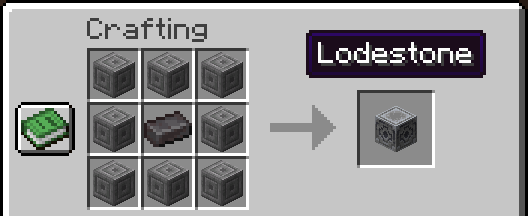
### Old Lodestone recipe has been returned Now a netherite ingot is used in crafting, as in version 1. 21. 4 and earlier.
This is due to the fact that the Lodestone is used as a winch, and I decided to return the more expensive craft.
# ## 🧰 Tools ### General Usage Information Selectors set points that select areas. The points are placed by right-clicking. The color of the second point is darker.
The button and stop setter select one block by right-clicking. Button and Door setters requires the copied floor ID by holding down Sprint key and right-clicking on the block with the stop set.
Any point can be removed by holding down Sneak key and right-clicking on the block.
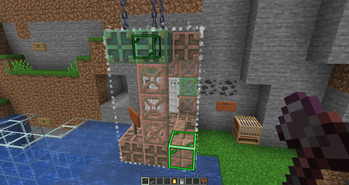
### Elevator Selector Places global two green points, selects elevator cabin. There is a height limit for points: not reaching the bedrock and not close to the world ceiling.
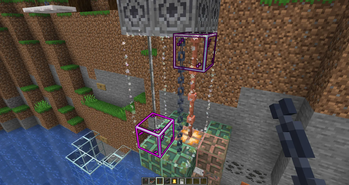
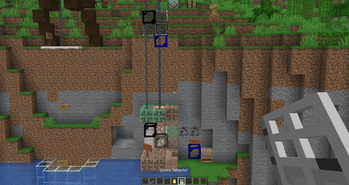
### Rope Selector Places two purple points, selects elevator rope(s). Each of the ropes must consist of one block along its entire length. The first point is fixed to the roof of the elevator, the second to the winch(Lodestone). I note that [block entity](https://minecraft.wiki/w/Block_entity) are not supported.
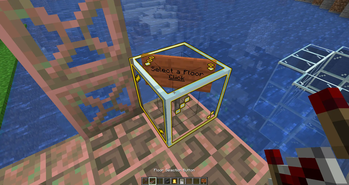
### Floor Selection Button Places one yellow point, only inside the elevator cabin. Modifies the sign so that the front side becomes clickable.
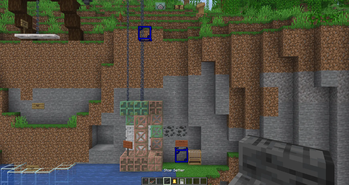
### Stop Setter Places blue points, one for each Y coordinate. For other tools, the floor ID will need to be copied from these blocks.
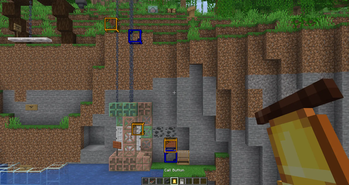
### Call Buttons Places golden points, needs to copy the floor ID. Modifies the sign so that the front side becomes clickable.
### Doors Selector It has two types of door placement - for elevator and floor.
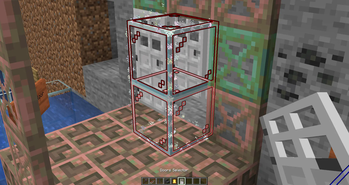
For the elevator door, two red points are placed inside the cabin, selects the door.
For the floor door, you need to copy the floor ID, then two gray dots are placed, selects the door.
I note that [block entity](https://minecraft.wiki/w/Block_entity) are not supported.
# ## 🏗️ Elevator Elements ### Elevator Cabin The cabin moves by moving blocks. - When moving up, entities inside the cabin and on the roof are teleported up; - When moving down, entities inside the cabin and below the cabin are teleported down.
If a block is detected in the direction of movement, the elevator will stop and tell the players in the elevator about it.
### Rope When the elevator is moving, the correctness of the cable blocks on the roof of the elevator with the blocks saved is checked. The elevator will stop and tell you an error if an incompleteness or an incorrect cable block is detected.
### Doors Any doors are checked for the absence of an [block entity](https://minecraft.wiki/w/Block_entity) before opening, and then they will open. When closing, the absence of any block or mob in place of the doors is checked.
The doors will open in the following situations: - The elevator arrived on the floor; - The player pressed the elevator call button if the elevator is already on the floor with the doors closed; - The player inside the elevator pressed the door open button.
The doors will try to close after 15 seconds, but if the doors cannot close, the closing will be repeated after 3 seconds.
### Buttons The elevator call buttons send a signal to the non-moving elevator with the floor ID and the elevator ID. The value is encoded using the formula: `{(eID * 1000) + (height + 400)}0` If you specify a number in the first line of the sign, it will be considered the floor number, then you can write any text in the other three l
📊 Mod Details
- Game
- Minecraft Data Packs
- Author
- Antoha256M
- Version
- 1.0.0
- Downloads
- 1,992
- Endorsements
- 17
- Category
- adventure
- Created
- 8/23/2025
- Updated
- 1/13/2026
- Game Versions
- 1.21.11
- Tags
- adventure, game-mechanics, technology
🔧 How to Install Minecraft Data Packs Mods
Download from Modrinth. Use Prism Launcher or drop into your mods folder.
📖 Full step-by-step install guide for Minecraft Data Packs →
Visit the official mod page for specific installation instructions for this mod.
🎮 Need cheat codes or console commands? Check ur gaming wiki for Minecraft Data Packs commands, item IDs, and more.
❓ Frequently Asked Questions
Which Minecraft Data Packs versions does Customizable Elevators support?
The author lists 1.21.11. Other versions may work but are untested by the author.
What is the latest version of Customizable Elevators?
Version 1.0.0, published 2026-01-13 with 1,992 downloads recorded at the source.
Keep browsing — more Minecraft Data Packs mods await