Custom Book Author
⚪ Last updated 2023🖼️ Gallery (6 images)
🔍 Analysis
- 🏆 #598 of 2046 datapack mods in this game by downloads
📋 About This Mod
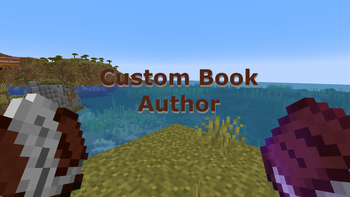
<img src="https://i.imgur.com/WCM8xZ6.png" alt="cover image showing two books held" /> <p><a href="https://discord.gg/R2P4VGC">Discord</a>: The Quin Studios community hub, and semi-regular news <br /><a href="https://www.instagram.com/quinstudios">Instagram</a>: Texture-by-texture progress for my resource pack, <a href="https://www.curseforge.com/minecraft/texture-packs/immersion">Immersion</a>, and general Quin Studios news <br /><a href="https://www.patreon.com/quinstudios">Patreon</a>: In-depth update and development progress posts for large projects <br /><br />If you like my work, please consider supporting me on <a href="https://www.patreon.com/quinstudios">Patreon</a></p> <h1>About</h1> <p>This datapack allows you to customize and change the author and title of a written book. Supports Minecraft versions 1.18+.</p> <p>To change the author name of a book, just follow these steps:</p> <p><br /> 1. Take a Book and Quill, and rename it to "Author" with an anvil.</p> <p> 2. On the first page, write the author name, however you want it to display.</p> <p> 3. Put the named book and quill in your offhand, and open a written book that you want to change the author of.</p> <p> 4. And voila, you're done! The new author name should now display properly.</p> <p><br />You can change book titles with this same method, only using a book and quill named "Title" instead of "Author". This method can be used to overcome the vanilla character limit for book titles, allowing you to now make books with titles potentially stretching even beyond the edges of your screen.</p> <h1>Installation</h1> <h3>New World:</h3> <p><br /> 1. Select Data Packs in the world creation menu (in 1.19.4+, select the More tab at the top of the screen first)</p> <p> 2. Drag and drop the download into the Minecraft window, then select Yes to add the pack</p> <p> 3. Click the arrow on the pack icon to load the pack, and then select Done</p> <p> 4. Load and play your world</p> <h3><br />Existing World:</h3> <p><br /> 1. Navigate to your world folder. You can open it from the worlds menu by selecting your world, Edit, <br /> and then Open World Folder</p> <p> 2. Go into the datapacks folder, and move the download there</p> <p> 3. Load your world</p> <p> 4. Type /reload</p> <p><br />Note that if you are installing the datapack into a pre-existing world, you will need to temporarily enable cheats in order to reload the datapack. Cheats do not need to be enabled after reloading, and are not necessary for new worlds.</p>

Discord: The Quin Studios community hub, and semi-regular news
Instagram: Texture-by-texture progress for my resource pack, Immersion, and general Quin Studios news
Patreon: In-depth update and development progress posts for large projects
If you like my work, please consider supporting me on Patreon
About
This datapack allows you to customize and change the author and title of a written book. Supports Minecraft versions 1. 18+.
To change the author name of a book, just follow these steps:
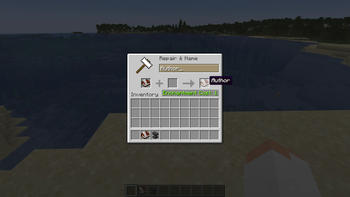
1. Take a Book and Quill, and rename it to "Author" with an anvil.
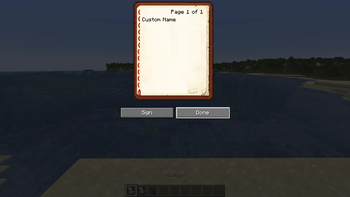
2. On the first page, write the author name, however you want it to display.
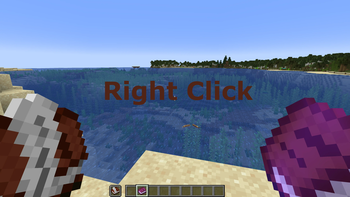
3. Put the named book and quill in your offhand, and open a written book that you want to change the author of.
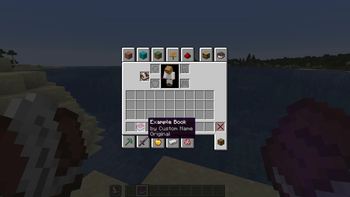
4. And voila, you're done! The new author name should now display properly.
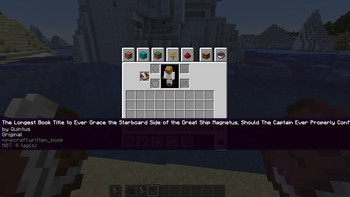
You can change book titles with this same method, only using a book and quill named "Title" instead of "Author". This method can be used to overcome the vanilla character limit for book titles, allowing you to now make books with titles potentially stretching even beyond the edges of your screen.
Installation
New World:
1. Select Data Packs in the world creation menu (in 1. 19. 4+, select the More tab at the top of the screen first)
2. Drag and drop the download into the Minecraft window, then select Yes to add the pack
3. Click the arrow on the pack icon to load the pack, and then select Done
4. Load and play your world
Existing World:
1. Navigate to your world folder. You can open it from the worlds menu by selecting your world, Edit,
and then Open World Folder
2. Go into the datapacks folder, and move the download there
3. Load your world
4. Type /reload
Note that if you are installing the datapack into a pre-existing world, you will need to temporarily enable cheats in order to reload the datapack. Cheats do not need to be enabled after reloading, and are not necessary for new worlds.
📊 Mod Details
- Game
- Minecraft Data Packs
- Author
- QuinStudios
- Version
- 2.0
- Downloads
- 493
- Endorsements
- 5
- Category
- datapack
- Created
- 4/24/2023
- Updated
- 4/23/2023
- Game Versions
- 1.18, 1.18.1, 1.18.2, 1.19, 1.19.1
- Tags
- game-mechanics, management, utility
🔧 How to Install Minecraft Data Packs Mods
Download from Modrinth. Use Prism Launcher or drop into your mods folder.
📖 Full step-by-step install guide for Minecraft Data Packs →
Visit the official mod page for specific installation instructions for this mod.
🎮 Need cheat codes or console commands? Check ur gaming wiki for Minecraft Data Packs commands, item IDs, and more.
❓ Frequently Asked Questions
Which Minecraft Data Packs versions does Custom Book Author support?
The author lists 1.18, 1.18.1, 1.18.2, 1.19, 1.19.1, 1.19.2. Other versions may work but are untested by the author.
What is the latest version of Custom Book Author?
Version 2.0, published 2023-04-23 with 493 downloads recorded at the source.
Keep browsing — more Minecraft Data Packs mods await