Command Blocks to Sign
🟠 Updated over a year ago🖼️ Gallery (2 images)
🔍 Analysis
- 👍 0.6% endorsement rate
- 🏆 #1059 of 2025 datapack mods in this game by downloads
📋 About This Mod
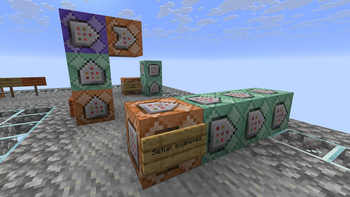
# Command Blocks to Sign Transform your command blocks into clickable signs! ## ⚙️ Server side! If you only install this datapack/mod on your server/LAN, it will work for everyone else without them needing to install it! ## 📖 Instructions: - Place a sign on the side of the command block that you want to convert, with a maximum of 4 command blocks. (They must be facing one to another). - Take a honeycomb and right click the sign to wax it. (The wax will be removed) - That's it! Your sign is ready. The system only reacts if the sign is on a command block, otherwise it will do nothing and the waxing of the sign will act as usual. <iframe width="560" height="315" src="https://www.youtube-nocookie.com/embed/tcRHDGpwh7A" title="YouTube video player" frameborder="0" allow="accelerometer; autoplay; clipboard-write; encrypted-media; gyroscope; picture-in-picture; web-share" allowfullscreen></iframe> !(https://cdn.modrinth.com/data/cached_images/e5aa8a607241a01a423da587914317a896dd129c.png) ## ⤵️ Installation: ### Datapack: Download the latest release and put the datapack `.zip` file into the datapacks folder of your Minecraft world. ### Mod: Download the latest release and put the mod `.jar` file into the mods folder of your Minecraft game. ## ✍️ Feedback, Questions & Suggestions I'm always listening! If you happen to have questions, suggestions or just encountered a bug, then feel free to join my discord server to ask for help in the "mods and datapacks" section. (https://discord.gg/kwzQWS4)
# Command Blocks to Sign Transform your command blocks into clickable signs!
## ⚙️ Server side! If you only install this datapack/mod on your server/LAN, it will work for everyone else without them needing to install it!
## 📖 Instructions: - Place a sign on the side of the command block that you want to convert, with a maximum of 4 command blocks. (They must be facing one to another). - Take a honeycomb and right click the sign to wax it. (The wax will be removed) - That's it! Your sign is ready.
The system only reacts if the sign is on a command block, otherwise it will do nothing and the waxing of the sign will act as usual.
!(https://cdn.modrinth.com/data/cached_images/e5aa8a607241a01a423da587914317a896dd129c.png)
## ⤵️ Installation: ### Datapack: Download the latest release and put the datapack `.zip` file into the datapacks folder of your Minecraft world. ### Mod: Download the latest release and put the mod `.jar` file into the mods folder of your Minecraft game.
## ✍️ Feedback, Questions & Suggestions I'm always listening! If you happen to have questions, suggestions or just encountered a bug, then feel free to join my discord server to ask for help in the "mods and datapacks" section. (https://discord.gg/kwzQWS4)
📊 Mod Details
- Game
- Minecraft Data Packs
- Author
- SozoKa
- Version
- 1.1.1
- Downloads
- 1,350
- Endorsements
- 8
- Category
- datapack
- Created
- 8/15/2025
- Updated
- 9/4/2025
- Game Versions
- 1.21, 1.21.1, 1.21.2, 1.21.3, 1.21.4
- Tags
- game-mechanics, technology, utility
🔧 How to Install Minecraft Data Packs Mods
Download from Modrinth. Use Prism Launcher or drop into your mods folder.
📖 Full step-by-step install guide for Minecraft Data Packs →
Visit the official mod page for specific installation instructions for this mod.
🎮 Need cheat codes or console commands? Check ur gaming wiki for Minecraft Data Packs commands, item IDs, and more.
❓ Frequently Asked Questions
Which Minecraft Data Packs versions does Command Blocks to Sign support?
The author lists 1.21, 1.21.1, 1.21.2, 1.21.3, 1.21.4, 1.21.5. Other versions may work but are untested by the author.
What is the latest version of Command Blocks to Sign?
Version 1.1.1, published 2025-09-04 with 1,350 downloads recorded at the source.
Keep browsing — more Minecraft Data Packs mods await