Colouring Brush
⚪ Last updated 2023🖼️ Gallery (4 images)
🔍 Analysis
- 👍 2.3% endorsement rate — high engagement, a strong quality signal
- 🏆 #495 of 2046 datapack mods in this game by downloads
📋 About This Mod
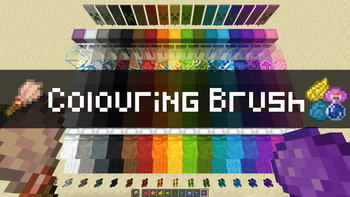
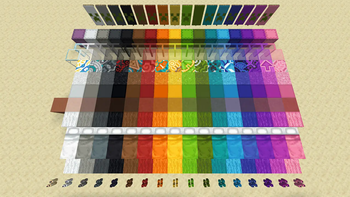
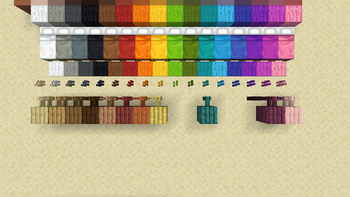
# Colouring Brush With brush and dyes, you can give, change, remove the colour of various coloured blocks: glass, wool, shulker box, terracotta, even planks. you name it! ## Dev Status * 🟦 **Active**: Actively developing. Working properly. * **Version**: v1.0 ## Compatibility * 1.20.x * Multiplayer friendly ## Features ### Colouring decoloured blocks Hold a brush and dyes in both hands and use the brush on glasses, terracotta, and more. You can colour following blocks. * Candles, candle cakes * Glasses, glass panes * Shulker boxes * Terracotta ### Recolouring coloured blocks Same mechanism as above. You can recolour following blocks. * Banners, wall banners * Candles, candle cakes * Concretes, concrete powders * Glasses, glass panes * Shulker boxes * Terracotta, glazed terracotta * Wools, beds, and carpets ### Recolouring wooden blocks Same mechanism as above. But cannot recolour in lime, green, light blue, blue, and purple. (Mojang plz add these woods) Using purple dye, you can recolour wooden fences into nether brick fences depending on the settings. * Planks * Stairs * Slabs * Fences * Fence gates * Doors (*optional: off) * Trap doors (*optional: off) * Pressure plates * Buttons * Signs, wall signs, hanging signs, and wall hanging signs ### Colouring sand into red sand Hold orange dyes in mainhand, a brush in offhand and use the brush on sand-related blocks. You can also dye chiselled sandstone depending on the settings. * Sand * Sandstones * Sandstone stairs * Sandstone slabs * Sandstone walls * Smooth sandstones * Smooth sandstone stairs * Smooth sandstone slabs * Cut sandstones * Cut sandstone slabs * Chiselled sandstone (*optional: off) ### Colouring cobblestones and stonebricks into mossy variants Hold green dyes in mainhand, a brush in offhand and use the brush on related blocks. * Cobblestone * Cobblestone stairs * Cobblestone slabs * Cobblestone walls * Stone bricks * Stone brick stairs * Stone brick slabs * Stone brick walls ### Decolouring blocks Hold a brush in mainhand, water bottle or water bucket in offhand, and use the brush on following blocks. **Be careful as you cannot use brush in offhand in this case.** * Candles, candle cakes * Cobblestone-related blocks * Glasses, glass panes * Sand-related blocks * Shulker boxes * Stone-brick-related blocks * Terracotta ### Balancing Options Use commands or click the menu on chat to toggle the options for the following features for balance purposes. In parentheses are default options. (Use /function guris:colouring/settings to evoke the menu) * Consume dye (on) * Consume water bottle (on) * Consume water bucket (off) * Damage brush (on) * Green jungle planks (off) * Maintain banner pattern (on) * Chiselled sandstone (off) * Nether brick fences (off) * Wooden doors (off) * Wooden trapdoors (off) ## Planned Features (Soon™) * Other stone blocks, stairs, slabs, etc (concerning balances and plausibility) * Automatic mainhand-offhand swapper when using water bottle and bucket ## References * (https://www.planetminecraft.com/data-pack/multitool-every-tool-in-one-item/) data pack for targeted block ray tracing * (https://www.planetminecraft.com/data-pack/timber-datapack/) data pack for settings menu design, item damaging
# Colouring Brush With brush and dyes, you can give, change, remove the colour of various coloured blocks: glass, wool, shulker box, terracotta, even planks. you name it!
## Dev Status 🟦 Active: Actively developing. Working properly. Version: v1. 0
## Compatibility 1. 20.x Multiplayer friendly
## Features ### Colouring decoloured blocks Hold a brush and dyes in both hands and use the brush on glasses, terracotta, and more. You can colour following blocks. Candles, candle cakes Glasses, glass panes Shulker boxes Terracotta
### Recolouring coloured blocks Same mechanism as above. You can recolour following blocks. Banners, wall banners Candles, candle cakes Concretes, concrete powders Glasses, glass panes Shulker boxes Terracotta, glazed terracotta Wools, beds, and carpets
### Recolouring wooden blocks Same mechanism as above. But cannot recolour in lime, green, light blue, blue, and purple. (Mojang plz add these woods) Using purple dye, you can recolour wooden fences into nether brick fences depending on the settings. Planks Stairs Slabs Fences Fence gates Doors (optional: off) Trap doors (optional: off) Pressure plates Buttons Signs, wall signs, hanging signs, and wall hanging signs
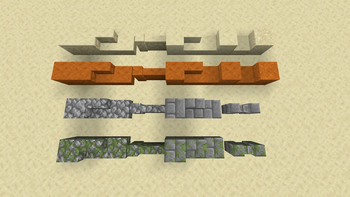
### Colouring sand into red sand Hold orange dyes in mainhand, a brush in offhand and use the brush on sand-related blocks. You can also dye chiselled sandstone depending on the settings. Sand Sandstones Sandstone stairs Sandstone slabs Sandstone walls Smooth sandstones Smooth sandstone stairs Smooth sandstone slabs Cut sandstones Cut sandstone slabs Chiselled sandstone (optional: off)
### Colouring cobblestones and stonebricks into mossy variants Hold green dyes in mainhand, a brush in offhand and use the brush on related blocks. Cobblestone Cobblestone stairs Cobblestone slabs Cobblestone walls Stone bricks Stone brick stairs Stone brick slabs Stone brick walls
### Decolouring blocks Hold a brush in mainhand, water bottle or water bucket in offhand, and use the brush on following blocks. Be careful as you cannot use brush in offhand in this case. Candles, candle cakes Cobblestone-related blocks Glasses, glass panes Sand-related blocks Shulker boxes Stone-brick-related blocks Terracotta
### Balancing Options Use commands or click the menu on chat to toggle the options for the following features for balance purposes. In parentheses are default options. (Use /function guris:colouring/settings to evoke the menu) Consume dye (on) Consume water bottle (on) Consume water bucket (off) Damage brush (on) Green jungle planks (off) Maintain banner pattern (on) Chiselled sandstone (off) Nether brick fences (off) Wooden doors (off) Wooden trapdoors (off)
## Planned Features (Soon™) Other stone blocks, stairs, slabs, etc (concerning balances and plausibility) Automatic mainhand-offhand swapper when using water bottle and bucket
## References (https://www.planetminecraft.com/data-pack/multitool-every-tool-in-one-item/) data pack for targeted block ray tracing (https://www.planetminecraft.com/data-pack/timber-datapack/) data pack for settings menu design, item damaging
📊 Mod Details
- Game
- Minecraft Data Packs
- Author
- lsk21kr
- Version
- v1.0
- Downloads
- 525
- Endorsements
- 12
- Category
- datapack
- Created
- 7/10/2023
- Updated
- 7/9/2023
- Game Versions
- 1.20, 1.20.1
- Tags
- decoration, game-mechanics, utility
🔧 How to Install Minecraft Data Packs Mods
Download from Modrinth. Use Prism Launcher or drop into your mods folder.
📖 Full step-by-step install guide for Minecraft Data Packs →
Visit the official mod page for specific installation instructions for this mod.
🎮 Need cheat codes or console commands? Check ur gaming wiki for Minecraft Data Packs commands, item IDs, and more.
❓ Frequently Asked Questions
Which Minecraft Data Packs versions does Colouring Brush support?
The author lists 1.20, 1.20.1. Other versions may work but are untested by the author.
What is the latest version of Colouring Brush?
Version v1.0, published 2023-07-09 with 525 downloads recorded at the source.
Keep browsing — more Minecraft Data Packs mods await