CobbleStops
🟡 Updated this year🖼️ Gallery (3 images)


🔍 Analysis
- 👍 0.2% endorsement rate
- 🏆 #1419 of 1805 datapack mods in this game by downloads
📋 About This Mod
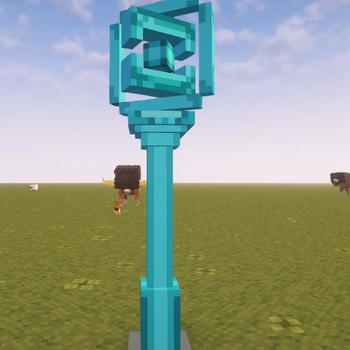
CobbleStops Datapack (for Cobblemon 1.7.1) Instantly add functional, rewarding PokeStops to your Cobblemon test server! This datapack adds a new, custom PokéStop NPC that players can interact with to claim items. It's designed to be incredibly easy for server owners to configure, allowing you to change all loot pools and cooldowns to fit your needs. !(https://cdn.modrinth.com/data/cached_images/0cf8da74685c3ce566500a5dde2ffd22f7b3d636_0.webp) Features - Adds a New NPC: Spawns a dedicated "PokeStop" NPC. - Fully Customizable Loot: Easily configure every possible reward by editing the loot_pool.json file. No scripting knowledge required! - 4 Rarity Tiers: Rewards are split into Common, Uncommon, Rare, and Ultra Rare pools. You decide what items go where. ``` Weighted Rarity: The script uses a 1-100 roll to determine which pool a player gets a reward from. The defaults are: - Common: 60% - Uncommon: 25% - Rare: 10% - Ultra Rare: 5% ``` - Configurable Cooldown: Set how long (in hours) a player must wait before using the PokeStop again. - User-Friendly Feedback: Players receive a clean, colorful chat message telling them exactly what they found. Installation This datapack has two parts that MUST be installed correctly: Server-Side (Host): Place the datapack .zip file into your server's world folder, inside the datapacks folder. Client-Side (All Players): All players (including the host) MUST install the same .zip file in their resourcepacks folder and enable it in their settings. This is required for everyone to see the PokeStop model. How to Use & Configure 1. Spawning the CobbleStop Once the datapack and resource pack are installed, you can spawn the NPC in-game (you must have OP permissions). Simply run the command: /spawnnpc pokestop 2. Configuring the Loot You can change every item reward without touching the main script. By using ``/npcedit`` you can edit all values including loot for each loot pool in the npc. 3. Configuring the Cooldown You can set the wait time for the PokéStop directly in-game. Make sure you are in Creative Mode or have admin permissions. Use ``/npcedit`` on the PokeStop NPC to open the NPC Editor. Find the "Cooldown" setting in the top the editor. Change the value to your desired wait time (in hours). Save and exit the editor. The new cooldown will apply from the next time a player uses the PokeStop. Each PokeStop will have its own independent cooldown.
CobbleStops Datapack (for Cobblemon 1. 7. 1) Instantly add functional, rewarding PokeStops to your Cobblemon test server! This datapack adds a new, custom PokéStop NPC that players can interact with to claim items.
It's designed to be incredibly easy for server owners to configure, allowing you to change all loot pools and cooldowns to fit your needs.
!(https://cdn.modrinth.com/data/cached_images/0cf8da74685c3ce566500a5dde2ffd22f7b3d636_0.webp)
Features - Adds a New NPC: Spawns a dedicated "PokeStop" NPC. - Fully Customizable Loot: Easily configure every possible reward by editing the loot_pool.json file. No scripting knowledge required! - 4 Rarity Tiers: Rewards are split into Common, Uncommon, Rare, and Ultra Rare pools. You decide what items go where.
``` Weighted Rarity: The script uses a 1-100 roll to determine which pool a player gets a reward from. The defaults are:
- Common: 60%
- Uncommon: 25%
- Rare: 10%
- Ultra Rare: 5%
``` - Configurable Cooldown: Set how long (in hours) a player must wait before using the PokeStop again. - User-Friendly Feedback: Players receive a clean, colorful chat message telling them exactly what they found. Installation This datapack has two parts that MUST be installed correctly:
Server-Side (Host): Place the datapack .zip file into your server's world folder, inside the datapacks folder.
Client-Side (All Players): All players (including the host) MUST install the same .zip file in their resourcepacks folder and enable it in their settings. This is required for everyone to see the PokeStop model.
How to Use & Configure 1. Spawning the CobbleStop Once the datapack and resource pack are installed, you can spawn the NPC in-game (you must have OP permissions).
Simply run the command: /spawnnpc pokestop
2. Configuring the Loot You can change every item reward without touching the main script.
By using ``/npcedit`` you can edit all values including loot for each loot pool in the npc.
3. Configuring the Cooldown You can set the wait time for the PokéStop directly in-game.
Make sure you are in Creative Mode or have admin permissions.
Use ``/npcedit`` on the PokeStop NPC to open the NPC Editor.
Find the "Cooldown" setting in the top the editor.
Change the value to your desired wait time (in hours).
Save and exit the editor. The new cooldown will apply from the next time a player uses the PokeStop. Each PokeStop will have its own independent cooldown.
📊 Mod Details
- Game
- Minecraft Data Packs
- Author
- jolihan
- Version
- 1.0.1
- Downloads
- 5,198
- Endorsements
- 11
- Category
- datapack
- Created
- 9/17/2025
- Updated
- 12/12/2025
- Game Versions
- 1.21.1
- Tags
- game-mechanics, mobs, utility
🔧 How to Install Minecraft Data Packs Mods
Download from Modrinth. Use Prism Launcher or drop into your mods folder.
📖 Full step-by-step install guide for Minecraft Data Packs →
Visit the official mod page for specific installation instructions for this mod.
🎮 Need cheat codes or console commands? Check ur gaming wiki for Minecraft Data Packs commands, item IDs, and more.
❓ Frequently Asked Questions
Which Minecraft Data Packs versions does CobbleStops support?
The author lists 1.21.1. Other versions may work but are untested by the author.
What is the latest version of CobbleStops?
Version 1.0.1, published 2025-12-12 with 5,198 downloads recorded at the source.
Keep browsing — more Minecraft Data Packs mods await