Cave-Ins
🟠 Updated over a year ago🖼️ Gallery (4 images)
🔍 Analysis
- 👍 0.5% endorsement rate
- 🏆 #761 of 1071 adventure mods in this game by downloads
📋 About This Mod
<h1>Cave-Ins Summary</h1> The <b>Cave-Ins</b> datapack brings customizable, multiplayer-friendly mining physics to your game without mods! Ceiling blocks in caves now have a tendency to fall when you mine them, resulting in a randomized, small, or even massive cave-in. Use supports to prevent cave-ins in a 12 block radius, or use silk touch on your tools to ignore the risk all together. There's even an in-game config so you can adjust cave-in chances and features for an easier or more difficult experience. <b>Check Out The <a href="https://www.planetminecraft.com/data-pack/cave-ins-make-caves-more-interesting-with-block-physics/">Planet Minecraft</a> Page For More Info And Videos On How The Datapack Works!</b> <h2>Cave-Ins and Massive Cave-Ins Mechanic</h2> Every time you mine a block in the <b>"Trigger Blocks"</b> list (Located on the Planet Minecraft page) that has <b>2 blocks of air</b> under it, you run the risk of causing a <b>cave-in</b>. Small cave-ins are common and usually only provoke a handful of blocks to fall, but massive cave-ins can be <b>devastating</b> and span a large area if you're not careful. The chances of Cave-Ins and Massive Cave-Ins is configurable - see the "Config" section below to see how. As of v1.1 - Random Cave-Ins can occur around you at depths lower than y=30. They get more frequent as you delve deeper, making supports necessary. <h2>Support Structures</h2> Building supports is crucial in <b>preventing Cave-Ins</b>. To build a support, simply place a <b>Stripped Log</b> of any type between 2 <b>Polished Deepslate</b> blocks in the crafting grid. Supports can be a minimum height of <b>2-blocks</b> and a maximum height of <b>10-blocks</b>. They will support any blocks in a <b>15-block</b> range from the top of the support. Holding a <b>Soul Lantern</b> in your offhand with a <b>Pickaxe</b> in your mainhand will reveal the support status of the block you're facing if it could potentially trigger a Cave-In. <b>Red particles</b> indicate an <b>unsupported block</b>, while <b>cyan particles</b> indicate a <b>supported block</b>. <h2>TNT Cave-Ins</h2> TNT will <b>always</b> cause a <b>Massive Cave-In</b> if there is a block within 5 blocks above it. This makes TNT a more effective tool when mining, since Massive Cave-Ins often reveal pockets of ore. This also makes it perfect for sealing off small caves. To <b>prevent</b> a TNT Cave-In, simply place any <b>trapdoor</b> on top of the TNT to "cap" it before igniting it. Cave-Ins caused by TNT will not be prevented by nearby supports! <h2>Config</h2> <b>To open the config, type the following command into chat:</b> /function cave_in:config Here you can adjust Cave-In chances and enable/disable features. Please use the <b>Uninstall</b> button before removing this datapack. This will cleanup the scoreboard and any entities this datapack was using. <h2>Notes</h2> <b>This datapack is 100% multiplayer-friendly!</b> <b>A note on optimization:</b> I've spent the past several months slowly piecing this datapack together and making it as performant as possible. Watching it go from unplayable to having little to no performance impact has been amazing. However, please note that I have done pretty minimal server testing for this pack, so it may not be suitable for large volume servers depending on server resources. Expect TPS drops when Massive Cave-Ins occur - in some instances, there could be 100+ falling block entities at a time. Disabling falling block particles and sound effects in the config can help reduce lag if you're having issues.
Cave-Ins Summary
The Cave-Ins datapack brings customizable, multiplayer-friendly mining physics to your game without mods!
Ceiling blocks in caves now have a tendency to fall when you mine them, resulting in a randomized, small, or even massive cave-in. Use supports to prevent cave-ins in a 12 block radius, or use silk touch on your tools to ignore the risk all together. There's even an in-game config so you can adjust cave-in chances and features for an easier or more difficult experience.
Check Out The Planet Minecraft Page For More Info And Videos On How The Datapack Works!
Cave-Ins and Massive Cave-Ins Mechanic
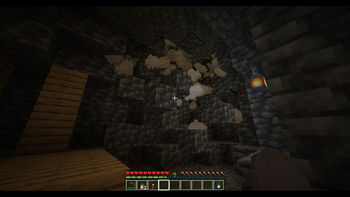
Every time you mine a block in the "Trigger Blocks" list (Located on the Planet Minecraft page) that has 2 blocks of air under it, you run the risk of causing a cave-in. Small cave-ins are common and usually only provoke a handful of blocks to fall, but massive cave-ins can be devastating and span a large area if you're not careful.
The chances of Cave-Ins and Massive Cave-Ins is configurable - see the "Config" section below to see how.
As of v1. 1 - Random Cave-Ins can occur around you at depths lower than y=30. They get more frequent as you delve deeper, making supports necessary.
Support Structures
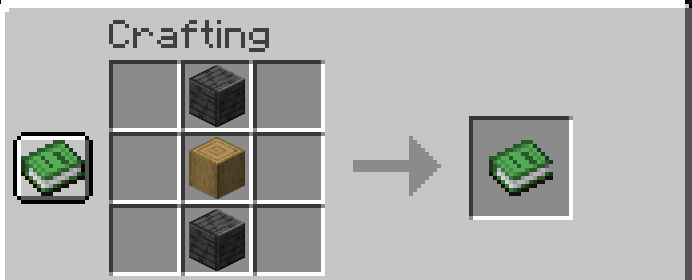
Building supports is crucial in preventing Cave-Ins. To build a support, simply place a Stripped Log of any type between 2 Polished Deepslate blocks in the crafting grid. Supports can be a minimum height of 2-blocks and a maximum height of 10-blocks. They will support any blocks in a 15-block range from the top of the support.
Holding a Soul Lantern in your offhand with a Pickaxe in your mainhand will reveal the support status of the block you're facing if it could potentially trigger a Cave-In.
Red particles indicate an unsupported block, while cyan particles indicate a supported block.
TNT Cave-Ins
TNT will always cause a Massive Cave-In if there is a block within 5 blocks above it. This makes TNT a more effective tool when mining, since Massive Cave-Ins often reveal pockets of ore. This also makes it perfect for sealing off small caves.
To prevent a TNT Cave-In, simply place any trapdoor on top of the TNT to "cap" it before igniting it. Cave-Ins caused by TNT will not be prevented by nearby supports!
Config
To open the config, type the following command into chat: /function cave_in:config
Here you can adjust Cave-In chances and enable/disable features.
Please use the Uninstall button before removing this datapack. This will cleanup the scoreboard and any entities this datapack was using.
Notes
This datapack is 100% multiplayer-friendly!
A note on optimization: I've spent the past several months slowly piecing this datapack together and making it as performant as possible. Watching it go from unplayable to having little to no performance impact has been amazing. However, please note that I have done pretty minimal server testing for this pack, so it may not be suitable for large volume servers depending on server resources. Expect TPS drops when Massive Cave-Ins occur - in some instances, there could be 100+ falling block entities at a time. Disabling falling block particles and sound effects in the config can help reduce lag if you're having issues.
📊 Mod Details
- Game
- Minecraft Data Packs
- Author
- Lettooce
- Version
- 1.3
- Downloads
- 7,564
- Endorsements
- 41
- Category
- adventure
- Created
- 12/21/2023
- Updated
- 8/5/2025
- Game Versions
- 1.21.5, 1.21.6, 1.21.7, 1.21.8
- Tags
- adventure, game-mechanics, utility
🔧 How to Install Minecraft Data Packs Mods
Download from Modrinth. Use Prism Launcher or drop into your mods folder.
📖 Full step-by-step install guide for Minecraft Data Packs →
Visit the official mod page for specific installation instructions for this mod.
🎮 Need cheat codes or console commands? Check ur gaming wiki for Minecraft Data Packs commands, item IDs, and more.
❓ Frequently Asked Questions
Which Minecraft Data Packs versions does Cave-Ins support?
The author lists 1.21.5, 1.21.6, 1.21.7, 1.21.8. Other versions may work but are untested by the author.
What is the latest version of Cave-Ins?
Version 1.3, published 2025-08-05 with 7,564 downloads recorded at the source.
Keep browsing — more Minecraft Data Packs mods await