Cave Clean-Up
⚪ Last updated 2024🖼️ Gallery (4 images)
🔍 Analysis
- 👍 0.5% endorsement rate
- 🏆 #1593 of 2025 datapack mods in this game by downloads
📋 About This Mod
# Cave Clean-Up Tired of caves now looking ugly? Tired of half your inventory being filled up with junk blocks? Wish things were simpler like the old days? Well this is the data pack for you, cleans up caves by removing Diorite, Andesite, Granite and Tuff from world gen. This also replaces Deepslate with regular Stone while keeping all the cool new world generation of 1.18. ## Features: - Removes Diorite from world generation - Removes Andesite from world generation - Removes Granite from world generation - Removes Tuff from world generation - Replaces Deepslate with Stone - Adds crafting recipe for Cobbled Deepslate - Adds crafting recipe for Tuff ## Installation: When creating a new Minecraft world click on the "Data Packs" button, then click on the "Open Pack Folder" button, place the Cave Clean-Up data pack into the folder opened, in Minecraft move the Cave Clean-up data pack from "Available" to "Selected", click the "Done" button, then create you Minecraft as you normally would. You will get a warning when creating or joining your world with this data pack, this is to be expected. Just click either "Proceed" or "I Know What I'm Doing"
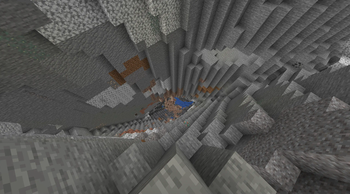
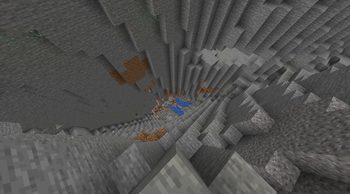
# Cave Clean-Up Tired of caves now looking ugly? Tired of half your inventory being filled up with junk blocks? Wish things were simpler like the old days? Well this is the data pack for you, cleans up caves by removing Diorite, Andesite, Granite and Tuff from world gen. This also replaces Deepslate with regular Stone while keeping all the cool new world generation of 1. 18.
## Features: - Removes Diorite from world generation - Removes Andesite from world generation - Removes Granite from world generation - Removes Tuff from world generation
- Replaces Deepslate with Stone
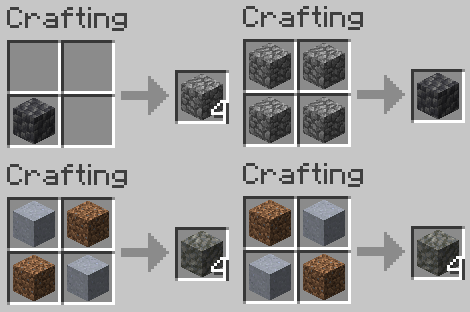
- Adds crafting recipe for Cobbled Deepslate
- Adds crafting recipe for Tuff
## Installation: When creating a new Minecraft world click on the "Data Packs" button, then click on the "Open Pack Folder" button, place the Cave Clean-Up data pack into the folder opened, in Minecraft move the Cave Clean-up data pack from "Available" to "Selected", click the "Done" button, then create you Minecraft as you normally would. You will get a warning when creating or joining your world with this data pack, this is to be expected. Just click either "Proceed" or "I Know What I'm Doing"
📊 Mod Details
- Game
- Minecraft Data Packs
- Author
- LukeWarmAbyss
- Version
- 1.20.4
- Downloads
- 942
- Endorsements
- 5
- Category
- datapack
- Created
- 3/29/2024
- Updated
- 3/27/2024
- Game Versions
- 1.20.4
- Tags
- worldgen
🔧 How to Install Minecraft Data Packs Mods
Download from Modrinth. Use Prism Launcher or drop into your mods folder.
📖 Full step-by-step install guide for Minecraft Data Packs →
Visit the official mod page for specific installation instructions for this mod.
🎮 Need cheat codes or console commands? Check ur gaming wiki for Minecraft Data Packs commands, item IDs, and more.
❓ Frequently Asked Questions
Which Minecraft Data Packs versions does Cave Clean-Up support?
The author lists 1.20.4. Other versions may work but are untested by the author.
What is the latest version of Cave Clean-Up?
Version 1.20.4, published 2024-03-27 with 942 downloads recorded at the source.
Keep browsing — more Minecraft Data Packs mods await