Show My Coordinates
⚪ Last updated 2023🖼️ Gallery (3 images)
🔍 Analysis
- 🏆 #709 of 2046 datapack mods in this game by downloads
📋 About This Mod
!(https://i.ibb.co/khbwCzy/banner.png) !(https://i.ibb.co/p0nYcGM/infos.png) ### **📝About:** Do you want to see your Coordinates? Now you can! And it's fully customizable. !(https://i.ibb.co/p0nYcGM/infos.png) ### **⚙️Features:** - Fully customizable - Customizable by players with triggers - Settings menu - There are 2 language support. - Automaticaly counts. - 4 update time (0.1s, 0.3s, 0.5s, 1.0s) - Players can send their coordinates to the chat - Help menu !(https://i.ibb.co/p0nYcGM/infos.png) ### **⌨️Commands:** - **(ADMIN) /function antrolgaming:showmycoordinates/settings** - Here you can access the admin settings menu. - **(Player) /trigger ag_sys_lang set <number>** - 0 = English, 1 = Hungarian - With this you can change the language. - **(Player) /trigger ag_smc_display set <number>** - 0 = Show Always, 1 = Only with Compass item - With this you can change when do you want your coordinates to appear. - **(Player) /trigger ag_smc_orientation set <number>** - 0 = Long, 1 = Short, 2 = Off - With this you can change how do you wanna see the orientations. - **(Player) /trigger ag_smc_status set <number>** - 0 = On, 1 = Off - With this you can turn off the SMC for yourself. - **(Player) /trigger ag_smc_send** - With this you can send your current coordinates to the chat. - **(Player) /trigger ag_smc_help** - With this you can send yourselft the help menu to your chat. !(https://i.ibb.co/p0nYcGM/infos.png) ### **💬Languages:** - English - Hungarian !(https://i.ibb.co/p0nYcGM/infos.png) ### **📜Our partner:** (https://i.ibb.co/JqPjJKf/bisect-hosting2.png)](https://www.bisecthosting.com/AntrolGaming) !(https://i.ibb.co/p0nYcGM/infos.png) ### **💡Ideas:** If you have an idea which makes the datapack better please write it on our discord server in the **#💡idea-suggestions forum.** !(https://i.ibb.co/p0nYcGM/infos.png) ### **👾Bugs:** If you have found a bug then please write it on our discord server in the **#🧰bug-reports forum** !(https://i.ibb.co/p0nYcGM/infos.png) ### **🔍Help:** **How to change datapack settings:** Write this command: **"/function antrolgaming:showmycoordinates/settings"** **How to install (1.):** 1. Download the ZIP file 2. Place in your save datapacks folder (.minecraft/saves/<YOUR_SAVE>/datapacks) 3. (Not necessary) Unzip the ZIP file 4. Restart the world which in the datapack was installed or write the command /reload 5. (If don't work 4.) Write this command: **" /datapack enable "file/AG, Show My Coordinates, v1.0" "** **How to install (2.):** 1. When creating a new world click on the Data Packs button 2. Drag the ZIP or the folder in the Available column. 3. Click yes then hover you mouse over the datapack and click the arrow. 4. Done **How to reach the minecraft folder:** - Search: **%appdata%** and go to **".minecraft"** folder. **Path:** - C:\Users\<YOUR USER>\AppData\Roaming\.minecraft **How to uninstall:** - Write the command **/function antrolgaming:showmycoordinates/settings** then click the uninstall text and then you can remove the datapack from here: **".minecraft/saves/<YOUR_SAVE>/datapacks"** !(https://i.ibb.co/p0nYcGM/infos.png) ### **👫Social:** (https://i.ibb.co/bX3jmNp/dc.png)](https://discord.gg/we8yC7p) (https://i.ibb.co/cCx47FY/yt.png)](https://www.youtube.com/channel/UCMny4h1EAJGaPJ7NWCnaaFA/) (https://i.ibb.co/4gQYW33/ig.png)](https://www.instagram.com/antrolgaming/) (https://i.ibb.co/Rc24xSX/tw.png)](https://twitter.com/GamingAntrol) !(https://i.ibb.co/p0nYcGM/infos.png) ### **❤️Support Us:** (https://i.ibb.co/RDKzTrD/donate.png)](https://www.curseforge.com/linkout?remoteUrl=https%253a%252f%252fko-fi.com%252fantrolgaming)
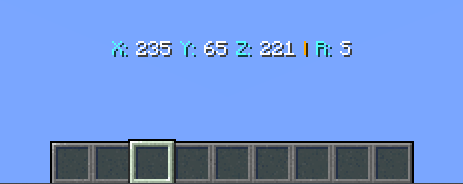
!(https://i.ibb.co/khbwCzy/banner.png)  ### 📝About: Do you want to see your Coordinates? Now you can! And it's fully customizable.  ### ⚙️Features: - Fully customizable - Customizable by players with triggers - Settings menu - There are 2 language support. - Automaticaly counts. - 4 update time (0. 1s, 0. 3s, 0. 5s, 1. 0s) - Players can send their coordinates to the chat - Help menu
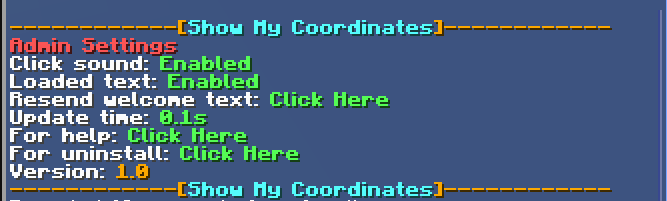
 ### ⌨️Commands: - (ADMIN) /function antrolgaming:showmycoordinates/settings - Here you can access the admin settings menu.
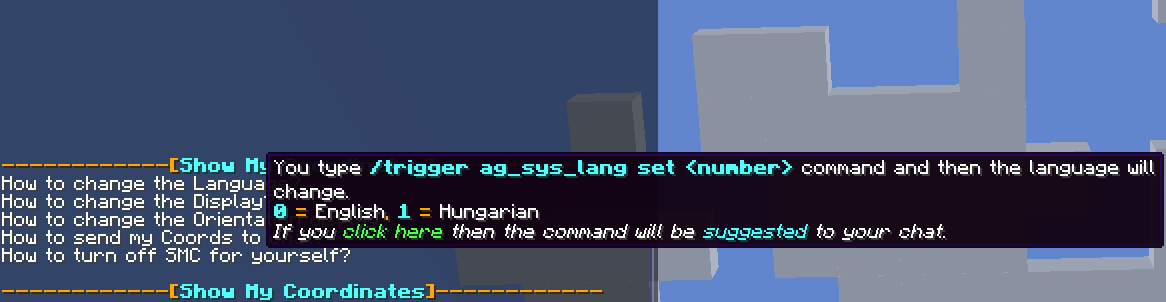
- (Player) /trigger ag_sys_lang set
- - 0 = English, 1 = Hungarian
- - With this you can change the language.
- (Player) /trigger ag_smc_display set
- - 0 = Show Always, 1 = Only with Compass item
- - With this you can change when do you want your coordinates to appear.
- (Player) /trigger ag_smc_orientation set
- - 0 = Long, 1 = Short, 2 = Off
- - With this you can change how do you wanna see the orientations.
- (Player) /trigger ag_smc_status set
- - 0 = On, 1 = Off
- - With this you can turn off the SMC for yourself.
- (Player) /trigger ag_smc_send
- - With this you can send your current coordinates to the chat.
- (Player) /trigger ag_smc_help
- - With this you can send yourselft the help menu to your chat.
 ### 💬Languages: - English - Hungarian
 ### 📜Our partner: [!(https://i.ibb.co/JqPjJKf/bisect-hosting2.png)](https://www.bisecthosting.com/AntrolGaming)  ### 💡Ideas: If you have an idea which makes the datapack better please write it on our discord server in the #💡idea-suggestions forum.
 ### 👾Bugs: If you have found a bug then please write it on our discord server in the #🧰bug-reports forum
 ### 🔍Help: How to change datapack settings:
Write this command: "/function antrolgaming:showmycoordinates/settings"
How to install (1.):
1. Download the ZIP file
2. Place in your save datapacks folder (.minecraft/saves/
How to install (2.): 1. When creating a new world click on the Data Packs button 2. Drag the ZIP or the folder in the Available column. 3. Click yes then hover you mouse over the datapack and click the arrow. 4. Done
How to reach the minecraft folder: - Search: %appdata% and go to ".minecraft" folder.
Path:
- C:\Users\\AppData\Roaming\.minecraft
How to uninstall:
- Write the command /function antrolgaming:showmycoordinates/settings then click the uninstall text and then you can remove the datapack from here: ".minecraft/saves/
 ### 👫Social: [!(https://i.ibb.co/bX3jmNp/dc.png)](https://discord.gg/we8yC7p) [!(https://i.ibb.co/cCx47FY/yt.png)](https://www.youtube.com/channel/UCMny4h1EAJGaPJ7NWCnaaFA/) [!(https://i.ibb.co/4gQYW33/ig.png)](https://www.instagram.com/antrolgaming/) [!(https://i.ibb.co/Rc24xSX/tw.png)](https://twitter.com/GamingAntrol)
 ### ❤️Support Us: [!(https://i.ibb.co/RDKzTrD/donate.png)](https://www.curseforge.com/linkout?remoteUrl=https%253a%252f%252fko-fi.com%252fantrolgaming)
📊 Mod Details
- Game
- Minecraft Data Packs
- Author
- seabat0101
- Version
- V1.0
- Downloads
- 460
- Endorsements
- 3
- Category
- datapack
- Created
- 4/7/2023
- Updated
- 4/4/2023
- Game Versions
- 1.19.4
- Tags
- utility
🔧 How to Install Minecraft Data Packs Mods
Download from Modrinth. Use Prism Launcher or drop into your mods folder.
📖 Full step-by-step install guide for Minecraft Data Packs →
Visit the official mod page for specific installation instructions for this mod.
🎮 Need cheat codes or console commands? Check ur gaming wiki for Minecraft Data Packs commands, item IDs, and more.
❓ Frequently Asked Questions
Which Minecraft Data Packs versions does Show My Coordinates support?
The author lists 1.19.4. Other versions may work but are untested by the author.
What is the latest version of Show My Coordinates?
Version V1.0, published 2023-04-04 with 460 downloads recorded at the source.
Keep browsing — more Minecraft Data Packs mods await