Give Quiet Clothes (Now With Cutscene Support)
⚪ Last updated 2015Preview
🔍 Analysis
- 👍 2.7% endorsement rate — high engagement, a strong quality signal
- 🏆 #15 of 934 Models and Textures mods in this game by downloads
📋 About This Mod
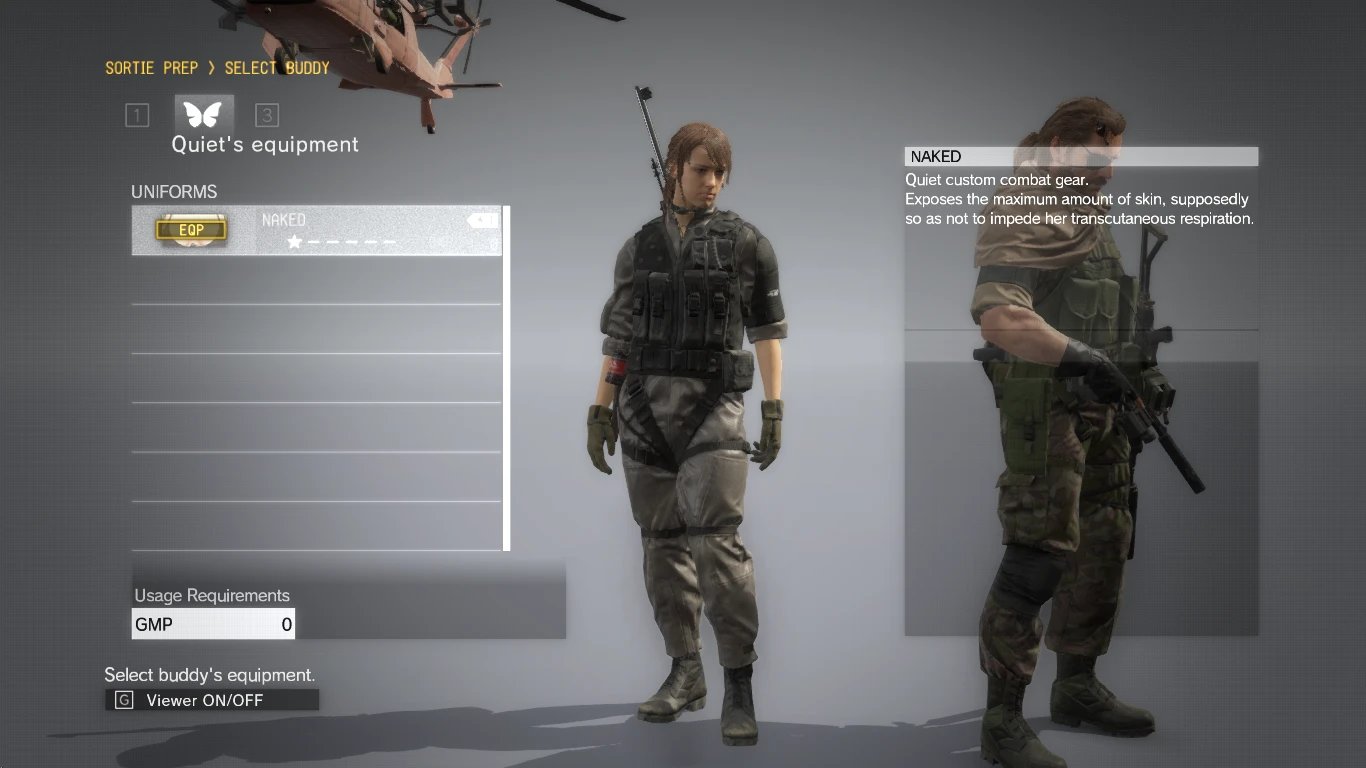
This mod replaces Quiets default model with her XOF Uniform outfit that can be unlocked after Mission 40. In this new version, this mod now changes just about every iteration of Quiet when using the optional "Cutscene" file!! This includes her appearance at Mother Base and during your first battle against her!
Honestly I'd love to make an actually lore friendly outfit that wasn't so revealing for Quiet, but 3D modeling is difficult, and this was easier.
Installation:
Base File Install: (will only affect how Quiet Looks during Missions) 1. Unpack your chunk1.dat file with the MGSV QAR Tool.
2. Extract the files from Give_Quiet_Clothes-Base.zip into the "chunk1" folder and allow it to overwrite all the files.
3. Recompile your chunk1.dat file with the QAR tool.
Cutscene File Install: (use with the Base File for best results) 1. Unpack your chunk0.dat, chunk1.dat, chunk2.dat and chunk3.dat files with the MGSV QAR Tool.
2. Extract the Give_Quiet_Clothes-Cutscenes.zip file into your "MGS_TPP/master" folder and allow it to overwrite all the files. DONT WORRY ABOUT MAKING BACKUPS OF ALL THESE FILES!! YOU CAN REVERT YOUR FILES BACK WITH THE UNINSTALL FILES AVAILABLE HERE!
3. Recompile your chunk0.dat, chunk1.dat, chunk2.dat and chunk3.dat files with the QAR tool.
Uninstallation: Each Uninstall file contains the normal versions of all files changed by the mod, basically serving a backup of the files for if you ever want to remove the mod from your game.
Base File Uninstallation: 1. Download the Base_Uninstall.zip file from the files page.
2. Extract the files into your "chunk1" folder.
3. Recompile your chunk1.dat file with the QAR tool.
Cutscene File Uninstall: 1. Download the Cutscenes_Uninstall.zip file from the files page.
2. Extract the files into your "MGS_TPP/master" folder and allow it to overwrite all the files.
3. Recompile your chunk0.dat, chunk1.dat, chunk2.dat and chunk3.dat files with the QAR tool.
Changelog: v2. 0: Remade the Base Files (I got a crash during playtesting and I think it was because of my bad creation of those file), and made the Cutscenes add-on to make the file not just for missions. v1. 0: Initial upload of mod.
Give Quiet Clothes (Now With Cutscene Support) is a cosmetic mod for Metal Gear Solid V that replaces Quiet's default outfit with clothed variants, including support for cutscenes. It has 621 endorsements and 23,213 downloads, last updated in October 2015.
✨ Key Features
📊 Pros & Cons
✅ Pros
- Community-approved with 621 endorsements and over 23k downloads.
- Cutscene support is a big plus—no more jarring outfit swaps during story moments.
- Simple cosmetic fix for players who want a less revealing Quiet.
⚠️ Cons
- Last updated in 2015—may have compatibility issues with current game versions or mods.
- Purely cosmetic; doesn't address any gameplay or lore elements beyond outfit changes.
For MGSV players who are tired of Quiet's default outfit and want a more clothed look without breaking immersion. Also for those who don't care about lore and just want a visual change. Skip if you're fine with the original design or want gameplay alterations.
💡 Beginner Tips
- Make sure to back up your original game files before installing any mod, especially if you're on PC.
- If you're using a mod manager, let it handle the file placement to avoid conflicts.
- Check the mod's comments section for any user-reported issues or compatibility notes.
📊 Mod Details
- Game
- Metalgearsolidvtpp Mods
- Author
- LieutenantShwa
- Version
- v2.0
- Downloads
- 23,213
- Endorsements
- 621
- Category
- Models and Textures
- Created
- 9/30/2015
- Updated
- 10/1/2015
🔧 How to Install Metal Gear Solid V: The P Mods
Download from Nexus Mods.
📖 Full step-by-step install guide for Metal Gear Solid V: The P →
Visit the official mod page for specific installation instructions for this mod.
🎮 Need cheat codes or console commands? Check ur gaming wiki for Metal Gear Solid V: The P commands, item IDs, and more.
Keep browsing — more Metal Gear Solid V: The P mods await