ANTI-BLOOM SHADER
⚪ Last updated 2023Preview
🔍 Analysis
- 👍 2.6% endorsement rate — high engagement, a strong quality signal
- 🏆 #8 of 267 Miscellaneous mods in this game by downloads
📋 About This Mod
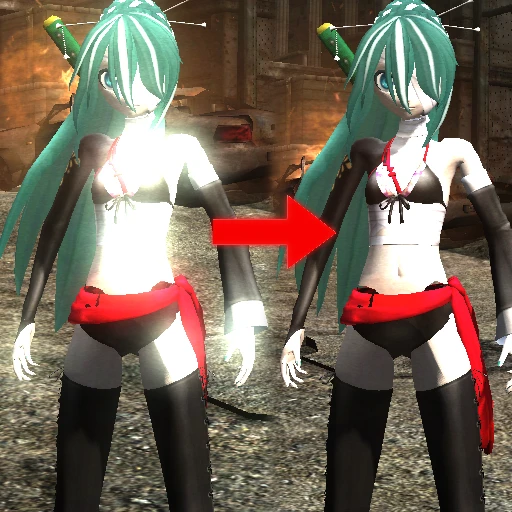
Removes in-game bloom natively.
WHY AND WHAT
This mods removes bloom from the game, that usually looks really bad on custom models.
This mod is usually paired with a custom model mod, but can be used standalone, though, you won't see much difference.
HOW I DID IT (TECHNICAL)
I decompiled the shaders stored in shader.dat (specifically filter01.pso)
Then I made it so it returns a transparent color, instead of the bloom.
Repacked the file, done.
INSTALLATION
1. Download the mod file.
2. Un-zip the archive you download
2. Open your Metal Gear Rising folder (in Steam you can use Browse Local Files)
3. Open GameData folder
4. Move the file you unzipped into the folder mentioned in step 3.
5. Play the game!
If the game doesn't launch after installing this mod, you might want to install the File Unlimiter
📊 Mod Details
- Game
- Metalgearrisingrevengeance Mods
- Author
- Aura39
- Version
- 1.0
- Downloads
- 14,533
- Endorsements
- 384
- Category
- Miscellaneous
- Created
- 11/14/2023
- Updated
- 11/14/2023
🔧 How to Install Metal Gear Rising: Reveng Mods
Download from Nexus Mods.
📖 Full step-by-step install guide for Metal Gear Rising: Reveng →
Visit the official mod page for specific installation instructions for this mod.
🎮 Need cheat codes or console commands? Check ur gaming wiki for Metal Gear Rising: Reveng commands, item IDs, and more.
Keep browsing — more Metal Gear Rising: Reveng mods await