RickReptile rock background 3.0
🟠 Updated over a year agoPreview
🔍 Analysis
- 👍 0.0% endorsement rate
📋 About This Mod
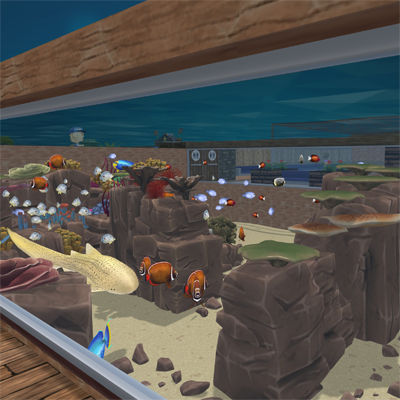
RickReptile presents rock background 3.0. Yet another way to decorate your tanks and easily the largest scenery mod ever for Megaquarium. In total this pack has over 30 rock models, each having 6 variations(1 bare and 5 filled with corals) offering in total over 180 variations, each model got between 5 to 11 different height options and all can be repainted, in total there are 5 different paint variations Providing over 5000 rock variantions. But that is not all, the bare rocks will allow scenery to be placed on them, allowing for even more customization options. In order to place any object on the rocks: 1:first place the rocks outside the tank 2: place the desired object on the rock 3: move the rock into the desired tank for repainting the rock: 1: place the rock outside the tank 2: check the name of the rock, it mentions the paint number 3: go to the infrastructure tab(where basegame paints are located) go to the ROCK BACKGROUNDS 3.0 PAINTS 4: select the number that you need, and select the paint you want. 5: place the rock in the desired tank Modders note: By downloading/using this mod you agree to not alter/translate/re-release this mod without written permission of the mod creator.
RickReptile presents rock background 3. 0. Yet another way to decorate your tanks and easily the largest scenery mod ever for Megaquarium. In total this pack has over 30 rock models, each having 6 variations(1 bare and 5 filled with corals) offering in total over 180 variations, each model got between 5 to 11 different height options and all can be repainted, in total there are 5 different paint variations Providing over 5000 rock variantions. But that is not all, the bare rocks will allow scenery to be placed on them, allowing for even more customization options. In order to place any object on the rocks: 1:first place the rocks outside the tank 2: place the desired object on the rock 3: move the rock into the desired tank for repainting the rock: 1: place the rock outside the tank 2: check the name of the rock, it mentions the paint number 3: go to the infrastructure tab(where basegame paints are located) go to the ROCK BACKGROUNDS 3. 0 PAINTS 4: select the number that you need, and select the paint you want. 5: place the rock in the desired tank Modders note: By downloading/using this mod you agree to not alter/translate/re-release this mod without written permission of the mod creator.
📊 Mod Details
- Game
- Megaquarium Mods
- Author
- 76561197989082436
- Version
- N/A
- Downloads
- 746
- Endorsements
- 0
- Category
- scenery, Rocks
- Created
- 2/20/2025
- Updated
- 2/20/2025
🔧 How to Install Megaquarium Mods
Subscribe on Steam Workshop. Mods auto-download and install. Launch the game to activate.
📖 Full step-by-step install guide for Megaquarium →
Visit the official mod page for specific installation instructions for this mod.
🎮 Need cheat codes or console commands? Check ur gaming wiki for Megaquarium commands, item IDs, and more.
Keep browsing — more Megaquarium mods await