MW5 LOM V2 -UPDATED 2023-
⚪ Last updated 2023Preview
🔍 Analysis
- 👍 3.4% endorsement rate — high engagement, a strong quality signal
- 🏆 #2 of 25 Utilities mods in this game by downloads
📋 About This Mod
Installation:
Simply download and run the executable from anywhere.
Make sure you have .net 7 desktop installed or you will get a prompt on startup.
Disclaimer:
This program edits the mod.json as well as overrides the modlist.json.
It does not read the modlist.json so any changes from outside the program will be overwritten
For Mod Authors:
To have the manager check if the dependencies for your mod are met, you will need to add the following to the mod.json file:
"Requires": [
"displayName_of_required_mod_1",
"displayName_of_required_mod_2",
"displayName_of_required_mod_3"
Where displayName_of_required_mod_1 is the displayName of the mod your mod is dependant on.
Example mod.json:
"displayName": "ExampleMod",
"version": "1. 0",
"buildNumber": 1,
"description": "ExampleMod",
"author": "",
"authorURL": "",
"defaultLoadOrder": 0,
"gameVersion": "1. 0",
"manifest": [""],
"steamPublishedFileId": 0,
"steamLastSubmittedBuildNumber": 0,
"steamModVisibility": "Private",
"Requires": [
"displayName_of_required_mod_1",
"displayName_of_required_mod_2",
"displayName_of_required_mod_3"
The user will see the following should he be missing dependencies:
Drag and Drop:
Other Features:
-
[]REMEMBER CHANGES ONLY TAKE EFFECT AFTER PRESSING APPLY!
[
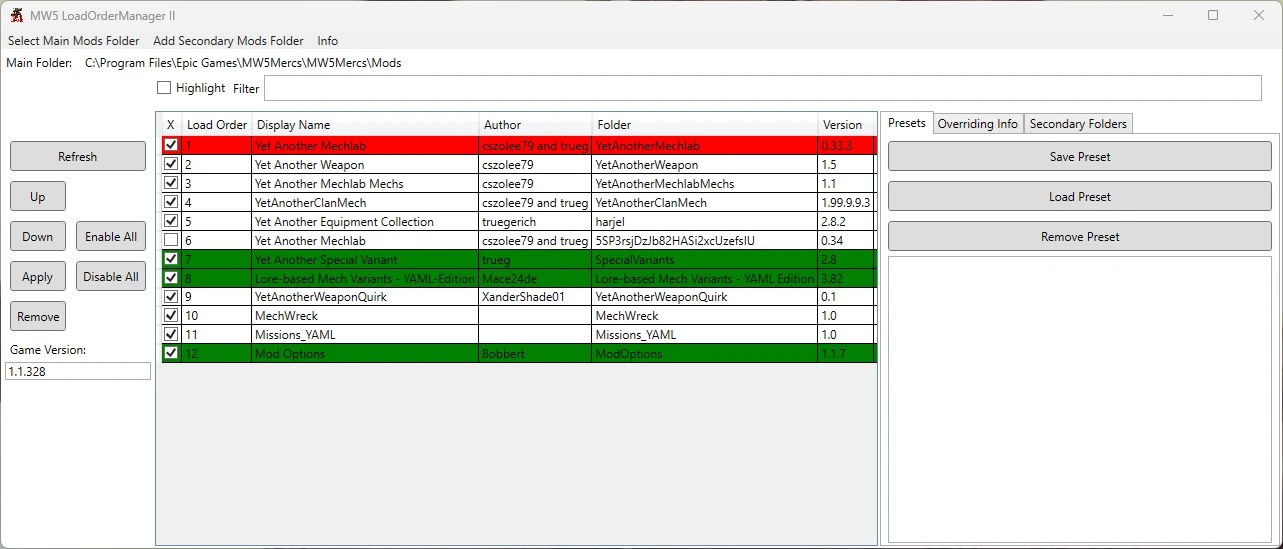
]Dependency check only works if supported by the mod author (go bug them about it). Turned off atm.[]Create, save and load presets for your different games.
[]Easy out-of-game mod activation management.
[]Export your mods load order. Turned off atm.
[]See what mods override each other.
- Support for author indicated mod dependencies. Turned off atm.
Quick User Guide:
You MUST select a main mods folder, the main mods folder is located inside your installation directory => MW5Mercs/Mods.
This is where the modlist.json will be written to.
Any vendor-related mods folders must then be selected as secondary folders.
Mods in secondary folders do not magically get transferred to the main folder.
If you select a secondary folder that the game does not recognize as a mods folder the mods in this folder will not be loaded into the game.
MW5 LOM V2 is a load order and activation manager for MechWarrior 5: Mercenaries, updated in 2023. It supports drag-and-drop of mod folders and archives, preset saving/loading, and detects mod conflicts. With 2,090 endorsements and 61,232 downloads, it's a popular utility for managing mod setups.
✨ Key Features
📊 Pros & Cons
✅ Pros
- Huge community trust with 2,090 endorsements and 61k downloads.
- Drag-and-drop support makes adding mods a breeze.
- Preset system lets you switch between different mod loadouts easily.
⚠️ Cons
- Last updated January 2023 — may not support the latest MW5 patches or DLC.
- Requires manual file placement or a mod manager, which might confuse newbies.
For MW5 players who run lots of mods and need a reliable way to manage load order. If you're tired of manually shuffling files or dealing with conflicts, this is your tool. Skip if you only use a few mods and don't care about load order.
💡 Beginner Tips
- Make sure to run the game once before installing mods so the game folder is fully generated.
- Use the preset feature to create a 'clean' preset with no mods for troubleshooting.
- Check the 'overrides' warning to spot conflicting mods before you launch the game.
📊 Mod Details
- Game
- Mechwarrior5mercenaries Mods
- Author
- RJ
- Version
- 1.6.0
- Downloads
- 61,232
- Endorsements
- 2,090
- Category
- Utilities
- Created
- 6/15/2020
- Updated
- 1/27/2023
🔧 How to Install MechWarrior 5: Mercenarie Mods
Download from Nexus Mods.
📖 Full step-by-step install guide for MechWarrior 5: Mercenarie →
Visit the official mod page for specific installation instructions for this mod.
🎮 Need cheat codes or console commands? Check ur gaming wiki for MechWarrior 5: Mercenarie commands, item IDs, and more.
Keep browsing — more MechWarrior 5: Mercenarie mods await