Formations and AI with Campaign AI - Compiled for Native
⚪ Last updated 2017Preview
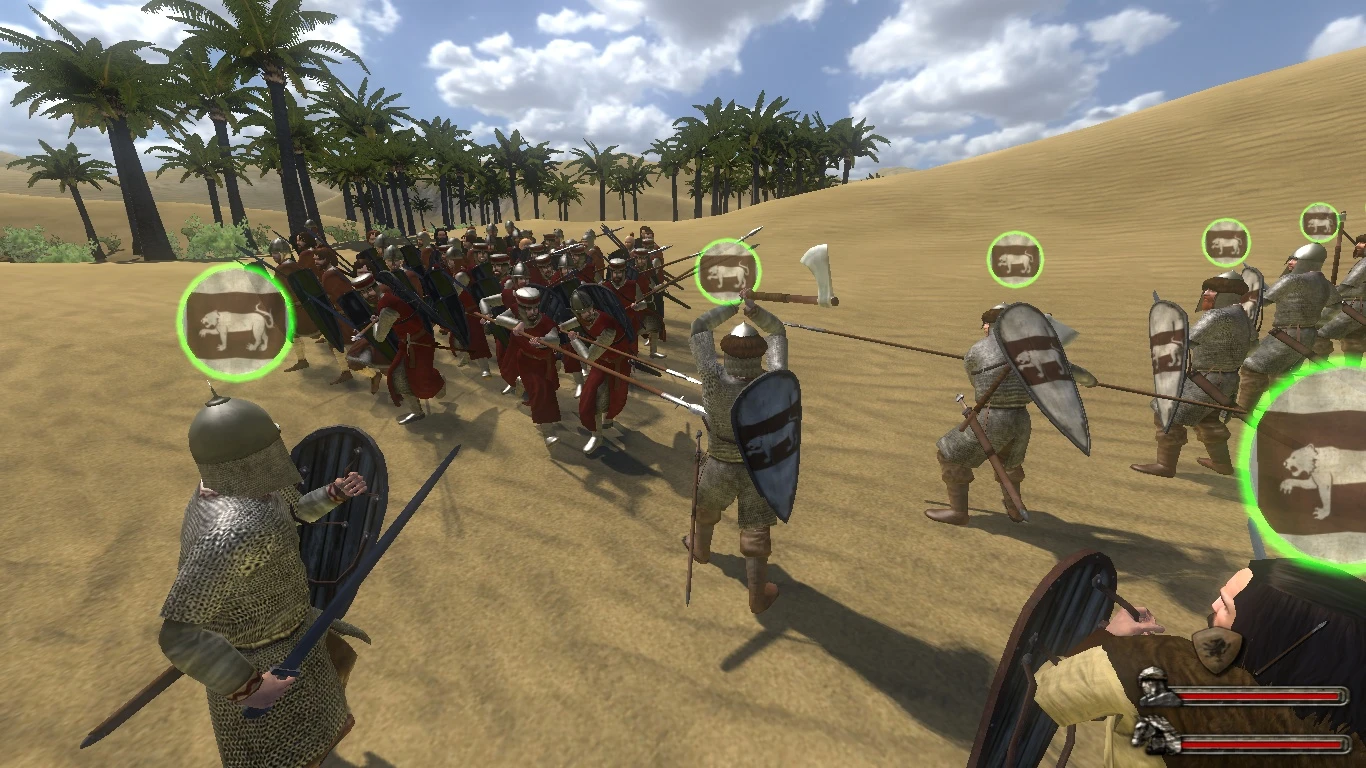
🔍 Analysis
- 👍 3.8% endorsement rate — high engagement, a strong quality signal
- 🏆 #123 of 533 Modules mods in this game by downloads
📋 About This Mod
Formations and AI Mods with Campaign AI Mod Playable compilation of three minimods by motomataru: 1. A formations mod 2. An extension mod to replace Native Battlefield AI 3. A collection of tweaks and fixes for Native Campaign AI
Formations and AI Mods with Campaign AI Mod by Motomataru Compiled for WB 1. 153 09/16/2012 This is a playable compilation of three minimods by motomataru. 1. A formations mod 2. An extension mod to replace Native Battlefield AI 3. A collection of tweaks and fixes for Native Campaign AI The Campaign AI mod restores campaign level activity and lord missions to those seen in early versions of Warband. The campaign map is much livelier. The formations mod is an extensive reworking of the original simple interface by Mirathei. At a command, infantry can form in ranks by level, ranks by shield/weapon, wedge by level, or square. Cavalry can form a wedge, and archers a staggered line. Formations follow all battlefield commands, including from the battle panel. Native AI is given the ability to make the same formations. The formations AI replaces Native AI. It makes decisions based primarily on army size rather than army composition. Each type of unit has different objectives. The intent was to make the AI smarter AND more proactive. INSTALLATION: Copy the Native mod in the Modules directory for your Warband installation. Rename the copied directory something snazzy. Copy the contents of this zip file to the new directory. To the best of my knowledge, these modules are save compatible with Native. To play your Native save games, go to your save games directory and make a copy the Native subdirectory. Rename it to whatever you named the new mod directory. QUICK PLAY GUIDE: See demo video http://www.youtube.com/watch?v=WmA-IxNASVE&feature=youtu.be For Hold and Follow commands, default division placement around the player is: infantry to the left, cavalry to the right, and archers up front. Additional infantry divisions set up further left, additional cavalry further right, and additional ranged further forward. So, for example, if you would like TWO ranged divisions and want the one with thrown weapons further forward, make sure the archers are in Division 3 and the skirmishers in a Division 4-9. Troop divisions that for whatever reason are NOT in formation will attempt to integrate with the other divisions in the \"Hold\" position. These divisions will maintain the same FACING that the player had unless the player checks the autorotate option in the Formations Options Menu under the Camp Menu. The player may override default placement through the additional F2 Menu command to memorize division(s) placement relative to the player. So if you prefer, for example, your cavalry in front and your archers behind, rearrange these divisions during a quiet battle and then press F2-F7. Just make sure to stand toward the rear when memorizing and pad your new arrangement with plenty of space, as changes in division sizes, position rotations, and map borders affect the precision of memorized placement. Player troops start every battle in Hold position around the player, utilizing either default or memorized placement and fo
📊 Mod Details
- Game
- Mb Warband Mods
- Author
- motomataru
- Version
- 1.168
- Downloads
- 2,566
- Endorsements
- 97
- Category
- Modules
- Created
- 1/5/2011
- Updated
- 2/14/2017
🔧 How to Install M&B Warband Mods
Manual install.
📖 Full step-by-step install guide for M&B Warband →
Visit the official mod page for specific installation instructions for this mod.
🎮 Need cheat codes or console commands? Check ur gaming wiki for M&B Warband commands, item IDs, and more.
Keep browsing — more M&B Warband mods await