Vector (Fly, Flight, hover, hovering, space, spaceship, thrust, Jet thrust)
⚪ Last updated 2023Preview
🔍 Analysis
- 🏆 #604 of 1877 Bot mods in this game by downloads
📋 About This Mod
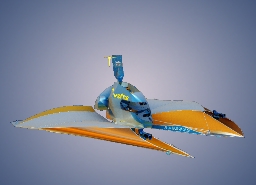
En *** Opportunities: - Swimming - Ground transport - Aircraft - Spaceship *** • " C " - Switches between "View from the cockpit" and "View from the 3rd person" • " V " - Raise or lower the Dashboard • " 0 " - Close or open the cockpit hatch • " 1 " - Turn hovers on or off • " 2 " - Power on or off the main systems • " ALT " - Change over of flight control modes: 0 - nozzle rotation by pressing the control keys 1 - nozzle rotation changes by holding the control keys, and the flight assistant tries to align the ship in accordance with the specified pitch angle 2 - Flight assistant tries to align the pitch of the ship along the horizon line • " 3 " - Enable or disable the push-pull control mode by holding the key • " SPACE " - Turn on or off the vertical thrust motors for maximum, except for the mode of the activated "3" key. When the "3" mode is activated, holding the "SPACE" key activates the main thrust motors with the specified power percentage. • " SHIFT " - Increases the thrust power of the main engines when retained. • " CTRL " - Reduces the thrust power of the main engines when retained. • " H " - Turn stabilizing motors on or off • "Nam + " - Enable or disable freeze mode. • " Z " - Turn on or off Emergency brake • " Y " - Turn on or off reverse thrust motors (brake) • " Nam - " - Turn the vacuum suction cup on or off When the suction cup is activated, the distance from the suction cup to the obstacle (lock-on target) is displayed on the pitch values screen • " LMB " (Left mouse button) - turn laser turrets on or off • " RMB " (Right mouse button) - retention for long-term laser radiation • " 5 " - Turn on or off the guidance of laser turrets on the drone (active only in the mode from the 3rd person), as well as activate the automatic emergency hover mode at critical altitude and speed • " 6 " - Turn the lighting under the ship on or off • " 7 " - Turn the warning lights on or off • " 8 " - Turn the headlights on or off • " 9 " - Turn the cockpit lighting on
En Opportunities: - Swimming - Ground transport - Aircraft - Spaceship • " C " - Switches between "View from the cockpit" and "View from the 3rd person" • " V " - Raise or lower the Dashboard • " 0 " - Close or open the cockpit hatch • " 1 " - Turn hovers on or off • " 2 " - Power on or off the main systems • " ALT " - Change over of flight control modes: 0 - nozzle rotation by pressing the control keys 1 - nozzle rotation changes by holding the control keys, and the flight assistant tries to align the ship in accordance with the specified pitch angle 2 - Flight assistant tries to align the pitch of the ship along the horizon line • " 3 " - Enable or disable the push-pull control mode by holding the key • " SPACE " - Turn on or off the vertical thrust motors for maximum, except for the mode of the activated "3" key. When the "3" mode is activated, holding the "SPACE" key activates the main thrust motors with the specified power percentage. • " SHIFT " - Increases the thrust power of the main engines when retained. • " CTRL " - Reduces the thrust power of the main engines when retained. • " H " - Turn stabilizing motors on or off • "Nam + " - Enable or disable freeze mode. • " Z " - Turn on or off Emergency brake • " Y " - Turn on or off reverse thrust motors (brake) • " Nam - " - Turn the vacuum suction cup on or off When the suction cup is activated, the distance from the suction cup to the obstacle (lock-on target) is displayed on the pitch values screen • " LMB " (Left mouse button) - turn laser turrets on or off • " RMB " (Right mouse button) - retention for long-term laser radiation • " 5 " - Turn on or off the guidance of laser turrets on the drone (active only in the mode from the 3rd person), as well as activate the automatic emergency hover mode at critical altitude and speed • " 6 " - Turn the lighting under the ship on or off • " 7 " - Turn the warning lights on or off • " 8 " - Turn the headlights on or off • " 9 " - Turn the cockpit lighting on
📊 Mod Details
- Game
- Main Assembly Mods
- Author
- 76561198951511337
- Version
- N/A
- Downloads
- 129
- Endorsements
- 0
- Category
- Bot
- Created
- 1/10/2023
- Updated
- 1/10/2023
🔧 How to Install Main Assembly Mods
Subscribe on Steam Workshop. Mods auto-download and install. Launch the game to activate.
📖 Full step-by-step install guide for Main Assembly →
Visit the official mod page for specific installation instructions for this mod.
🎮 Need cheat codes or console commands? Check ur gaming wiki for Main Assembly commands, item IDs, and more.
Keep browsing — more Main Assembly mods await