EZ Auto Backup with Steam Game Pass save file converter and in game Cheat Menu
🟢 Updated this monthThis mod was updated after the recent game update — it should work on the current version. (Update Notes Version 1.13.1.0)
Preview
🔍 Analysis
- 👍 1.8% endorsement rate — high engagement, a strong quality signal
- ✅ Updated 30 days after the latest game patch — actively maintained
- 🏆 #1 of 13 Utilities mods in this game by downloads
📋 About This Mod
EZ Auto Backup is an universal save file backup managing tool and was originally made for Elden Ring with autohotkey.
It can create backups of the save file each time the game saves or with an intervall. This is very usefull for the souls genre after you died, just return to the title screen and restore one of the last save backup. You can also just manually create backups before a boss fights or your favorite game sections to restore them any time. This will also help to prevent currupted save files which may happens, so you don't lose all your playing hours.
See it as an easy mode for the souls like genre with a lesser rage factor ;)
Visit my Discord for more info.
If you like this mod i would appreciate an endorse or you can also support me through PayPal or Patreon where you also get access to early access and beta versions.
This is the new main mod page for EZ Auto Backup
IMPORTANT for Game Pass:
It looks like you cannot restore a backup since the game always syncs with the cloud, and even turning off the internet or playing offline is reported to not working! if someone can confirm this or has a solution feel free to post it in the comments section.
Notes
-
[]Before restoring a backup, depending on the game you have to either return to the title screen or exit the game first![/]
[]Quick backup will always overwrite the "Quickbackup" file in the backup folder, to create seperate backups use a custom hotkey for manual backup instead.[/]
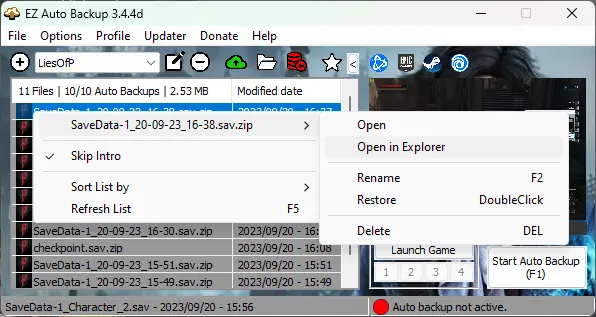
[]Auto backups will be created after the max amount is reached, then the oldest will be replaced. If you want to create permanent backups then either rename the auto backup file in the list, or use the "Manual backup" function (F3 by default). They are named after the current used profile. [/]
[]You can use your own notification sounds by replacing the existing ones in the ERAB folder.[/]
[]Screenshots may be inaccurate, but it should help to manage your the backup files.[/]
[]When you see a status overlay in the middle of the screen then press ctrl+alt+m for repositioning. To disable it go to "Settings > EZAB Settings > Misc > Use EZAB status overlay"[/]
[]Which backup method to choose?[/]
-
[]For games which saves often you can just use the auto backup either with ot without the "Instant" option with an interval timer.[/]
[]Otherwise the "instant" with an interval of 0 is highly recommended. That means a backup will isntantly created with each in game auto saves.[/]
Installation
-
[]Unpack EZAB[/]
[]Start ERAB.exe, when launched for the first time, EZAB will ask you to create a new profile.[/]
[]Select Lies of P from the local game list.[/]
[]Click "Create Profile" and choose the required save file and backup folders[/]
[]Enter a name for your profile to finish the profile creation process.[/]
[]Go to settings if you want to change the auto backup method or change some options. Auto backup every x min is the default method, you can also choose "Instant" where an backup is created directly after the game auto saves if the intervall is set to 0, otherwise it will only instantly save after the timer has expired.[/]
[]Start the game of your profile in order to use any backup functions. You can also only use the hotkeys for manually backups, or macro functions without starting auto backup.[/]
Added a Cheat menu in 3. 4. 5g
-When enabled, you will be redirected to the dxgi forum, where you can download it in order to use the in game cheat menu. (All credits to SunBeam)
-It enables the in game console, where you can add the ItemID from the list.
-In the Video below you can also see what to consider in the Game Pass version before loading a backup, make sure th
-
[]Unpack EZAB[/]
EZ Auto Backup is a utility for Souls-like games and others that automatically backs up saves with customizable hotkeys. It includes a save file converter for Steam Game Pass, an in-game cheat menu, and a mods manager. Useful for games without manual saves or corrupted save recovery. 215 endorsements, 11,989 downloads, updated 2025-10-06.
✨ Key Features
📊 Pros & Cons
✅ Pros
- Community-approved with 215 endorsements and nearly 12k downloads.
- Actively maintained — last updated October 2025.
- All-in-one tool: backup, save conversion, cheat menu, and mod management.
⚠️ Cons
- Cheat menu included — use with caution in online modes to avoid bans.
- No explicit compatibility list for specific game versions beyond 'souls genre and other games'.
For Soulsborne and action RPG players who want automatic save backups without manual effort, especially if you've lost progress to corrupted saves. Also useful for Game Pass players who need to convert save files. Skip if you only need a simple backup tool — this includes extras like cheat menu and mod manager that you might not use.
💡 Beginner Tips
- Run the tool as administrator to ensure it can access save files in protected system folders.
- Bind backup to an out-of-the-way key (like F8 or a controller combo) to avoid accidental triggers during combat.
- If converting Game Pass saves, back up both original and converted files before overwriting anything.
📊 Mod Details
- Game
- Liesofp Mods
- Author
- ai8772
- Version
- 3.6.2b-LE
- Downloads
- 12,270
- Endorsements
- 218
- Category
- Utilities
- Created
- 9/20/2023
- Updated
- 9/4/2026
🔧 How to Install Lies of P Mods
Download from Nexus Mods.
📖 Full step-by-step install guide for Lies of P →
Visit the official mod page for specific installation instructions for this mod.
🎮 Need cheat codes or console commands? Check ur gaming wiki for Lies of P commands, item IDs, and more.
Keep browsing — more Lies of P mods await