Helpful? Reference and Template
⚪ Last updated 2020Preview
🔍 Analysis
- 🏆 #1240 of 1804 banner mods in this game by downloads
📋 About This Mod
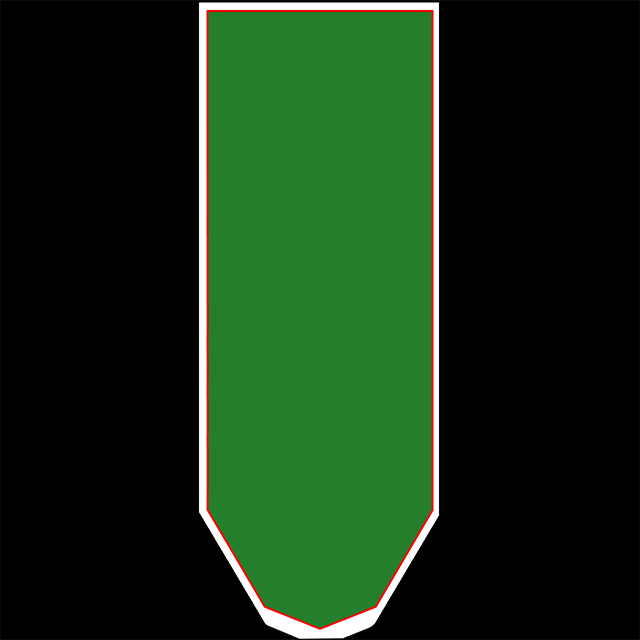
If you'd like to make your own banners, this should help (and maybe save you from entering the game repeatedly to check your work). The reference banner included in the appdata\locallow\Lionshield\Kingdoms and Castles\custombanners directory is a bit misleading as not all of the white section is treated the same by the game. I've colour-coded this banner to show this. The outer portion of the default reference banner is not displayed at all. (white here) Pixels in the thin red band are stretched to cover the side of the banner geometry in the game (weird!) (see above images) Only the green section will display on the face of the in-game banners. So to sum up... in the green thou shalt putteth thy images, in the red thou shalt not putteth thy images except in creating borders. Thou shalt not putteth thy pixels in the white, and black is right out! I wish I'd made this first rather than relying on overly thick borders :P This image is 640x640. I've included a larger and smaller version in the images section above. The game seems to display any banner images as long as they're proportional. (and treats the shown sections of the banner the same regardless of resolution).
📊 Mod Details
- Game
- Kingdoms And Castles Mods
- Author
- 76561198044672750
- Version
- N/A
- Downloads
- 38
- Endorsements
- 0
- Category
- banner
- Created
- 8/22/2020
- Updated
- 8/22/2020
🔧 How to Install Kingdoms and Castles Mods
Subscribe on Steam Workshop. Mods auto-download and install. Launch the game to activate.
📖 Full step-by-step install guide for Kingdoms and Castles →
Visit the official mod page for specific installation instructions for this mod.
🎮 Need cheat codes or console commands? Check ur gaming wiki for Kingdoms and Castles commands, item IDs, and more.
Keep browsing — more Kingdoms and Castles mods await