Loot Info - Container is empty or I already opened-looted it
🟡 Updated this yearPreview
🔍 Analysis
- 👍 1.0% endorsement rate — high engagement, a strong quality signal
- 🏆 #6 of 273 User Interface mods in this game by downloads
📋 About This Mod
Loot Info - It's empty? Or have I already opened/looted?
by JC Denton (PaulDenton on Nexus)
Version : 1. 4. 1
Date : 2025/11/18
Category : User Interface
Description
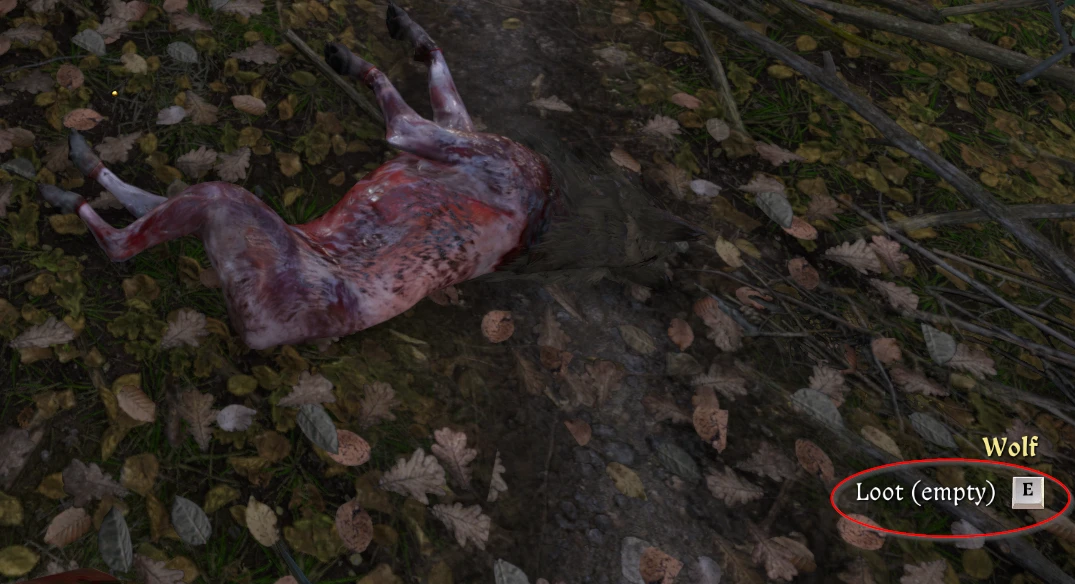
Displays beside the "Loot/Open/Steal" interaction button whether the content is empty, already been opened or looted.
Features
- Shows (empty) on the "loot/open/steal" button when the content is empty.
- Shows (searched) on the "loot/open/steal" button when the content already been looted, but not empty.
- Shows Icon "«»" beside of Loot/Open/Steal/Rob Text, if container contains Quest items
(optional -> in game configurable):
View image
Chinese (Simplified + Traditional)
Czech
English
French
German
Italian
Korean
Polish
Portuguese
Russian
Spanish
Turkish
Ukrainian
Notes:
-
[]Already opened chests etc. (before this mod installed)
are not displayed as "searched" after installation.
You have to open it again, then the condition will be displayed correctly.
[
]Henry's chest will NOT searched for Quest Item, causefor performance (FPS drops, if there are a lot of items in the chest).
[]See also the Steam Workshop Version of my Mod.
Mod Dependencies
Kindom Come: Deliverance 2 of course ;-) at least Version 1. 5.
The mod won't start on older versions of the game.
Install with Vortex Mod Manger (VMM)
It's recommended to use with hard link deployment for installation.
The mod has bee
This UI mod for Skyrim displays a message next to the Loot/Open/Steal interaction button indicating whether a container is empty or has already been opened/looted. It helps players avoid wasting time checking containers they've already cleared. With 719 endorsements and frequent updates, it's a popular quality-of-life tool for loot-focused players.
✨ Key Features
📊 Pros & Cons
✅ Pros
- Community-approved with 719 endorsements and nearly 70k downloads.
- Saves time by preventing repeated looting of empty containers.
- Simple, non-intrusive UI addition that doesn't alter gameplay.
⚠️ Cons
- Only affects containers—doesn't help with other loot sources like corpses or harvestable plants.
For Skyrim players who hate wasting time opening containers they've already cleared. Perfect for loot hoarders and completionists who want to streamline their dungeon runs. Skip if you prefer a more immersive UI or don't mind checking every container manually.
💡 Beginner Tips
- Use a mod manager like Vortex or Mod Organizer 2 to install and manage this mod easily.
- If you're playing Skyrim Special Edition, make sure to download the correct version for your game.
- Test the mod in a new game or after loading a save to ensure the UI text appears correctly.
📊 Mod Details
- Game
- Kingdomcomedeliverance2 Mods
- Author
- PaulDenton
- Version
- 1.4.1
- Downloads
- 69,973
- Endorsements
- 719
- Category
- User Interface
- Created
- 3/4/2025
- Updated
- 11/18/2025
🔧 How to Install Kingdom Come: Deliverance Mods
Download from Nexus Mods.
📖 Full step-by-step install guide for Kingdom Come: Deliverance →
Visit the official mod page for specific installation instructions for this mod.
🎮 Need cheat codes or console commands? Check ur gaming wiki for Kingdom Come: Deliverance commands, item IDs, and more.
Keep browsing — more Kingdom Come: Deliverance mods await