No Compass No Reticle and No Healthbar (optional)
🟡 Updated this yearPreview
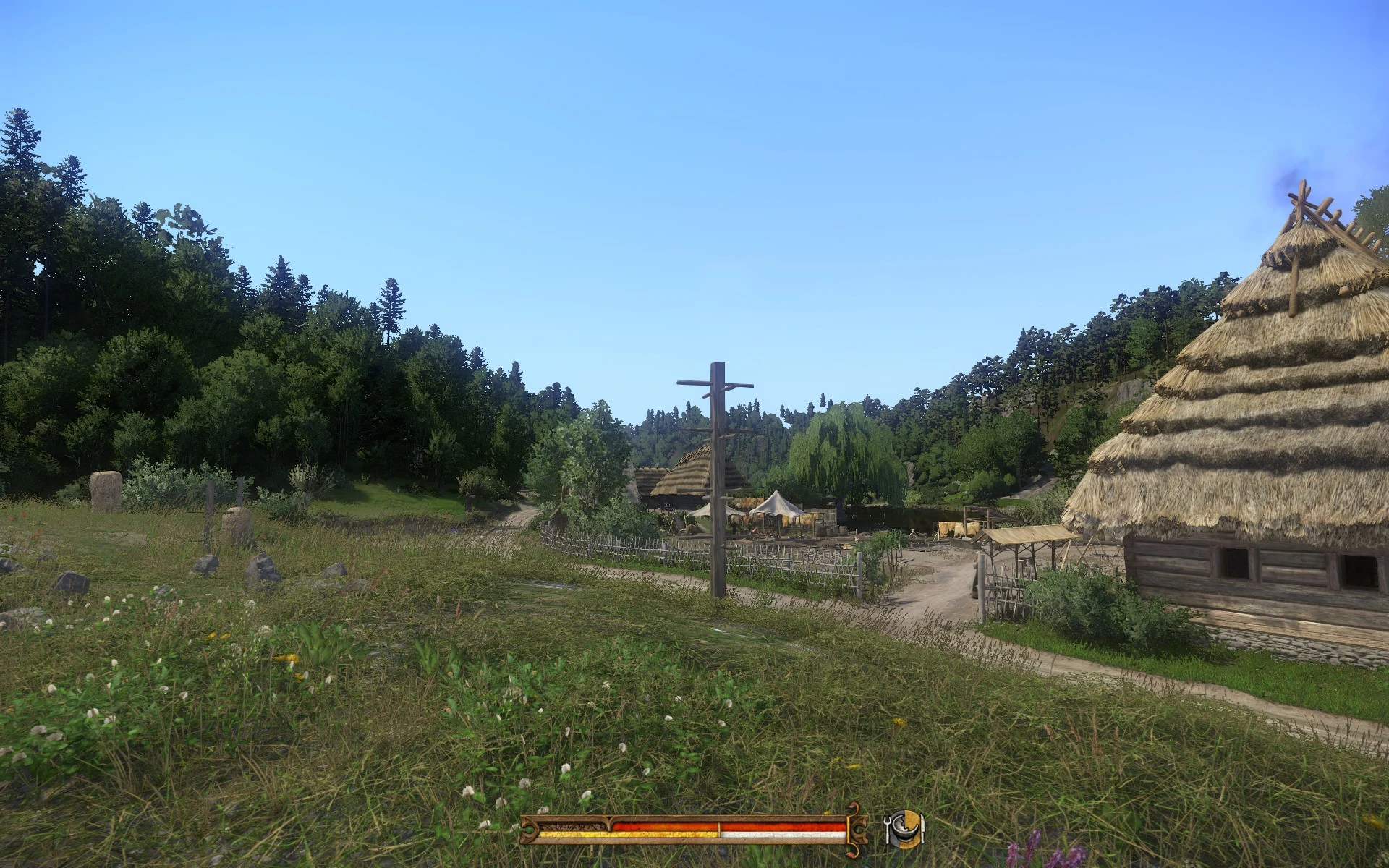
🔍 Analysis
- 👍 2.2% endorsement rate — high engagement, a strong quality signal
- 🏆 #20 of 44 User Interface mods in this game by downloads
📋 About This Mod
What it does
This mod removes your compass and as many other HUD elements as you like.
Main package "NoCompassAndCrosshair"
This one removes the compass and its quest markers/GPS, without touching hud.gfx file. It also Removes your reticle, makes your combat crosshair transparent, hides your block indicator and removes the enemy healthbar.
(Optional) Package "NoCompassAndCrosshair T extures"
This one brings different HUD files/versions you can choose from. After you've installed this package, you need to open its installation folder and read the Read Me file to activate your favourite HUD layout. A brief overview of what this package brings:
-
[]Vanilla HUD layout (if you really want to remove the compass only) or
[
]Inconspicuous reticle and transparent combat crosshair or[]No reticle and transparent combat crosshair or
[]No healthbar, no reticle, no combat crosshair, no block indicator, no nothing
[]and many more...
(Optional) Package "NoCompassAndCrosshair Addons"
This one contains 3 addons I like. Each one can run alone but is included in one addon download. Delete the individual addons you don't like. This download consists of:
-
[]z__Addon__NoCrimeAndTrespassingIcon.pak: This will remove your combat, trespassing and wanted indicators that are shown next to your compass.
[]z__Addon__NoBuffs_Vanilla_Version.pak: Hides your buffs/debuffs from the first-person view, except for the bleeding indicator. Your buffs and debuffs are still listed in your inventory so that you can check them there. ("Vanilla_Version" because I once wanted to support another mod with this addon, which, in the end, never happened. So, ignore this term.)
[]z__Addon__NoPerkUsageAnnouncement.pak: Removes this huge perk announcement which pops up when activating a perk.
Installation
-
[]Unzip
[
]Paste the folder "NoCompassAndCrosshair" in your "Mods" folder (e.g. C:\Program Files (x86)\SteamLibrary\steamapps\common\KingdomComeDeliverance\Mods).[]The mod's default installation will hide your compass and reticle and your opponents healthbar and makes your combat crosshair transparent, but does not remove your healthbar. If you want a different layout, read step 6.
[]Installing optional packages: Handle them as if they were individual mods. You don't need to merge them with the main package or something. However, they must be loaded after the main package (as long as you don't rename anything, the load order will be fine automatically).
[]Installing textures: If you want a different HUD layout (e.g. with a reticle or without anything), you'll need to download the texture package. This brings a number of texture maps with different layouts (these are all the very same file, but the respective elements are removed or still there, depending on your favourite). Read the text file that comes with it to see which file does what (maximise your text editor window to see the table properly). Once you found your favourite, you need to make sure that your favourite is being loaded at last. Ensure this by either renaming your favourite in "zzz_myFavorite.pak" or by (carefully) removing all the other texture map files.
Advanced Mod Adjustments:
I made this mod so that any change has its own .pak file. So, if you don't like a particular change, simply delete the respective .pak file(s) and enjoy what you were here for. I also added comments (quick and dirty) next to my changes so that you can easily identify what I did and merge them with other mods you like (or even to make your own mod). The sky shall be your limit!
Compatibility
[]This mod is not compatible with mods that are changing your UI's style (different colour, cursor/reticle changes, etc.).
[]This mod changes one language file and HUD.xml. Hence, this mod may be incompatible with mods that changing in-game text and other HUD mods.
[](Addon) Hiding Buffs: This touches the buff.xml file and by that, it's not compatible with mods that change this file, too. Perk and buff mods are probably incompatible with this addon.
[](Addon) No trespassing/wanted/combat i
-
[]Unzip
-
[]z__Addon__NoCrimeAndTrespassingIcon.pak: This will remove your combat, trespassing and wanted indicators that are shown next to your compass.
This UI mod removes the compass, reticle, and other HUD elements in 7 Days to Die. It offers multiple packages for customizing HUD layouts, including optional addons to hide crime icons, buffs, and perk announcements. With 327 endorsements and recent updates, it's a popular choice for immersive gameplay.
✨ Key Features
📊 Pros & Cons
✅ Pros
- Community favorite with 327 endorsements and over 15k downloads
- Flexible modular design lets you pick exactly which HUD elements to remove
- Actively maintained (last updated May 2026)
⚠️ Cons
- Optional texture package requires manual file selection and reading a Read Me file to activate
- Addons are bundled together, so you must delete unwanted ones manually
- No explicit compatibility notes for other UI mods or game versions
For 7 Days to Die players who want a more immersive, HUD-free experience without losing essential info. Great for streamers or those who prefer minimal UI. Skip if you rely heavily on the compass or healthbar for situational awareness.
💡 Beginner Tips
- If you only want the compass gone, install the main package and skip the optional texture package to avoid extra configuration.
- When using the texture package, open the installation folder and read the Read Me file to choose your preferred HUD layout.
- The addons are separate .pak files—delete the ones you don't want before placing them in your mods folder.
📊 Mod Details
- Game
- Kingdom Come Mods
- Author
- Nic0h
- Version
- 1.7.20
- Downloads
- 15,085
- Endorsements
- 327
- Category
- User Interface
- Created
- 3/13/2018
- Updated
- 5/26/2026
🔧 How to Install Kingdom Come Mods
Create /Mods/ folder in Data directory. Use Vortex for complex mods.
📖 Full step-by-step install guide for Kingdom Come →
Visit the official mod page for specific installation instructions for this mod.
🎮 Need cheat codes or console commands? Check ur gaming wiki for Kingdom Come commands, item IDs, and more.
Keep browsing — more Kingdom Come mods await