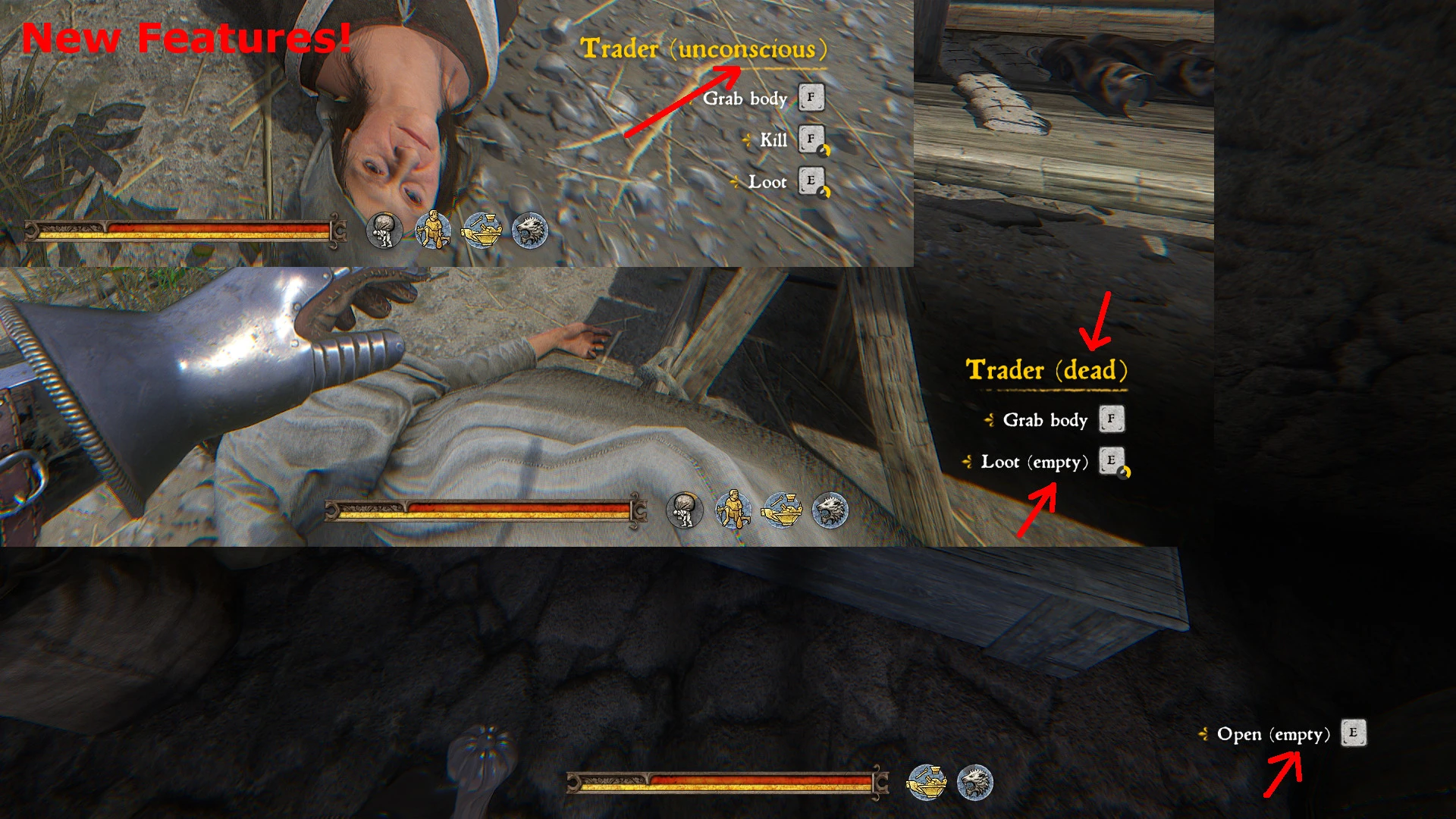
Loot Info - Container is empty or I already opened-looted it
⚪ Last updated 2020Preview
🔍 Analysis
- 👍 4.5% endorsement rate — high engagement, a strong quality signal
- 🏆 #14 of 44 User Interface mods in this game by downloads
📋 About This Mod
Loot Info - It's empty? Or have I already opened/looted?
by JC Denton (PaulDenton on Nexus)
Version : 1. 8. 0
Date : 2020/02/22
Category : User Interface
Description
Displays in the Loot/Open/Steal button whether the content is empty or has already been opened.
This mod has the localizations:
English/French/Spanish/Italian/Polish/Czech/Chineses/Russian and German.
Already opened chests etc. (before this mod installed)
are not displayed as "searched" after installation.
You have to open it again, then the condition will be displayed correctly.
---------------------------------------------------------------------------------------------------
Zeigt beim Plündern/Öffnen/Stehlen-Button an, ob der Inhalt leer ist oder ob schon geöffnet wurde.
Diese Mod hat die Lokalisationen:
Englisch/Französisch/Spanisch/Italienisch/Polnisch/Tschechisch/Chinesisch/Russisch und Deutsch.
Bereits geöffnete Truhen etc. (vor der Installation dieser Mod)
werden nach Installation erstmal nicht als "durchsucht" angezeigt.
Du musst diese nochmal öffnen, dann wird der Zustand korrekt angezeigt.
Other FEATURES
Can display "(dead)" or "(unconscious)" on the npc name.
---------------------------------------------------------------------------------------------------
Anzeige "(tot)" oder "(bewußtlos)" im NPC-Namen.
Mod Dependencies
Kindom Come: Deliverance of course ;-) at least Version 1. 8. 1
CLAM
(Only necessary if you have installed a mod that is in the incompatibility list.)
Manual install
Open the JCD_LootInfo-... zip, and extract all the content into your Mod folder
(e.g. Steam\steamapps\common\KingdomComeDeliverance\Mods\)
If the mods folder is not exist, then create it.
Now the folder "steamapps\common\KingdomComeDeliverance\Mods\" should contain
the folder "JCD_LootInfo".
--------------------------------------------------------------------------------------------------------------------------------------------------------
Öffne die JCD_LootInfo-...zip, und entpacke den kompletten Inhalt in deinen Mod-Ordner
(Steam\steamapps\common\KingdomComeDeliverance\Mods\).
Ist der Mods-Ordner nicht da, dann erstelle ihn neu.
Nun sollte sich in dem Ordner "steamapps\common\KingdomComeDeliverance\Mods\"
der Ordner "JCD_LootInfo" befinden.
IMPORTANT!:
If you use CLAM together with my mod (Version < 1. 2. 0), then please also check CLAM for updates!
Manual uninstall
Delete the unpacked folder "JCD_LootInfo".
----------------------------------------------------------------
Lösche den entpackten Ordner "JCD_LootInfo".
Incompatibilities
Perkaholic and Perkaholic - German or other translations.
Perkaholic new patch compatible
Please download and install CLAM if you use my Mod together with one of these mods.
For all other Mods which change the following scripts:
Under \Data\Scripts\Entities\WH\Stash:
AnimStash.lua
StashCorpse.lua
Under \Data\Scripts\Entities\AI:
DeerDoe_x.lua
Horse_x.lua
NPC_Female_x.lua
RedDeer_x.lua
RoeBuck_x.lua
Sheep_x.lua
Under \Data\Scripts\Entities\AI\Shared:
BasicAIActions.lua
Under \Data\Libs\Localization:
localization.xml
If this file conflicts with another mod, w
Loot Info is a UI mod for Kingdom Come: Deliverance that shows whether a container is empty or already looted directly on the Loot/Open/Steal button. It also displays '(dead)' or '(unconscious)' on NPC names. Supports multiple languages and requires game version 1.8.1 or later.
✨ Key Features
📊 Pros & Cons
✅ Pros
- Community favorite with 959 endorsements and over 21k downloads — clearly fills a need.
- Saves time by preventing you from clicking every container twice.
- Multi-language support means it works for a wide audience.
⚠️ Cons
- Last updated in 2020 — may not be compatible with the latest game patches.
- Already-opened containers before installation won't show as searched until you open them again.
- Requires game version 1.8.1 or later, so older versions won't work.
For Kingdom Come: Deliverance players who hate wasting time looting empty containers. Also useful for those who want to quickly see if an NPC is dead or unconscious. Skip if you're on an older game version or don't mind the vanilla UI.
💡 Beginner Tips
- Extract the mod files directly into your Mods folder (e.g., Steam\steamapps\common\KingdomComeDeliverance\Mods\).
- If the Mods folder doesn't exist, create it manually.
- After installing, open any previously looted container once to update its status.
📊 Mod Details
- Game
- Kingdom Come Mods
- Author
- PaulDenton
- Version
- 1.8.0
- Downloads
- 21,152
- Endorsements
- 959
- Category
- User Interface
- Created
- 3/25/2018
- Updated
- 2/21/2020
🔧 How to Install Kingdom Come Mods
Create /Mods/ folder in Data directory. Use Vortex for complex mods.
📖 Full step-by-step install guide for Kingdom Come →
Visit the official mod page for specific installation instructions for this mod.
🎮 Need cheat codes or console commands? Check ur gaming wiki for Kingdom Come commands, item IDs, and more.
Keep browsing — more Kingdom Come mods await