Photorealistic Reshade
⚪ Last updated 2020⚠️ Install Order · 1 step
Install in this order, then this mod last — most mods fail to load without their framework and dependencies in place.
Preview
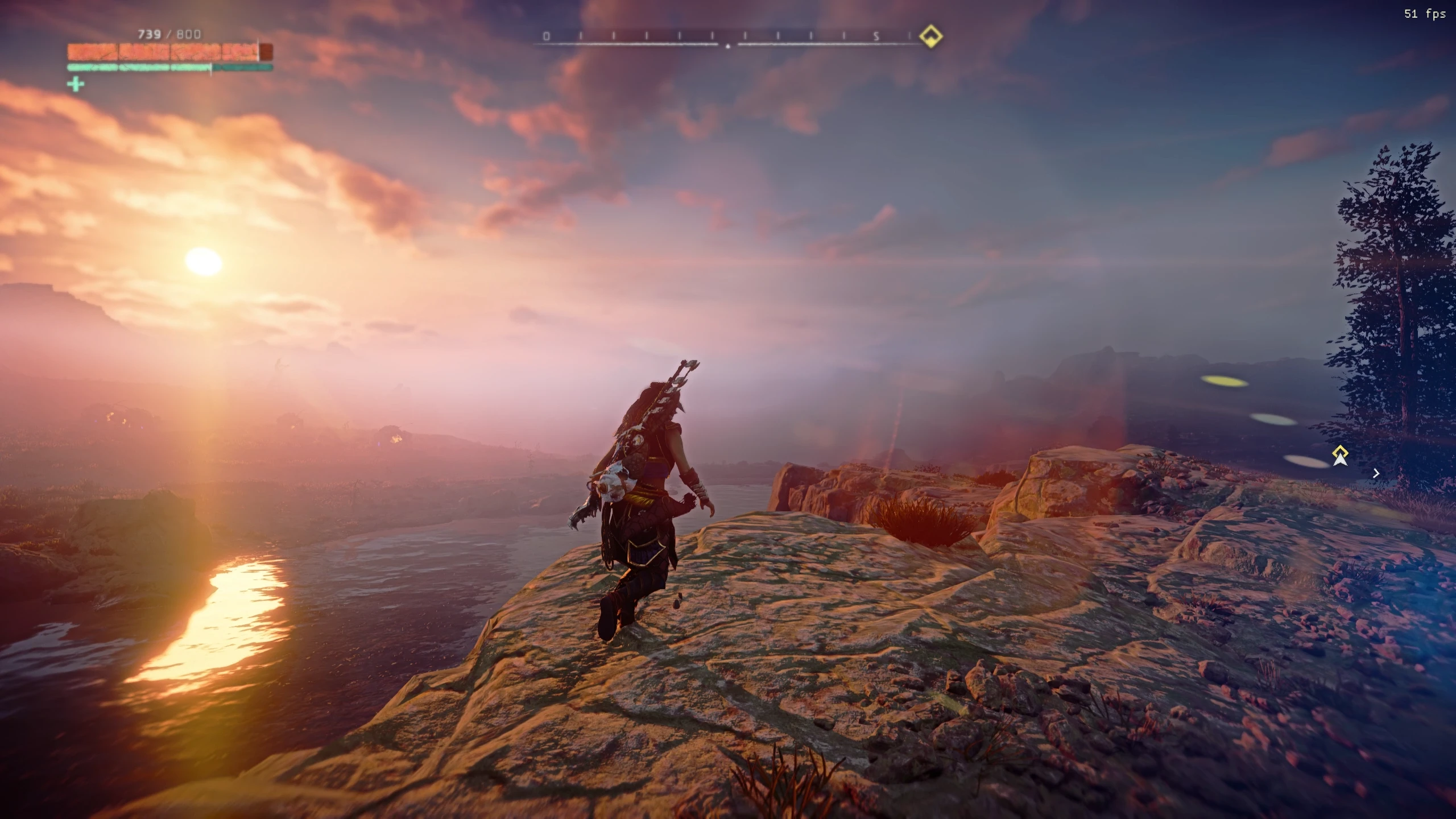
🔍 Analysis
- 👍 4.9% endorsement rate — high engagement, a strong quality signal
- 🏆 #19 of 120 Visuals and Graphics mods in this game by downloads
📋 About This Mod
PLEASE: Don't forget to return here and ENDORSE ! If you downloaded and like my preset.
Horizon Zero Dawn Photorealistic Reshade
tonemapping
and removes blur.
No overkill preset,
just enhance the already great graphic!
3hWxS0bWopY
How to reshade installation video:
u64ljsMG9Vc
--------------------------------------------------------------------------------------------------------------------------------------------------------------------------------------------------------------------------------------------
Follow my Youtube Channel
used shader:
Quint_Clarity, (paid shader)
DELC_Sharpen,
my other presets:
Installation
1. Download Reshade
2. Extract to a location
3. Install it into your HZD folder where the Horizonzerodawn.exe is
4. Download Photorealistic Reshade and put the .ini into the same HZD folder
5. activate it ingame with home(pos1) and select Photorealistic.ini
Credits
Guerilla Games for the game
crosire for Reshade
Photorealistic Reshade is a visual enhancement preset for Skyrim that improves colors, shadows, and tonemapping while removing the default blur. It offers a subtle, non-overkill enhancement for players who want better graphics without heavy post-processing. With 952 endorsements and 19,272 downloads, it's a popular choice for those seeking a more natural look.
✨ Key Features
📊 Pros & Cons
✅ Pros
- Community favorite with 952 endorsements and nearly 20k downloads
- Subtle enhancement that keeps the game's original aesthetic intact
- Simple install—just drop the files and go
⚠️ Cons
- Last updated in 2020, so it may not be compatible with the latest Skyrim patches or Reshade versions
- No screenshots or detailed installation instructions provided by the author
- Requires Reshade, which isn't included—you'll need to grab it separately
For Skyrim players who want a quick visual boost without overhauling the game's look. If you're tired of the default blur and want richer colors and shadows, this is a solid pick. Skip if you're looking for a dramatic reshade or if you prefer presets with extensive customization options.
💡 Beginner Tips
- Make sure you have Reshade installed first, then drop the preset files into your Skyrim directory.
- If the preset doesn't show up in-game, check that the file names match your Reshade version.
- Try toggling the preset on and off with the Reshade hotkey to see the difference before committing.
📊 Mod Details
- Game
- Horizonzerodawn Mods
- Author
- Digital Dreams
- Version
- 1.0
- Downloads
- 19,272
- Endorsements
- 952
- Category
- Visuals and Graphics
- Created
- 8/19/2020
- Updated
- 8/19/2020
🔧 How to Install Horizon Zero Dawn Mods
Download from Nexus Mods.
📖 Full step-by-step install guide for Horizon Zero Dawn →
Visit the official mod page for specific installation instructions for this mod.
🎮 Need cheat codes or console commands? Check ur gaming wiki for Horizon Zero Dawn commands, item IDs, and more.
Keep browsing — more Horizon Zero Dawn mods await