HZD - Cinematic Vision Reshade
⚪ Last updated 2020⚠️ Install Order · 1 step
Install in this order, then this mod last — most mods fail to load without their framework and dependencies in place.
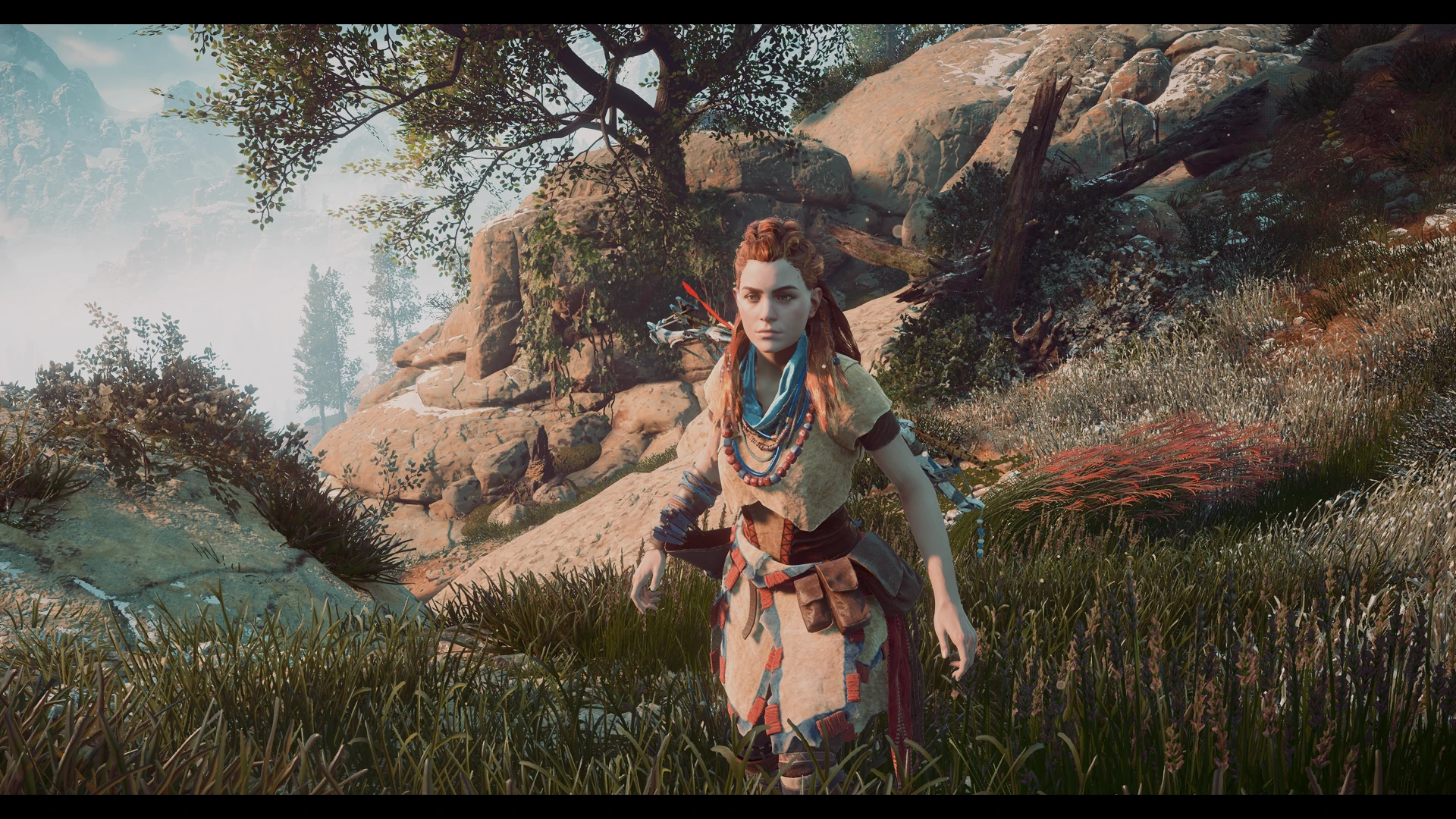
Preview
🔍 Analysis
- 👍 7.0% endorsement rate — high engagement, a strong quality signal
- 🏆 #94 of 120 Visuals and Graphics mods in this game by downloads
📋 About This Mod
PLEASE: If you downloaded and liked my preset, don't forget to return here and click on "ENDORSE"! That's my only request to you! I've spent time and work with it, so endorsing my mod you will be helping me and I will appreciate it so much. Thank you all!!
ALSO CHECK MY OTHER WORKS
PhoenixVivid ENB-Reshade for Skyrim SE
Phoenix Cinematic ENB-Reshade for Fallout 4
Phoenix Enhancer Reshade for The Elder Scrolls Online
Phoenix Luminance ENB for Dragon's Dogma DA
Drangleic Enhanced Reshade for Dark Souls II
Phoenix Undead Reshade for Dark Souls III
Imaginarium ENB for Skyrim SE
Insanity ENB for Skyrim LE
NCW ENB for Fallout 4
HZD - Cinematic Visual is a Reshade preset which offer two graphics profiles for Horizon Zero Dawn game that can be changed ingame anytime you want:
- CINEMATIC: Visual simulation of some filmic filters, giving a more vintage look. Its enabled by default;
- ENHANCED: Improved vanilla graphics with a custom colors and sharpness adjustment.
The performance impact is about 3 -7 FPS, depending on your PC specs. Reshade resources used: AmbientLight, Border, Colourfulness, Curves, FilmicPass, LumaSharpen, Technicolor2, Tonemap and Vibrance.
L-xxlVITVQI
Subscribe to my YouTube Channel
Follow me on Flickr
- REQUIREMENTS
ONLY for NVIDIA users: If you are using HDMI conection, Its VERY IMPORTANT to set your Dynamic Range in full, in the graphics card control panel (see this image). For AMD Users: open AMD control panel, click on Gaming tab > Games >Global Graphics > Display > Pixel Format and set to: RGB 4:4:4 Pixel Format PC Standard (Full RGB).
- INSTALLATION STEPS
1- Download the latest Reshade version from https://reshade.me/ ;
2- Run the executable to install the Reshade ----> Your system will be scanned for the games installed, so select Horizon Zero Dawn (OR if it does not appear in the list browse until find the game executable .exe folder and
A Reshade preset for Horizon Zero Dawn that enhances the game's visuals with a cinematic feel, ideal for both gameplay and screenshot capture. With 80 endorsements and over 1,100 downloads, it's a niche but appreciated choice for players seeking a film-like atmosphere.
✨ Key Features
📊 Pros & Cons
✅ Pros
- Gives your game that movie-like look without heavy performance hits
- Solid community backing with 80 endorsements
- Perfect for screenshot enthusiasts who want dramatic visuals
⚠️ Cons
- No screenshots or detailed previews provided by the author
- Last updated in 2020 — may not be compatible with the latest game patches
- Requires Reshade to be installed separately, which adds setup steps
For Horizon Zero Dawn players who want to elevate their visual experience with a cinematic touch, especially those who enjoy taking screenshots. If you're after gameplay changes, this isn't for you — it's purely cosmetic.
💡 Beginner Tips
- Make sure you have Reshade installed and configured for Horizon Zero Dawn before applying this preset.
- If you're using a mod manager, you can manually place the preset file in the game's root folder to avoid conflicts.
- Test the preset in different lighting conditions (day/night) to see if it suits your taste.
📊 Mod Details
- Game
- Horizonzerodawn Mods
- Author
- Phoenix
- Version
- 1.1
- Downloads
- 1,137
- Endorsements
- 80
- Category
- Visuals and Graphics
- Created
- 8/9/2020
- Updated
- 8/10/2020
🔧 How to Install Horizon Zero Dawn Mods
Download from Nexus Mods.
📖 Full step-by-step install guide for Horizon Zero Dawn →
Visit the official mod page for specific installation instructions for this mod.
🎮 Need cheat codes or console commands? Check ur gaming wiki for Horizon Zero Dawn commands, item IDs, and more.
Keep browsing — more Horizon Zero Dawn mods await