A Mild Buzz - Reshade Preset for Horizon Zero Dawn
⚪ Last updated 2023⚠️ Install Order · 1 step
Install in this order, then this mod last — most mods fail to load without their framework and dependencies in place.
Preview
🔍 Analysis
- 👍 6.5% endorsement rate — high engagement, a strong quality signal
- 🏆 #98 of 120 Visuals and Graphics mods in this game by downloads
📋 About This Mod
MILD BUZZ RESHADE PRESET FOR HORIZON ZERO DAWN
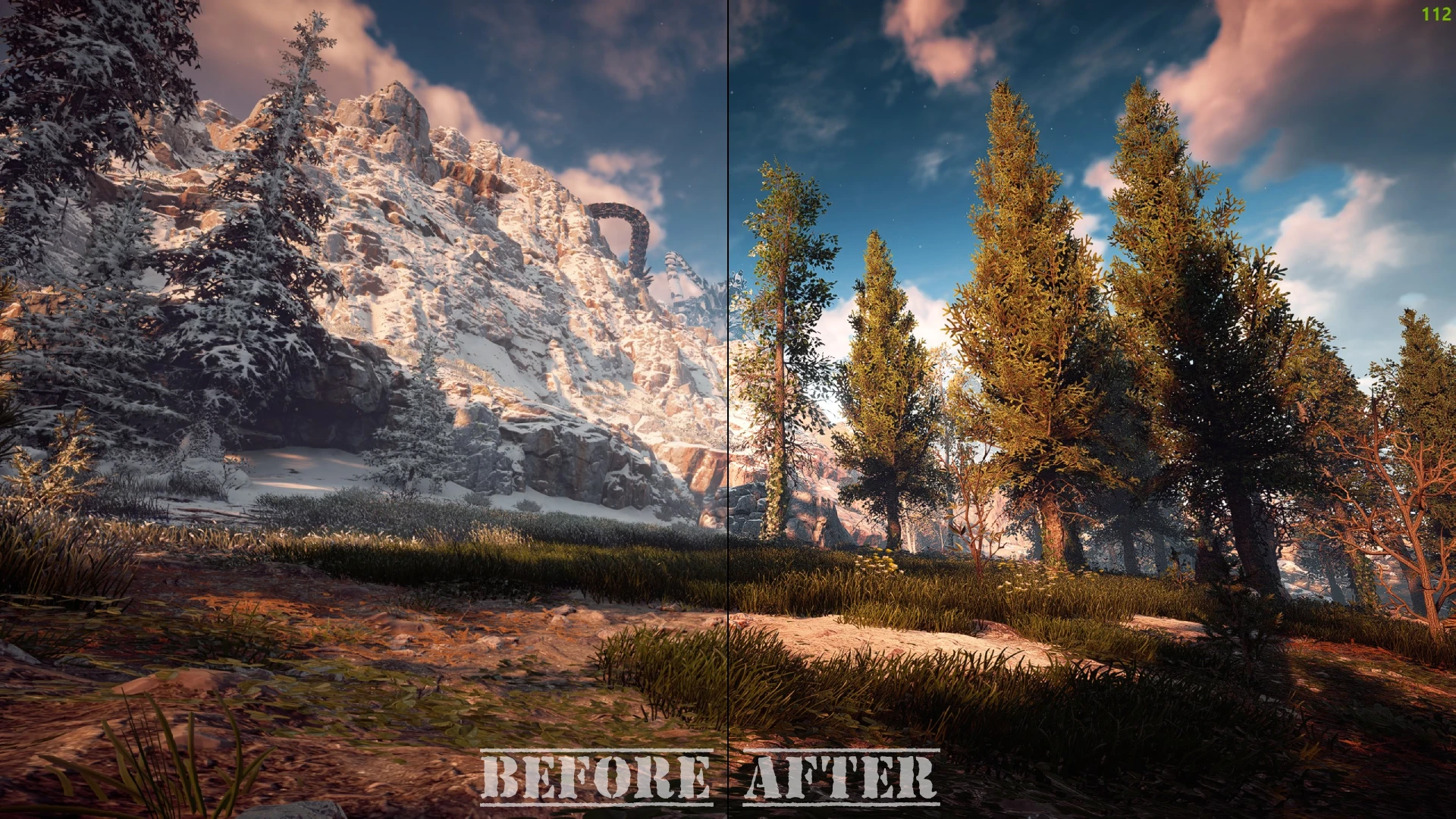
This ReShade Preset aims to sharpen up some of the textures which can be a little blurry on PC as well as to enhance the colors, shadows and tone of the game. This isn't a drastic overhaul, just a minimal boost to an overall beautiful game if you will.
Step 1 - ReShade Installation:
- Download ReShade: https://reshade.me/downloads/ReShade_Setup_5. 9. 2.exe
- Run ReShade setup, when prompted to select a game locate your Horizon Zero Dawn installation folder and select 'HorizonZeroDawn.exe' (Usually found in "C:\Program Files (x86)\Steam\steamapps\common/Horizon Zero Dawn")
- Select DirectX 10/11/12 and click 'Next'
- When prompted to select a preset click 'Skip'
- At the top right of the next screen click 'Uncheck All' then click 'Check All' to ensure you have selected all the packages to install, then click 'Next'
- Wait until all the packages have downloaded and you have successfully installed ReShade.
Step 2 - Installing 'A Mild Buzz' Preset:
- Download & unpack 'MildBuzz.zip' and place the .ini file inside your Horizon Zero Dawn installation folder, where you just installed ReShade.
- Start Horizon Zero Dawn
- If you have successfully completed all the previous steps you should see ReShade beginning to compile presets at the top of your screen. If there are any errors in this process do not worry, red text is not a problem here.
- Click the 'Home' button on your keyboard, then 'Skip Tutorial'
- At the top of the window you will see 'ReShade Preset' - click on it and locate the 'MildBuzz.ini' inside your game folder. This will enable all of the needed effects for this preset. You are finished the installation process.
Optional Step - Customizing the Preset:
- Click 'Active to top' to ensure you find the Preset we need for this step
- Select the 'prod80_02_Bonus_LUT_pack' from the list of presets.
- At the bottom of the screen the list of options relating to this preset should open up. Look for the 'LUT Selection' drop down menu.
- You can now easily cycle through 50 different options which can drastically change the preset to your liking. I personally prefer PD80 Cinematic 2, however there are 49 other options for you to choose from depending on your monitor or personal preferences.
Uninstallation:
- Run the ReShade Setup file
- Select HorizonZeroDawn.exe
- Select DirectX 10/11/12
- Select Uninstall
A minimal Reshade preset for Horizon Zero Dawn that sharpens textures and enhances colors, shadows, and tone. Includes a built-in LUT selector for personalized customization. With 70 endorsements and over 1,000 downloads, it's a niche but appreciated visual enhancement for players seeking a subtle upgrade.
✨ Key Features
📊 Pros & Cons
✅ Pros
- Lightweight and minimal—won't tank your framerate like heavy ENBs
- Built-in LUT selector gives you easy color grading options without extra tools
- Community-tested with 70 endorsements and over 1,000 downloads
⚠️ Cons
- Requires Reshade to be installed separately—no instructions included
- Only one preset, so you might want more variety if you're picky
- Last updated in December 2023—may not be compatible with future game patches
For Horizon Zero Dawn players who want a subtle visual boost without overhauling the game's look. If you're into tweaking colors and sharpness but don't want a heavy preset, this is for you. Skip if you prefer dramatic reshades or don't want to mess with Reshade setup.
💡 Beginner Tips
- Make sure you have Reshade installed and set up for Horizon Zero Dawn before adding this preset.
- Use the LUT selector in-game to cycle through different color grades and find your favorite.
- If the game updates, check the mod page for compatibility notes—Reshade presets can break with patches.
📊 Mod Details
- Game
- Horizonzerodawn Mods
- Author
- collapsedlung
- Version
- 1.0
- Downloads
- 1,072
- Endorsements
- 70
- Category
- Visuals and Graphics
- Created
- 12/23/2023
- Updated
- 12/23/2023
🔧 How to Install Horizon Zero Dawn Mods
Download from Nexus Mods.
📖 Full step-by-step install guide for Horizon Zero Dawn →
Visit the official mod page for specific installation instructions for this mod.
🎮 Need cheat codes or console commands? Check ur gaming wiki for Horizon Zero Dawn commands, item IDs, and more.
Keep browsing — more Horizon Zero Dawn mods await