Stand Up Straight
⚪ Last updated 2024Preview
🔍 Analysis
- 👍 1.9% endorsement rate — high engagement, a strong quality signal
- 🏆 #3 of 92 Miscellaneous mods in this game by downloads
📋 About This Mod
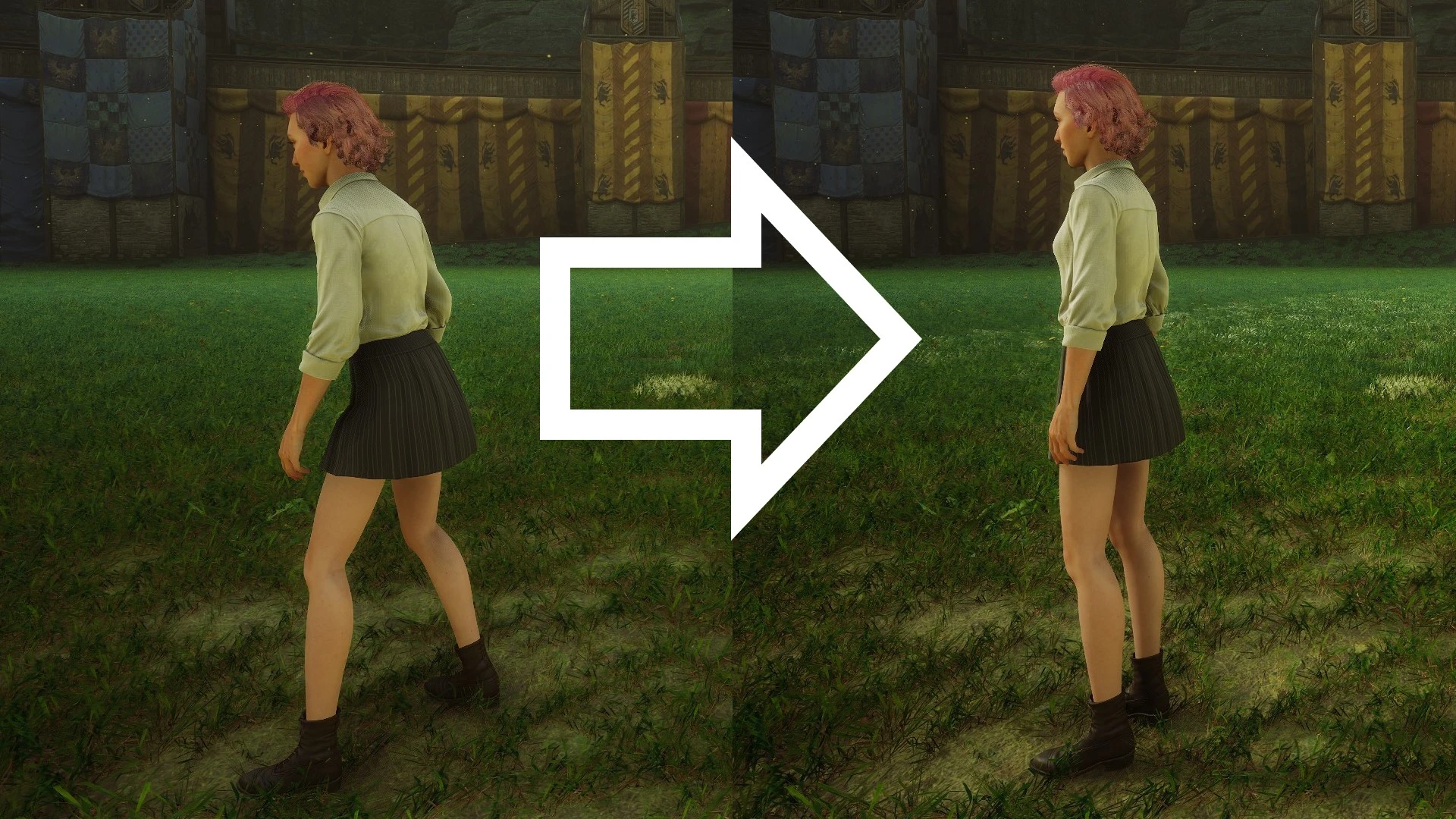
Get rid of the awful slouching hunchback look and stand up straight whenever possible.
Announcement
For those running the latest version of the game, this mod is now available via the official modding system inside the game.
Versions
See the "Changelogs" dropdown just above.
Introduction
For some reason the player-character in Hogwarts Legacy frequently adopts a weird slouching hunchback pose. This is intended to be the player's "ready for anything" pose, but it just looks awful, especially on female characters. This mod is intended to fix that by forcing the player-character to stand up straight whenever possible.
Awards
I am delighted to report that this humble mod won Mod Of The Month for November 2023! Thank you to everyone who voted. You're the best. 😁
Installation
You should be able to install the mod automatically using Vortex (then skip to step 4 below), but Vortex can be a bit unreliable with Hogwarts Legacy mods (it doesn't always delete mods properly) so I would recommend installing it manually as follows:
-
[]Download the mod.
[
]Unzip the contents.[]Move zStandUpStraight-1017_P.utoc, zStandUpStraight-1017_P.ucas, and zStandUpStraight-1017_P.pak to the Steam\steamapps\common\Hogwarts Legacy\Phoenix\Content\Paks\~mods\ folder.
[]Install Blueprint Apparate Modloader if you haven't already.
[]Start Hogwarts Legacy
[]Load your most recent save-file.
[]Press the F8 key to activate Blueprint Apparate Modloader.
[]Type StandUpStraight in the little window and hit the Enter key on your keyboard.
[]The word StandUpStraight should disappear and reappear lower down in that window with an X next to it. If it doesn't - if it stays on the top line - then either a) you put the .utoc, .ucas and .pak files in the wrong folder, or b) one of your existing mods is already using pakchunk 1017. Use my PakChunk Checker to check that. If you have a pakchunk conflict see the Conflicts section below.
[]Press F8 again to close the modloader window.
Note that you only need to follow the above process once. From now on the mod will just work.
Usage / Key Bindings
There are no key bindings. The mod should just work automatically.
How to Un-Install
📊 Mod Details
- Game
- Hogwartslegacy Mods
- Author
- icouldifiwantedto
- Version
- 2.0
- Downloads
- 113,437
- Endorsements
- 2,124
- Category
- Miscellaneous
- Created
- 11/7/2023
- Updated
- 6/24/2024
🔧 How to Install Hogwarts Legacy Mods
Download from Nexus Mods.
📖 Full step-by-step install guide for Hogwarts Legacy →
Visit the official mod page for specific installation instructions for this mod.
🎮 Need cheat codes or console commands? Check ur gaming wiki for Hogwarts Legacy commands, item IDs, and more.
Keep browsing — more Hogwarts Legacy mods await