Grim Truce Mod
🟢 Updated this monthPreview
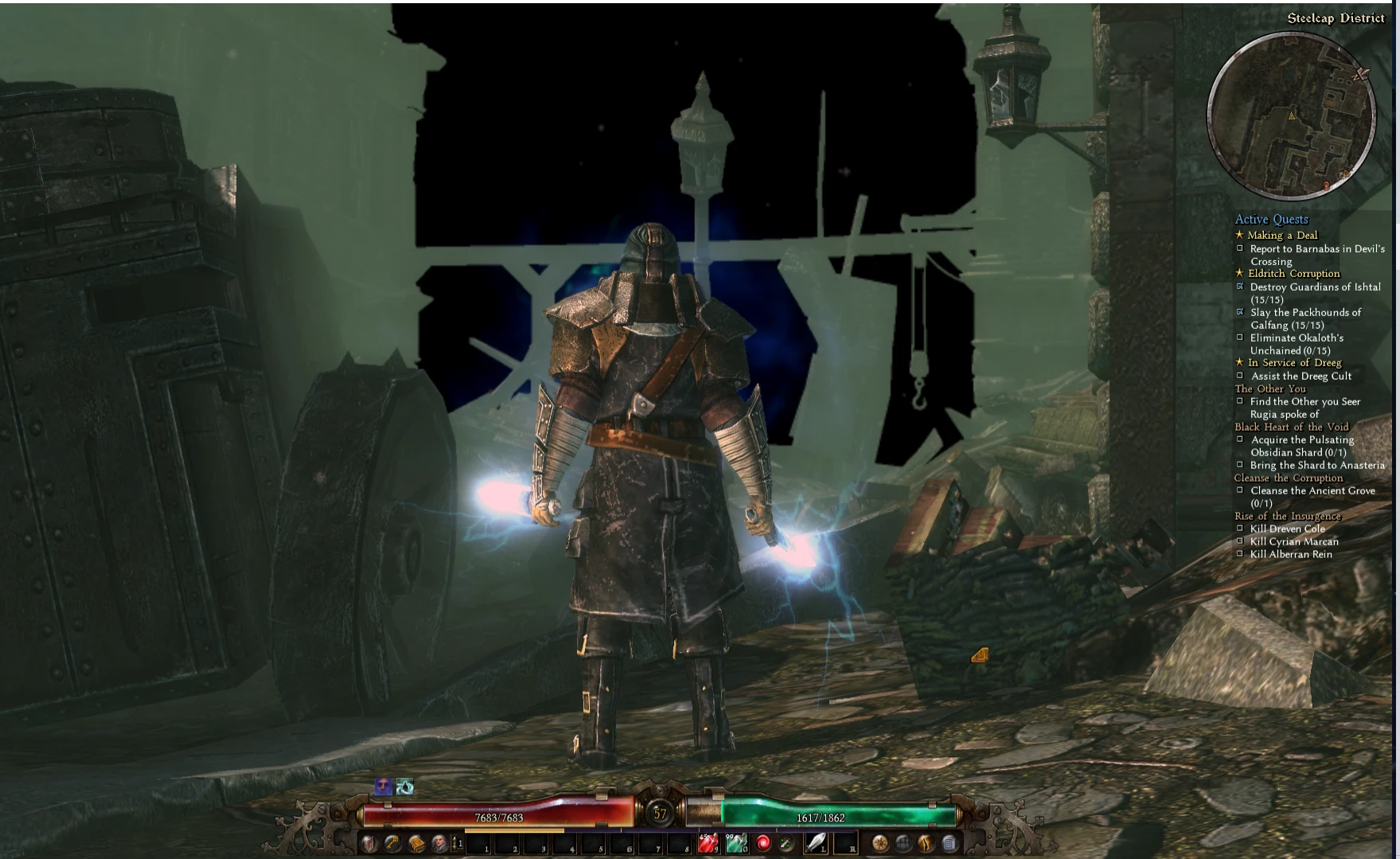
🔍 Analysis
- 👍 3.7% endorsement rate — high engagement, a strong quality signal
- ✅ Updated 69 days after the latest game patch — actively maintained
- 🏆 #34 of 51 Miscellaneous mods in this game by downloads
📋 About This Mod
Mod best played on a controller, see Grim Truce layout. Run in 64 bit compatibility to avoid crashes. Keyboard movement has been added "WoW like" targeting is possible. Camera rotation is easier on an MMO mouse/mouse with thumb key as
GRIM TRUCE Please see how to setup the screen properly below.
**************************************************************************************************
SETUP (PLEASE SET UP LIKE BELOW TO GET THE SCREEN TO LOOK CORRECT):
***********************************************************************************************
This mod now supports 1920 x 1080, 4k displays, and ultrawide 3440 x 1440
Create a character in custom mode. So you can have it be readily selected.
Exit the game.
Step 3:
Go to My Documents\My Games\Grim Dawn\Settings\Options and change the following parameters:
resolution 1920 1600
screen mode = 1
uiscale = 0. 38
resolution 3840 3100
screen mode = 1
uiscale = 0. 92
Ultrawide 3440 x 2000
screen mode = 1
uiscale 0. 55
Consider lowering all graphics settings other than textures to 0 and background fps/corpse persistence to 0.
The game will play a lot faster and smoother.
Launch grim dawn after saving the custom resolution in the option.txt file as mentioned above. Next, right click a blank area on
the windows task bar and choose "Cascade Windows". Move the game window all the way up so that
the window title bar is almost completely out of view. You should be set. Enjoy :3
Launch grim dawn after saving the custom resolution in the option.txt file as mentioned above. Next, you will want to alt tab to
gain access to the task bar. Mouse over grim dawn in the task bar and you will see a small window preview of grim dawn above
the task bar icon. You then hold shift and hold right click on the label of the small grim dawn preview window and drag it the
cursor a short distance while releasing the right click. ( If you do not drag the cursor like this the drop down menu will not appear)
When you release a dropdown menu will appear allowing you the Move option and you will see a four arrow cursor over the grim
dawn window. Press the down arrow and you will be able to move the window to align it with the top of your screen. (This will
move you to the next character in your list if you are on the main game menu, just press the up arrow to move back to your last
played character.) A video will also be posted showing this process if this explanation is not clear enough.
*************************************************************************************************
Current state of the game:
The mod is now a camera only mod. The game has been rebalanced a lot to make many of the difficulty changes
unnecessary. Enjoy this as a controller over the shoulder 3rd person experience.
Controller Setup, This profile is available as a community layout under:
Grim Dawn - XB1 Grim Truce Camera Mod Controller Layout
Recommended Control Setup (BUILD UPLOADED TO STEAM COMMUNITY):
Intended Steam controller config (Steam Library->Grim Dawn->Manage Games->controller set up). This
is the only way I know also to have a reverse Y-axis for the camera. My set up:
A = skill 1/interact
B = skill 2
X = skill 3
Y = skill 4
RB = skill 8
RT = skill 9 (soft pull) skill 10 (full pull)
R3 = weapon swap
LB = skill 5
LT = sklll 6 (soft pull) skill 7 (full pull)
L3 = nothing
Dpad Up = health potion
Dpad Right = energy potion
Dpad Left = personal riftgate
Dpad Down = skill bar swap.
Start Button = Map and also Options/Pause if hit again.
These bindings should be shared with the community in steam when you "browse xbox control schemes and select
"other control types."
*Binding 2 abilities can make you more efficient on cooldowns like Slam (half press) Cadence (Full press) will do
Slam whenever off CD and otherwise will do Cadence. Another is Curse of Frialty (soft pull) Pet Attack (Full Pull).
Makes pets always attack your curse of frailty target on cast.
(R3 can be used to access a second page of skills, I use this page for permanent buffs before setting out)
UI Interface:
LT: Allows Item comparison without components attached
R3: Swap hot bars in skill select wheel
L3/D-pad Left: Swap weapons in character screen
Quickstart to the World of Cairn - Most of this info is useful for starting any version of GD.
📊 Mod Details
- Game
- Grimdawn Mods
- Author
- Truce Wolf
- Version
- 1.7
- Downloads
- 1,291
- Endorsements
- 48
- Category
- Miscellaneous
- Created
- 4/15/2020
- Updated
- 10/3/2026
- Tags
- Stay Home. Make Mods.
🔧 How to Install Grim Dawn Mods
Install via a mod manager (Vortex or Mod Organizer 2). Most mods drop into the game folder.
📖 Full step-by-step install guide for Grim Dawn →
Visit the official mod page for specific installation instructions for this mod.
🎮 Need cheat codes or console commands? Check ur gaming wiki for Grim Dawn commands, item IDs, and more.
Keep browsing — more Grim Dawn mods await