Better LOD config
🟠 Updated over a year agoPreview
🔍 Analysis
- 👍 2.3% endorsement rate — high engagement, a strong quality signal
- 🏆 #3 of 163 Visuals mods in this game by downloads
📋 About This Mod
Description
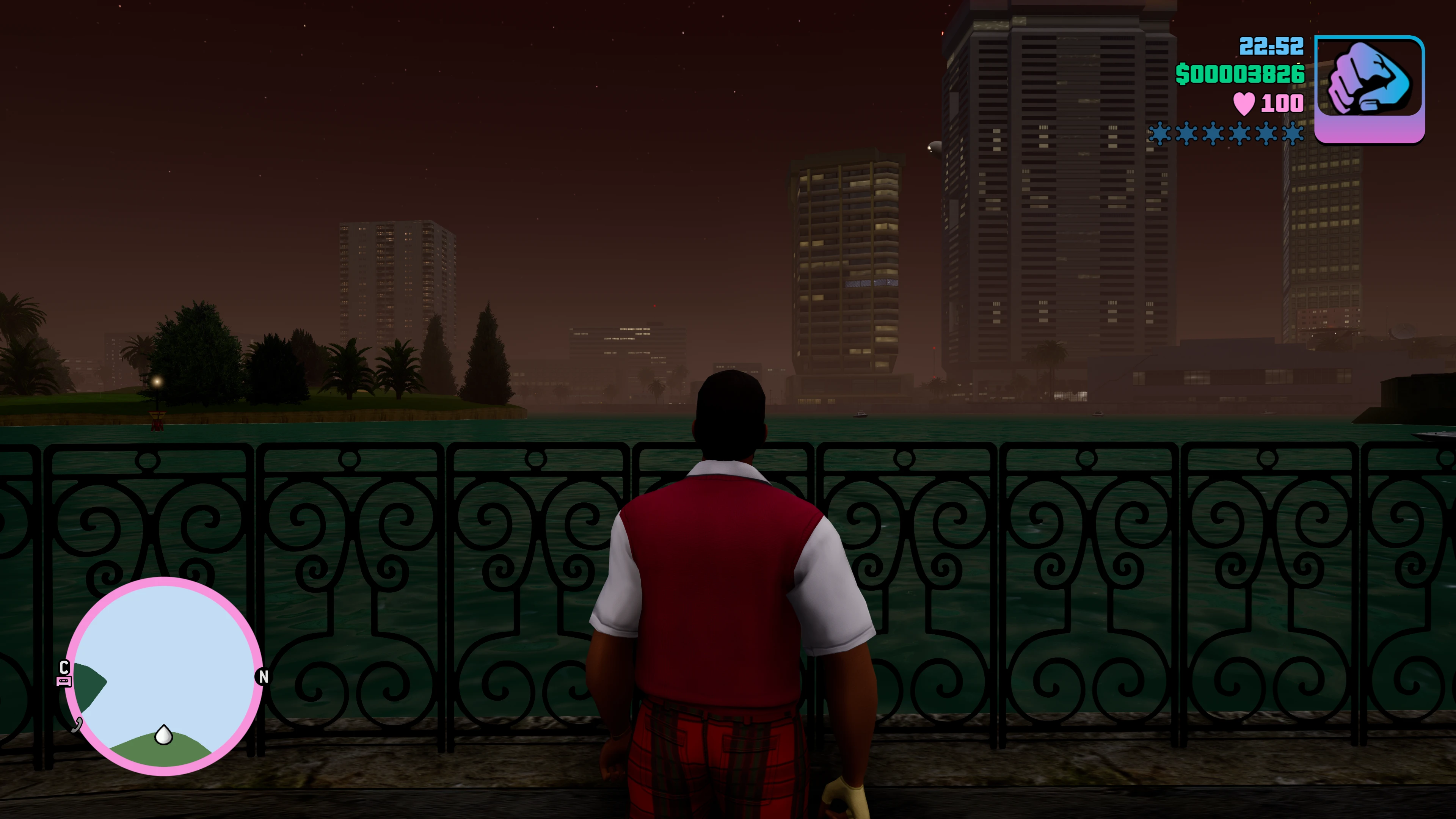
This mod is just a customsettings.ini that i edited to reduce the frequency of pop in. Compatible with all three games. Lights, statics, landscapes etc should all be at their highest quality at all times.
Unfortunately the crappy low detail LOD for upstate in Liberty City seems to be the highest available. This config file doesn't fix that.
Important!
Make sure to change the value Traffic=2 to Traffic=3 in the file GameUserSettings.ini ! This forces the game to use the highest default traffic levels. The variables in the downloaded file are multipliers of this default value. If you do not want your games to be basically empty of cars you will either need to make this change or remove the values in the "Known Issues" section immediately below this one.
Known Issues
-
[](All Games) Vehicle and Pedestrian Density is Lower
Increasing the draw distance of the vehicles and people drastically decreases their density. To compensate there are variables that increase density, but they cause the game to crash above certain values. These games likely still need a "Limit Adjuster" or comparable mod to affect these changes. If one ever releases for the DE I will remove or adjust these entries as needed.
- [
[]Vice City - the game will hard crash if you increase the density too much to compensate for draw distance
[]San Andreas - the game can handle increased peds just fine, but at a certain point cars disappear. But on the whole it handles things better than VC
To default the vehicles just comment out or delete these lines:
gta.cars.density
gta.cars.distance
- (VC / all? ) North Point Mall - Crash During Mission "Rub Out" (Probably at other points of all games, I just haven't been able to test)
gta.peds.distance
gta.peds.density
Or you can leave them commented out and have default pedestrian draw distance and density.
Performance
!! The foliage settings will hit your performance
!!
In the woods of San Andreas particularly. I have a beastly rig and ha
Better LOD config is a simple custom settings.ini file that reduces object pop-in frequency in Fallout 4. It is compatible with the Classic Lighting Update mod. With 793 endorsements and 34,285 downloads, it's a popular tweak for players seeking smoother visuals without major overhauls.
✨ Key Features
📊 Pros & Cons
✅ Pros
- Community favorite with 793 endorsements and over 34k downloads.
- Simple drop-in fix for annoying pop-in without heavy performance cost.
- Works alongside Classic Lighting Update for a cleaner visual experience.
⚠️ Cons
- Only tweaks LOD settings—won't fix other visual issues like texture seams.
- May conflict with other mods that alter the same ini settings.
- No active updates since November 2024, so might not be tested with the latest game patches.
For Fallout 4 players who are tired of objects popping in and want a quick, lightweight fix. If you use Classic Lighting Update, this is a no-brainer. Skip if you're looking for a full visual overhaul or if you already have a complex LOD mod setup.
💡 Beginner Tips
- Place the customsettings.ini in your Fallout 4 directory, but back up your original first.
- If you use a mod manager, you can install it as a mod and let the manager handle file conflicts.
- Test in an area with lots of distant objects, like downtown Boston, to see the difference.
📊 Mod Details
- Game
- Grandtheftautothetrilogy Mods
- Author
- bigbadjarret
- Version
- 4.15
- Downloads
- 34,285
- Endorsements
- 793
- Category
- Visuals
- Created
- 11/19/2021
- Updated
- 11/30/2024
🔧 How to Install Grand Theft Auto: The Tri Mods
Download from Nexus Mods.
📖 Full step-by-step install guide for Grand Theft Auto: The Tri →
Visit the official mod page for specific installation instructions for this mod.
🎮 Need cheat codes or console commands? Check ur gaming wiki for Grand Theft Auto: The Tri commands, item IDs, and more.
Keep browsing — more Grand Theft Auto: The Tri mods await