Realistic Colors And Details
🟠 Updated over a year ago⚠️ Install Order · 1 step
Install in this order, then this mod last — most mods fail to load without their framework and dependencies in place.
Preview
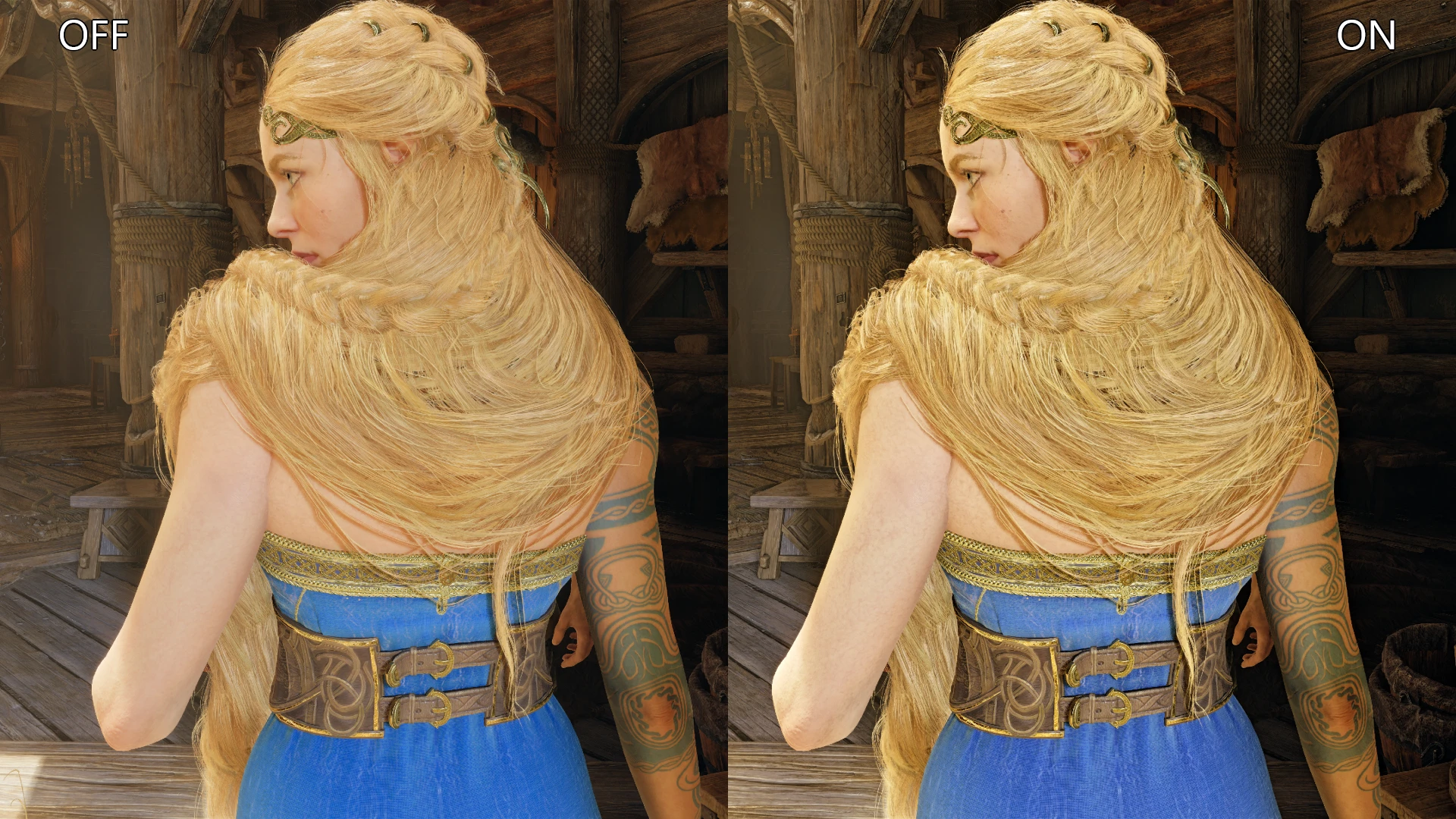
🔍 Analysis
- 👍 2.3% endorsement rate — high engagement, a strong quality signal
- 🏆 #1 of 13 Visual Preset mods in this game by downloads
📋 About This Mod
Hey there! happy to see you around here! you probably came to make GOWR looks better, then you absolutely came to the right mod ^.^
i'm Haninos and i've been a displays calibrator for over 10 years, i just can't play any game without putting my humble touches on the visuals.
Out of passion for the game and for my favorite character of all time KRATOS, i proudly publish my first mod here on nexus. MY PRESET KEY FEATURES :
My goal is only correcting the colors i won't add any an unnecessary effects, The game is already a masterpiece in everyway.
3 - Improving the highlights and lighting clarity so you could distingues small details in brightened spots by fixing the whitepoint on 6500K.
4 - Balancing the saturation and contrast of the RGBcym (primary and secondary colors).
5 - Doing all the above with the minimum loss of your precious FPS. ^.^ The good news that most of the project tasks above has been accomblished in the V2 version of my mod.
bear in mind as long as FPS is concerned too i got to secrifce some color accuracy to keep it run as smooth as possible.
FINAL RESULT:
All you have to do is download the latest version and see for yourself how much more impressive GOWR has become!
IF YOU LIKE IT PLEASE CONSIDER ENDORSE IT TO THE OTHERS TO MAKE IT REACH THE COMMUNITY.
HOW TO INSTALL :
Just extract the RAR file and drop its contents in your main game folder where GoWR.exe existed.
Make sure to overwrite the changes if there're any for the shaders folder.
A ReShade SDR preset for the game that removes the blue tint, enhances details, and delivers more natural, balanced colors without clipping whites or blacks. Designed on a high-end calibrated OLED TV with game brightness at 50. Ideal for players seeking a color correction overhaul.
✨ Key Features
📊 Pros & Cons
✅ Pros
- Community-trusted with 148 endorsements and over 6,300 downloads
- Addresses a common complaint (blue tint) with a straightforward fix
- No clipping on whites or blacks means you won't lose detail in highlights or shadows
⚠️ Cons
- Requires ReShade, which adds an extra setup step
- Calibrated for a specific display (OLED TV) and brightness setting, so results may vary on other monitors
- No before/after screenshots or detailed installation guide provided in the description
For players who notice the game's blue tint and want a quick color correction without fiddling with in-game settings. Also for those who already use ReShade and want a preset tuned for high-end displays. Skip if you're happy with the default colors or don't want to install ReShade.
💡 Beginner Tips
- Make sure ReShade is installed and set to load the preset file in the ReShade menu.
- If your display isn't an OLED TV, tweak the preset's saturation and contrast sliders to match your monitor.
- Set your in-game brightness to 50 as the author did for the intended look.
📊 Mod Details
- Game
- Godofwarragnarok Mods
- Author
- Haninos
- Version
- 2.5
- Downloads
- 6,353
- Endorsements
- 148
- Category
- Visual Preset
- Created
- 9/23/2024
- Updated
- 9/30/2024
🔧 How to Install God of War Ragnarok Mods
Download from Nexus Mods.
📖 Full step-by-step install guide for God of War Ragnarok →
Visit the official mod page for specific installation instructions for this mod.
🎮 Need cheat codes or console commands? Check ur gaming wiki for God of War Ragnarok commands, item IDs, and more.
Keep browsing — more God of War Ragnarok mods await