FF7 3D Model Editor Ver 1.1
🟡 Updated this yearPreview
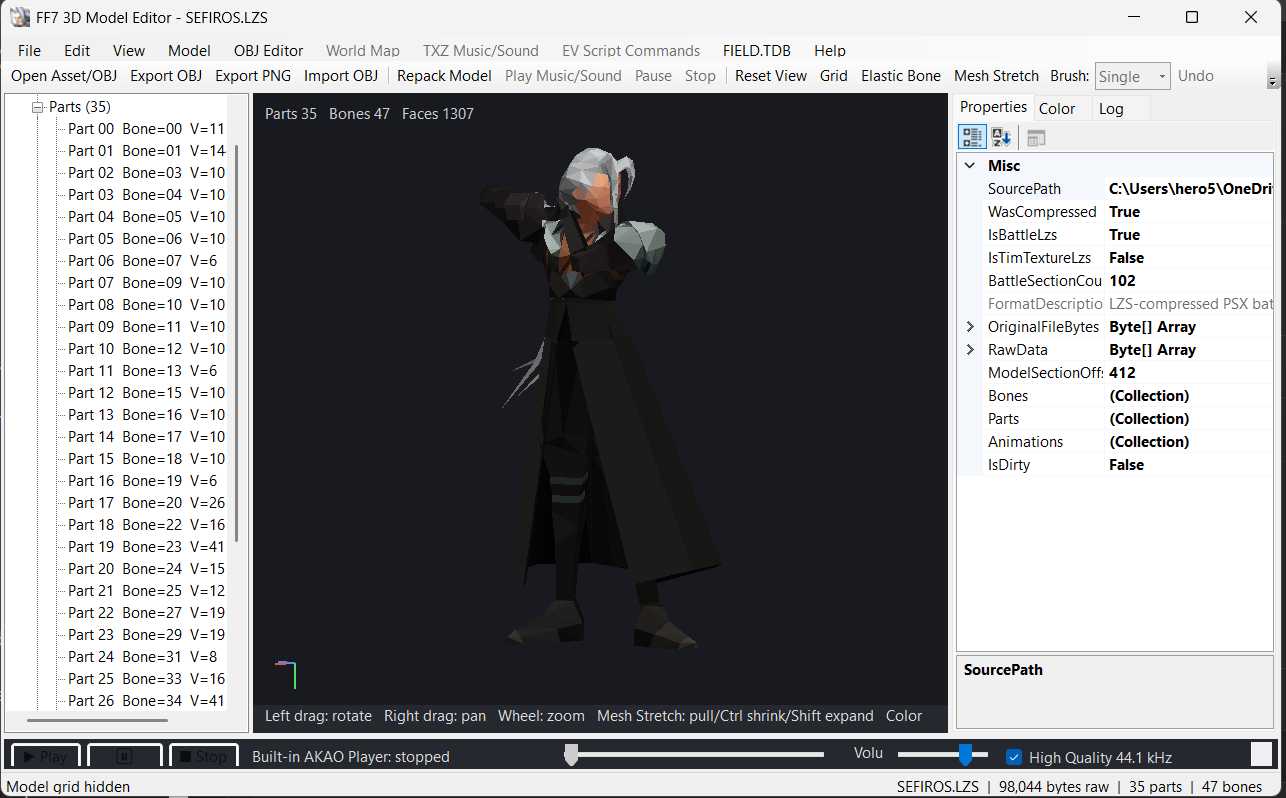
📋 About This Mod
# Final Fantasy VII 3D Model Editor Created by Shadow501 Final Fantasy VII 3D Model Editor is an advanced Windows editing tool designed for modifying models and related assets from the original PlayStation version of Final Fantasy VII. The editor brings together 3D model editing, animations, bones, polygons, colors, palettes, textures, FIELD assets, world-map files, scripts, audio, and PlayStation BIN/CUE rebuilding in one application. The project is actively being improved, and additional compatibility, scanning accuracy, and editing features are planned for future versions. --- # Main Features Open compressed and decompressed Final Fantasy VII . BCX field models Open and edit FF7 battle . LZS models Preserve important battle-LZS archive sections while editing model geometry Display FF7 models directly inside the built-in model viewer Browse individual models or complete LZS folders Live model preview Mouse rotation Pan Zoom Reset camera Wireframe / polygon grid display Skeleton display Direct model selection Edit model geometry without requiring an external 3D viewer --- # Bone Editing The editor contains extensive tools for working with FF7 skeletal models. Select Bones directly from the model Select Bones from the model tree Copy Bones Paste Bones Remove Bones Export individual Bones Import individual Bones Export all Bones Import complete Bone/model packages Resize Bones manually Uniform Bone scaling Independent X / Y / Z Bone scaling Preserve Bone center and location while resizing Automatically fit imported BCX Bones to destination geometry Preserve destination Bone bind-pose position Undo Bone modifications Redo Bone modifications --- # Elastic Bone Editing Bones can also be manipulated interactively inside the model preview. Enable Elastic Bone editing mode Drag Bones directly with the mouse Attach
FF7 3D Model Editor Ver 1.1 is a Windows tool for editing 3D models and related assets from the original PlayStation Final Fantasy VII. It combines 3D model editing with other features, but the description is cut off. Currently has zero endorsements and downloads, and was last updated in August 2026.
✨ Key Features
📊 Pros & Cons
✅ Pros
- Targets the original PS1 FF7, so it's built for classic model modding.
- Combines multiple editing functions into one tool, which could save you from juggling separate utilities.
- Freshly updated in August 2026, so it's actively maintained.
⚠️ Cons
- Zero endorsements and zero downloads—nobody's tested it yet, so you're the guinea pig.
- The description cuts off mid-sentence, so you don't know the full feature list or if it's stable.
- Compatibility risk: it's a niche tool for PS1 assets, so it may not work with modern mod setups or require specific file formats.
This is for hardcore FF7 modders who want to dig into the original PlayStation models and aren't afraid of using an untested tool. If you're a casual player looking for quick visual tweaks, this isn't for you—it's a technical editor, not a one-click mod.
💡 Beginner Tips
- Since it's a Windows tool, make sure you're running it on a compatible OS and have the original PS1 game files extracted.
- Start with a backup of your game files before editing any models—you don't want to corrupt your save or game data.
- Check the mod's page for any missing details or updates, as the description is incomplete.
📊 Mod Details
- Game
- Gb Romhacks Mods
- Author
- Shadow501
- Version
- 1.0
- Downloads
- 0
- Endorsements
- 0
- Category
- compression / decompression
- Created
- 8/7/2026
- Updated
- 8/7/2026
- Tags
- Compression / Decompression, Data Extraction / Insertion, Game Specific, Graphics Editors, Graphics Viewers, Palettes, Pointers, Sound
🔧 How to Install GB Hacks Mods
Apply .ips patches. Use SameBoy emulator or real GB with flashcart.
📖 Full step-by-step install guide for GB Hacks →
Visit the official mod page for specific installation instructions for this mod.
🎮 Need cheat codes or console commands? Check ur gaming wiki for GB Hacks commands, item IDs, and more.
Keep browsing — more GB Hacks mods await