Pokemon Follower Mod (Includes SM)
🟡 Updated this yearPreview
🔍 Analysis
- 👍 0.7% endorsement rate
📋 About This Mod
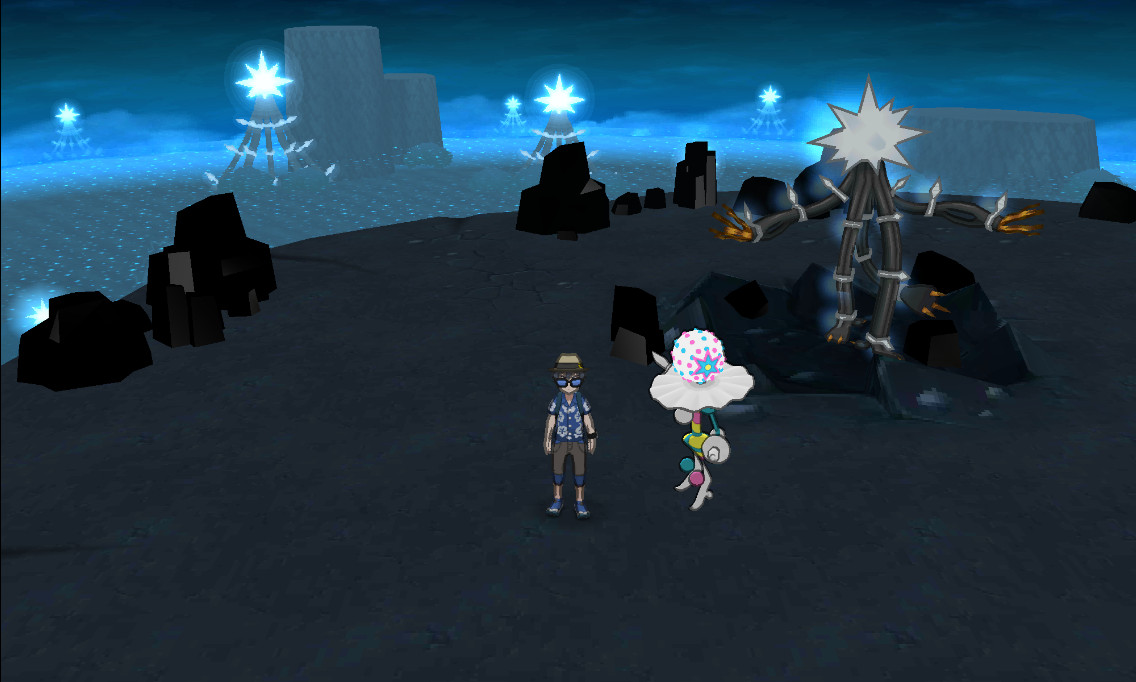
Here will be the releases of the follower Pokemon Mod. This works on both console and emulator! Please let me know if there are any issues. Supported Games Download the ZIP that matches your game. Each package supports the unpatched game and its official version 1. 2 update; the plugin detects the supported game revision automatically. Pokemon Sun: 0004000000164800 Pokemon Moon: 0004000000175E00 Pokemon Ultra Sun: 00040000001B5000 Pokemon Ultra Moon: 00040000001B5100 This release does not require replacement CRO files, a modified static.crr , a modified a/0/9/4 , or a rebuilt game image. Console Installation Extract the ZIP for your game. Merge its luma folder with the luma folder on the root of your SD card. Make sure you are using Luma3DS 13. 0 or newer. The latest release is recommended. Open the Rosalina menu (normally L + D-Pad Down + Select ), enable Plugin Loader , and then launch the game. For example, the Ultra Moon plugin should be located at: SD:/luma/plugins/00040000001B5100/Gen7FieldFollower. 3gx If the plugin does not load, update Luma3DS, check that Plugin Loader is enabled, and verify that the folder name matches your game's Title ID. Desktop Emulator Installation In Citra or Azahar, open File and select Open Citra Folder or Open Azahar Folder . Open the sdmc folder. Create it if it is missing. Merge the downloaded luma folder into sdmc . Open Emulation -> Configure -> System and enable Enable 3GX plugin loader . Fully restart the game after installing or replacing the plugin. For example, the Ultra Moon plugin should be located at: (Citra or Azahar User Folder)/sdmc/luma/plugins/00040000001B5100/Gen7FieldFollower. 3gx Android Emulator Installation Find your emulator's User Data folder. In Azahar, its location is shown in the app's options. Open or create the sdmc folder and merge the downloaded luma folder into it. Open the emulator's System settings and enable the 3GX Plugin Loader. Fully restart the game. The resulting path should look like: (User Data Folder)/sdmc/luma/plugins/(Title ID)/Gen7FieldFollower. 3gx Important: Remove the Older CRO Version Do not use the old LayeredFS follower CRO package at the same time as this 3GX plugin. If you previously installed that version, remove its FieldRo.cro and FieldDebug.cro , then fully restart the game. On console, check: SD:/luma/titles/(Title ID)/romfs/FieldRo.cro SD:/luma/titles/(Title ID)/romfs/FieldDebug.cro SD:/luma/titles/(Title ID)/romfs/.crr/static.crr On Citra or Azahar, check: (User Folder)/load/mods/(Title ID)/romfs/FieldRo.cro (User Folder)/load/mods/(Title ID)/romfs/FieldDebug.cro (User Folder)/load/mods/(Title ID)/romfs/.crr/static.crr Remove static.crr only if it came from the older follower package, since another CRO mod may use it. The plugin detects the legacy follower files and displays a warning, but it will never delete them for you. Luma3DS and the emulators load only one 3GX plugin for a game. Remove or relocate other . 3gx files from the same Title ID folder before testing this release. Confirming That It Works Boot the game and enter the overworld. Your lead party Pokemon should appear as the follower. The follower may temporarily hide during menus, rides, cutscenes, field transitions, or low-performance periods when Dynamic Follower is enabled; this is intentional. If the follower never appears, press Start + Select , confirm that Follower Pokemon is enabled, and recheck the plugin path and legacy CRO warning. Additional installation references: 3GX plugins on Luma3DS Citra and Azahar game-modding guide Settings Menu Press Start + Select to open the settings menu. The game pauses while the menu is open. Press B , or press Start + Select again, to close it and resume play. Settings are saved beside the plugin and restored on the next launch. Follower Pokemon: Enables or disables the follower system. Disabling it also releases the follower's loaded resources. Dynamic Follower: Intended primarily for Old 3DS systems. It temporarily hides the follower after sustained frame-rate loss and retries after performance stabilizes near 30 FPS. Follower Outline: Selects one of four follower-only outline modes, including an off setting. Follower Behavior: Adjusts follow distance, movement thresholds, walk and run behavior, catch-up speed, teleport distance, and animation playback limits. A reset option restores the tuned defaults. Performance Level: Selects Retail, Medium, Low, or Lite. Lite applies the most aggressive performance-saving settings for Old 3DS systems, although demanding areas may still drop below 30 FPS. On a fresh installation, Old 3DS systems default to Lite and New 3DS systems default to Retail. Your saved selection takes priority afterward. Follower Interactions Stand near an idle follower, face it, and press A . The follower turns toward the player, plays an available reaction animation, and uses its cry. Some flying or unusually animated Pokemon may shift vertically because their field and interaction animations we
📊 Mod Details
- Game
- GameBanana Mods
- Author
- Aqua_
- Version
- 3.1
- Downloads
- 8,507
- Endorsements
- 60
- Category
- Game Mechanics
- Created
- 7/15/2026
- Updated
- 8/4/2026
🔧 How to Install GameBanana Mods
Download from GameBanana — the largest mod hosting community.
📖 Full step-by-step install guide for GameBanana →
Visit the official mod page for specific installation instructions for this mod.
🎮 Need cheat codes or console commands? Check ur gaming wiki for GameBanana commands, item IDs, and more.
Keep browsing — more GameBanana mods await