1.2 Script FIX.
🟡 Updated this yearPreview
🔍 Analysis
- 👍 2.4% endorsement rate — high engagement, a strong quality signal
- 🏆 #457 of 1392 Skins mods in this game by downloads
📋 About This Mod
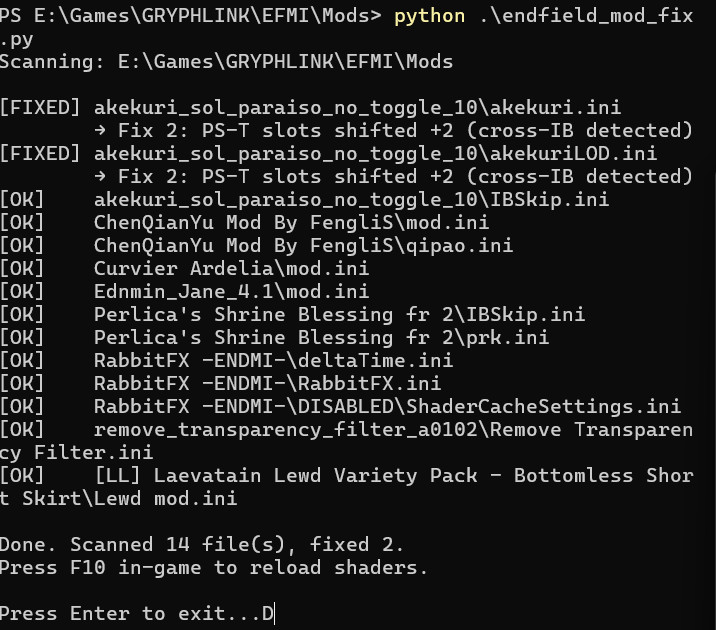
# Arknights: Endfield - v1.2 Mod Fix Script A Python script that automatically fixes mods broken by the v1.2 update. Drop it into your Mods folder and run it. ### IMPORTANT Make a copy of your mods folder before attempting this fix to avoid any incovenients. ### Note This was NOT tested with every single mod, worked on the ones i had. hopefully it can work for yours. ## What it fixes **Fix 1 — Missing body parts (ShaderOverride VS hashes)** Changed the shader VS hashes in v1.2, breaking cross-IB rendering. The script replaces the outdated `` blocks with the new v1.2 hashes and sets `allow_duplicate_hash = overrule` to suppress errors. **Fix 2 — Yellow tint (PS-T texture slot shift)** Makers inserted two new textures in v1.2, shifting all subsequent texture slots by +2. The script fixes this in one of two ways, auto-detected per file: - **RabbitFX method** (permanent) — used when no cross-IB rendering is detected. Replaces raw `ps-t` slot assignments with `Resource\RabbitFX` references. - **+2 slot shift** (compatible) — used when cross-IB rendering is detected. Increments all `ps-t` slot numbers by 2, preserving cross-IB compatibility. ## How to use 1. Make sure Python is installed (python.org — tick "Add to PATH") 2. Drop `endfield_mod_fix.py` into your Mods folder 3. Double-click it or run `python endfield_mod_fix.py` from that folder 4. Launch the game and press **F10** to reload shaders The script scans all `.ini` files recursively, skips files that are already up to date, and prints a summary of everything it changed. ## Requirements - Python 3.x - RabbitFX plugin installed in your Mods folder (for mods fixed with the RabbitFX method) ## Credits Fix logic based on the tutorial by **FengliS** (gamebanana.com/tuts/19708).
# Arknights: Endfield - v1. 2 Mod Fix Script A Python script that automatically fixes mods broken by the v1. 2 update. Drop it into your Mods folder and run it. ### IMPORTANT Make a copy of your mods folder before attempting this fix to avoid any incovenients. ### Note This was NOT tested with every single mod, worked on the ones i had. hopefully it can work for yours. ## What it fixes Fix 1 — Missing body parts (ShaderOverride VS hashes) Changed the shader VS hashes in v1. 2, breaking cross-IB rendering. The script replaces the outdated `` blocks with the new v1. 2 hashes and sets `allow_duplicate_hash = overrule` to suppress errors. Fix 2 — Yellow tint (PS-T texture slot shift) Makers inserted two new textures in v1. 2, shifting all subsequent texture slots by +2. The script fixes this in one of two ways, auto-detected per file: - RabbitFX method (permanent) — used when no cross-IB rendering is detected. Replaces raw `ps-t` slot assignments with `Resource\RabbitFX` references. - +2 slot shift (compatible) — used when cross-IB rendering is detected. Increments all `ps-t` slot numbers by 2, preserving cross-IB compatibility. ## How to use 1. Make sure Python is installed (python.org — tick "Add to PATH") 2. Drop `endfield_mod_fix.py` into your Mods folder 3. Double-click it or run `python endfield_mod_fix.py` from that folder 4. Launch the game and press F10 to reload shaders The script scans all `.ini` files recursively, skips files that are already up to date, and prints a summary of everything it changed. ## Requirements - Python 3.x - RabbitFX plugin installed in your Mods folder (for mods fixed with the RabbitFX method) ## Credits Fix logic based on the tutorial by FengliS (gamebanana.com/tuts/19708).
📊 Mod Details
- Game
- GameBanana Mods
- Author
- unkemptmagio
- Version
- N/A
- Downloads
- 11,118
- Endorsements
- 270
- Category
- Skins
- Created
- 4/19/2026
- Updated
- 4/19/2026
🔧 How to Install GameBanana Mods
Download from GameBanana — the largest mod hosting community.
📖 Full step-by-step install guide for GameBanana →
Visit the official mod page for specific installation instructions for this mod.
🎮 Need cheat codes or console commands? Check ur gaming wiki for GameBanana commands, item IDs, and more.
Keep browsing — more GameBanana mods await