MTZ 800 1000 Series v1.3.3.8
🟡 Updated this yearPreview
🔍 Analysis
- 🏆 #81 of 2245 Other mods in this game by downloads
📋 About This Mod
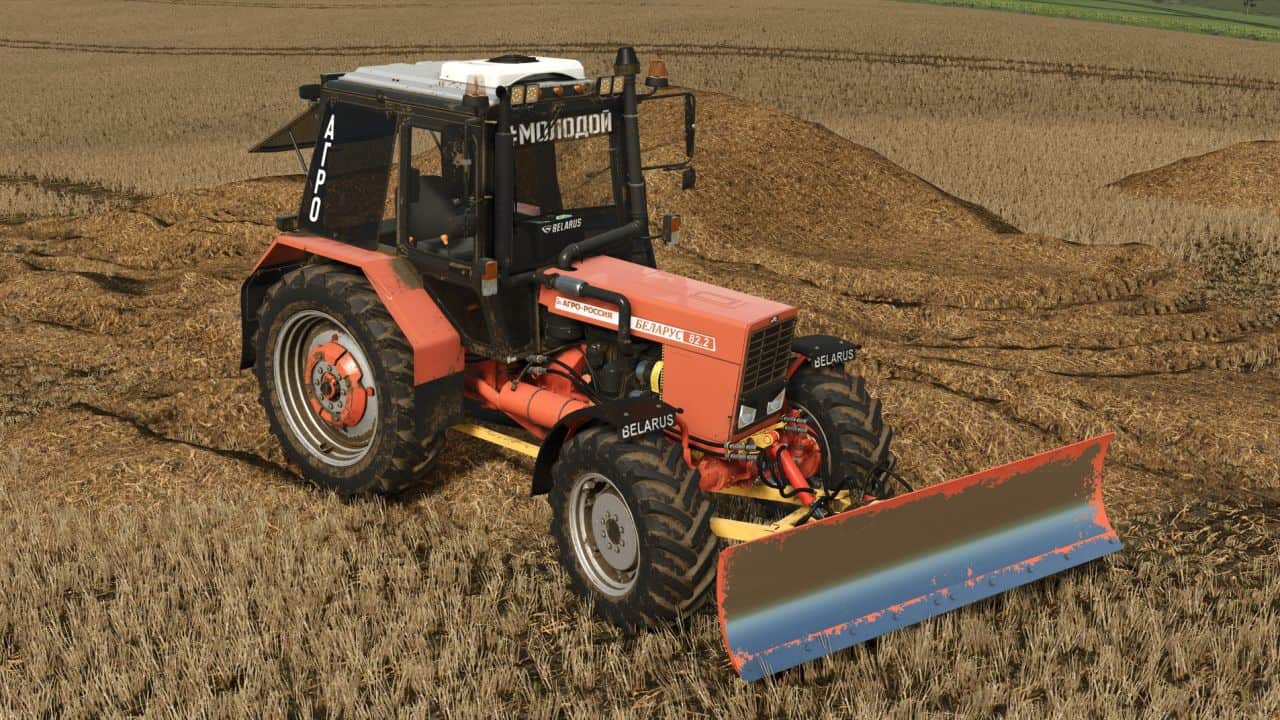
MTZ 800 1000 Series v1. 3. 3. 8 | FS25 Mod Download Home Upload Mod Featured Mods FS25 Universal Autoload FS25 Courseplay FS25 Autodrive FS25 Super Strength FS25 Vehicle Explorer FS25 Enhanced Vehicle Installing Mods Modding Info FS25 Modding Guide FS25 Modding Tool How to Start Modding How to edit a Tractor? Convert FS22 to FS25 Mods Testing Your FS25 Mods FS25 Cheats FS25 Guides FS25 FAQ About FS25 FS25 News Giants Editor FS25 FS25 Ground Deformation FS25 Release Date FS25 Mods on Consoles FS25 System Requirements FS25 Console Commands Download FS25 Game Landwirtschafts Simulator 25 Mods Best Mods Help Contacts Maps Cars Trucks Tractors Trailers Vehicles Excavators Implements Harvesters Headers Buildings Objects Gameplay Prefab Textures Packs Tractors MTZ 800 1000 Series v1. 3. 3. 8 FS25 Mods | 10 Aug, 2026 Pack of 19 models of the Minsk Tractor Plant (Available models: 80. 1, 82. 1, 572, 82. 2, 820, 890, 890. 2, 892, 892. 2, 920, 920. 2, 950, 952, 952. 2, 1021, 1025, 1025. 2 and MUL 82. 2 (with and without TLZ)); – A large number of wheel configurations are available on all models; – On tractors (except for modifications with a beam axle), front track adjustment is available; – Separate choice of color for hubs, side panels and discs; – Configuration of side windows framed/frameless; – Configuration of stairs on one/both sides; – Standard/export roof configuration with two air conditioning options (compact (under the hood) or on the roof); – Configurations without shields (if installed), without mudguards, without wings; – Configurations of hood lights, front and rear work lights, auxiliary lights and headlight protection; – Choice of roof and hood color; – Tinting configurations, full/partial; – Choice of glass color (not tinted); – A huge selection of stickers on the windshield (divided into groups, do not choose at the same time!) and on the door windows; – Muffler configurations short/long and two colors to choose from, black/silver; – Filter configurations long/even longer and two colors to choose from, black/gray; – Configurations of front and rear loads; – Configuration of the basic hitch (not reinforced) with an earring / with a triangle; – Configuration of the dashboard and steering wheel of new/old samples; – Configuration of hood stickers (Export, SAREX, AGROPANONKA, UKRAVTOZAPCHASTINA, TEKHNOTORG and option without stickers); – Loader configuration with/without protection. The package also includes the PKU-0. 8 Salskselmash loader, its configurations: – Choice of color for rods, booms, cylinders; – Attachments: bucket, forks for logs, bales and pallets, hook for BigBag. There is adjustment of the rear-view mirrors, rear linkage and blade for the MUL modification with TLZ. And all the latest updates that were pressed, but were indicated when collecting donations – We fixed a lot, both the light and the passenger and a bunch of everything else, I don’t even remember everything anymore) I partially remodeled some parts of the MTZ. – The main thing is the dump (wintersummer). The dump is not simple, not as previously revived for FS. It has the function of removing trees, plowcultivator (can be disabled), small floating mode (B button), mouse control accordingly. In general, before playing with it, we advise you to figure it out and test how everything works in order to understand the essence, nothing complicated, just a few buttons for everything it works. We really liked this option – Previously there were questions about the automatic checkpoint, I left xml with this checkpoint in the archive. For those who need it, your task is to remove 2 files from the archive: mtz_800.xml and mtz_1000.xml. And for the files: mtz_800d.xml and mtz_1000d.xml – remove the letter: d in the name and leave them in the archive. Author: Sevills Garage TYOMATY Vladimir69 Maksimka Pan Tags: FS MTZ MUL SAREX Having problems with the mod? Check the comments for possible solutions, and report any new bugs you discover. Download Useful Information: How to install FS25 Mods | Farming Simulator 25 FAQ | Farming Simulator 25 News | FS25 System Requirements | Download FS25 Game | Giants Editor FS25 | FS25 Modding Guide | FS25 Cheats | FS25 Guides ... --> John Deere 6000 Series Edit v1. 0 Tractors 26 Apr, 2026 Fendt 700/800 TMS v1. 0 Tractors 7 Sep, 2025 John Deere 6R 2022 v1. 1 Tractors 30 May, 2026 Leave a Reply Cancel reply Your email address will not be published. Required fields are marked Comment Name Email I have read and accepted the Privacy Policy Categories Maps Cars Trucks Combine / Harvesters Tractors Trailers Forestry Forklifts / Excavators Vehicles Headers Buildings Implements / Tools Objects Gameplay Seasons Prefab Textures Packs Trending Mods Strumyk Grom Pack v1. 0 17 Aug, 2026 Kuhn GA 15131 Rust Edition v1. 4 16 Aug, 2026 Kuhn DC 401 plow v1. 5 16 Aug, 2026 Kuhn GMD 4411 Rust
This Farming Simulator 25 mod adds a pack of 19 Minsk Tractor Plant models, including the 80.1, 82.1, 572, 82.2, 820, 890, 890.2, 892, 892.2, 920, 920.2, 950, 952, 952.2, 1021, 1025, 1025.2, and MUL 82.2 variants. It's a fresh release with no endorsements or downloads yet, so it's untested by the community.
✨ Key Features
📊 Pros & Cons
✅ Pros
- Huge variety: 19 tractor models in one pack, covering the classic MTZ series.
- Fresh release (August 2026) — likely compatible with the latest game version.
- Caters to fans of Eastern European farming equipment who want authentic Belarusian tractors.
⚠️ Cons
- Zero endorsements and downloads — completely untested by the community.
- No screenshots or detailed feature list provided, so you're flying blind on quality.
- Potential for bugs or missing textures since it's brand new with no player feedback.
For Farming Simulator 25 players who love classic Soviet-era tractors and want a wide selection of MTZ models. If you're into realistic Eastern European farming, this pack is worth a try. Skip if you prefer modern equipment or need proven, community-tested mods.
💡 Beginner Tips
- Place the extracted folder into your Farming Simulator 25 mods directory (Documents/My Games/FarmingSimulator2025/mods).
- After installing, check the in-game mod hub to confirm the pack appears before starting a save.
- Since it's a new mod, test it on a separate save to avoid corrupting your main farm if issues arise.
📊 Mod Details
- Game
- Fs25 Hub Mods
- Author
- fs25modhub.com
- Version
- 1.3.3.8
- Downloads
- 0
- Endorsements
- 0
- Category
- Other
- Created
- 8/10/2026
- Updated
- 8/10/2026
🔧 How to Install Farming Simulator 25 Mods
Download from https://www.fs25modhub.com.
📖 Full step-by-step install guide for Farming Simulator 25 →
Visit the official mod page for specific installation instructions for this mod.
🎮 Need cheat codes or console commands? Check ur gaming wiki for Farming Simulator 25 commands, item IDs, and more.
Keep browsing — more Farming Simulator 25 mods await