Modded Courseplay v8.3.0.1
🟡 Updated this yearPreview
🔍 Analysis
- 🏆 #7 of 45 Scripts mods in this game by downloads
📋 About This Mod
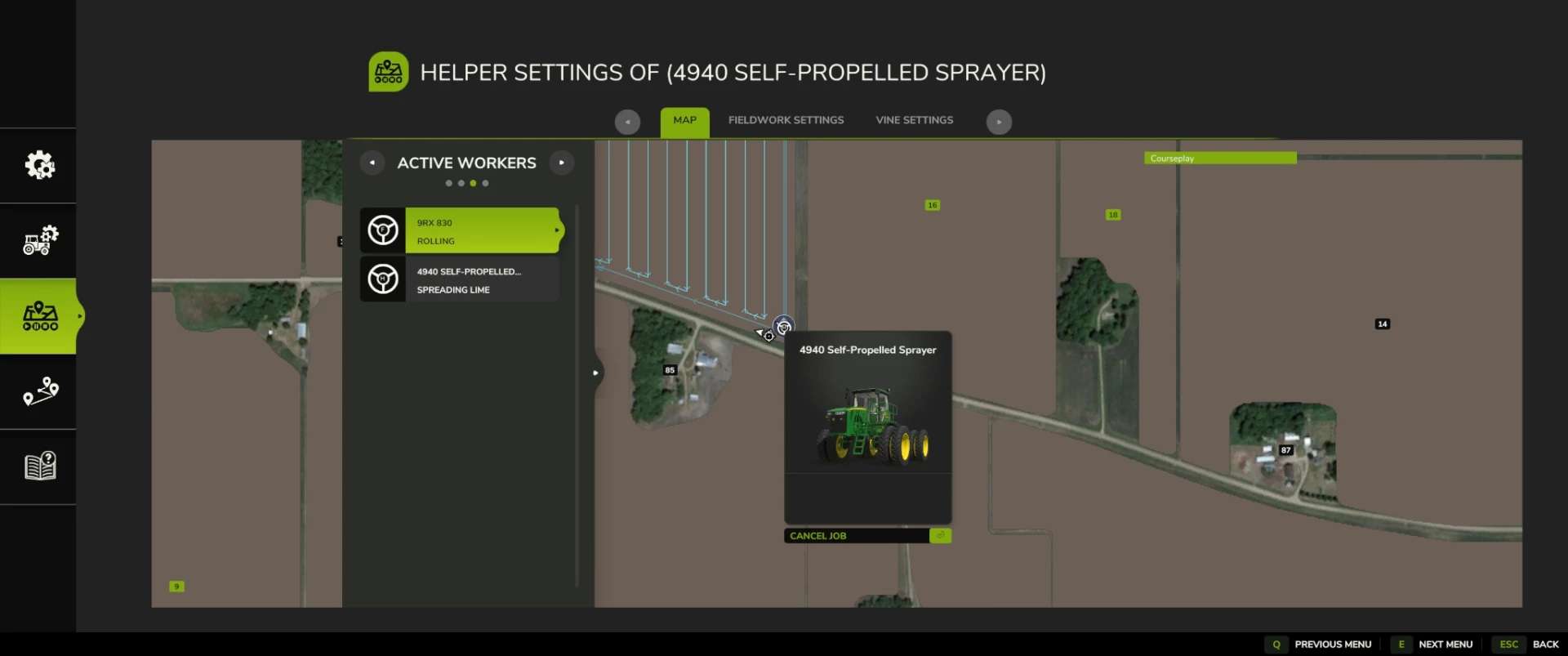
Modded Courseplay v8.3.0.1 | FS25 Mod Download Home Upload Mod Featured Mods FS25 Universal Autoload FS25 Courseplay FS25 Autodrive FS25 Super Strength FS25 Vehicle Explorer FS25 Enhanced Vehicle Installing Mods Modding Info FS25 Modding Guide FS25 Modding Tool How to Start Modding How to edit a Tractor? Convert FS22 to FS25 Mods Testing Your FS25 Mods FS25 Cheats FS25 Guides FS25 FAQ About FS25 FS25 News Giants Editor FS25 FS25 Ground Deformation FS25 Release Date FS25 Mods on Consoles FS25 System Requirements FS25 Console Commands Download FS25 Game Landwirtschafts Simulator 25 Mods Best Mods Help Contacts Maps Cars Trucks Tractors Trailers Vehicles Excavators Implements Harvesters Headers Buildings Objects Gameplay Prefab Textures Packs Gameplay / Other Modded Courseplay v8.3.0.1 FS25 Mods | 15 Jun, 2026 VERSION / CORE CLEANUP – Fixed a fieldwork turn-state logic issue that could affect turn handling. – Bumped custom version through the project, ending at 8.3.0.1. – Cleaned up older/incorrect references from the base mod. – Removed/avoided duplicate Lua registration issues. – Fixed vehicle configuration XML issues, including bad offset naming and duplicate entries. – Updated visible FS22-style text/references where they were showing incorrectly in the FS25 build. MAJOR HUD OVERHAUL – Reworked the Courseplay mini HUD into a cleaner style layout. – Kept the Courseplay green/black color theme. – Added a cleaner title bar: – Courseplay – Fieldwork – Courseplay – Unload Combine – Courseplay – Silo Work – Moved version number to the top-right of the HUD. – Removed visible CP: prefixes from HUD text where possible. – Enlarged and cleaned the vehicle name row. – Added/realigned the eye/course visibility icon. – Cleaned divider lines and spacing. – Improved font sizes and alignment. – Fixed long vehicle names so they trim cleaner instead of overflowing. – Rebuilt the bottom action row so buttons stay in a consistent order: 1. Courseplay/settings, Field target / crosshair 2. Play, Record or next/unload-now, Pause / reverse / recycle, Clear 3. Clear copied course cache, Copy generated course – Made buttons larger and easier to click. – Fixed overlapping/non-clickable button issues. – Moved all main action buttons to the bottom. – Kept copy-generated-course button available. – Added/cleaned the copied-course cache clear button. – Changed the unload-combine “next” icon scaled/positioned cleaner. – Prevented hidden buttons from remaining clickable underneath visible buttons. – Fixed HUD movement so it cannot be dragged while locked. – Fixed a bug where dragging the HUD moved the background but left buttons/text behind horizontally. – HUD position now moves as one unit. – HUD position/state is saved better. – Added HUD open/closed persistence. – If the HUD was open when saving, it should reopen after loading. – If it was closed when saving, it should stay closed. – Saved HUD position is retained. FIELDWORK HUD TEXT CLEANUP – Cleaned fieldwork HUD labels and values: – Waypoint: 1530/3050 – Start at: last waypoint – Start at: nearest waypoint – Start at: first waypoint – Work width – Tool offset horizontal – Added the missing space after Waypoint:. – Fixed course display states: – Course: temporary – Course: (none) – Course: Field 8 – Spreader Current intended behavior: – If a course has a field, show: – Course: Field 8 – Spreader – If multiple fields are detected, show: – Course: Fields 8, 9 – Spreader – If no field is detected, fall back to the course/tool name: – Course: Spreader – If no course is loaded: – Course: (none) – If a temporary/generated course exists but is not saved: – Course: temporary – Added redundancy protection so it should not show: – Course: Field 8 – Field 8 – Spreader SAVED-COURSE FOLDER / PATH DISPLAY – Added folder/path-aware course display. – Tried mapping folders like: – combine/field 8 – sprayer/field 8 – planter/field 8 – Later changed the preferred display to field-first format: – Course: Field 8 – Spreader instead of: – Course: Spread – Spreader AUTO-GENERATED COURSE NAMES – Added generated-course auto-name logic and bumped to 8.2.1.0 for that feature. New auto-name style examples: – Field 8 – Spreader – Field 8 – Harvester – Fields 8, 9 – Mower Design choices: – No crop name included. – No fill type included. – Keeps the course reusable across crops/products. – Uses field number first. – Uses implement/tool type second. – Falls back to generic course/tool name if no field is detected. COURSE GENERATOR / JOB MENU CHANGES – Made Create Job bottom actions visible immediately on the map page. – Start Job / Generate Course should appear without needing to switch tabs first. – Cleaned labels in the job menu. – Removed visible CP: prefixes from some action text. – Improved bottom-action syncing across pages. ACTIVE WORKERS MENU INSIDE COURSEPLAY – Fixed selected worker index mismatch. – Fixed vehicle name mismatch. – Added better active worker descriptions. – Improved selected-row behavior. – L
Modded Courseplay v8. 3. 0. 1 | FS25 Mod Download Home Upload Mod Featured Mods FS25 Universal Autoload FS25 Courseplay FS25 Autodrive FS25 Super Strength FS25 Vehicle Explorer FS25 Enhanced Vehicle Installing Mods Modding Info FS25 Modding Guide FS25 Modding Tool How to Start Modding How to edit a Tractor? Convert FS22 to FS25 Mods Testing Your FS25 Mods FS25 Cheats FS25 Guides FS25 FAQ About FS25 FS25 News Giants Editor FS25 FS25 Ground Deformation FS25 Release Date FS25 Mods on Consoles FS25 System Requirements FS25 Console Commands Download FS25 Game Landwirtschafts Simulator 25 Mods Best Mods Help Contacts Maps Cars Trucks Tractors Trailers Vehicles Excavators Implements Harvesters Headers Buildings Objects Gameplay Prefab Textures Packs Gameplay / Other Modded Courseplay v8. 3. 0. 1 FS25 Mods | 15 Jun, 2026 VERSION / CORE CLEANUP – Fixed a fieldwork turn-state logic issue that could affect turn handling. – Bumped custom version through the project, ending at 8. 3. 0. 1. – Cleaned up older/incorrect references from the base mod. – Removed/avoided duplicate Lua registration issues. – Fixed vehicle configuration XML issues, including bad offset naming and duplicate entries. – Updated visible FS22-style text/references where they were showing incorrectly in the FS25 build. MAJOR HUD OVERHAUL – Reworked the Courseplay mini HUD into a cleaner style layout. – Kept the Courseplay green/black color theme. – Added a cleaner title bar: – Courseplay – Fieldwork – Courseplay – Unload Combine – Courseplay – Silo Work – Moved version number to the top-right of the HUD. – Removed visible CP: prefixes from HUD text where possible. – Enlarged and cleaned the vehicle name row. – Added/realigned the eye/course visibility icon. – Cleaned divider lines and spacing. – Improved font sizes and alignment. – Fixed long vehicle names so they trim cleaner instead of overflowing. – Rebuilt the bottom action row so buttons stay in a consistent order: 1. Courseplay/settings, Field target / crosshair 2. Play, Record or next/unload-now, Pause / reverse / recycle, Clear 3. Clear copied course cache, Copy generated course – Made buttons larger and easier to click. – Fixed overlapping/non-clickable button issues. – Moved all main action buttons to the bottom. – Kept copy-generated-course button available. – Added/cleaned the copied-course cache clear button. – Changed the unload-combine “next” icon scaled/positioned cleaner. – Prevented hidden buttons from remaining clickable underneath visible buttons. – Fixed HUD movement so it cannot be dragged while locked. – Fixed a bug where dragging the HUD moved the background but left buttons/text behind horizontally. – HUD position now moves as one unit. – HUD position/state is saved better. – Added HUD open/closed persistence. – If the HUD was open when saving, it should reopen after loading. – If it was closed when saving, it should stay closed. – Saved HUD position is retained. FIELDWORK HUD TEXT CLEANUP – Cleaned fieldwork HUD labels and values: – Waypoint: 1530/3050 – Start at: last waypoint – Start at: nearest waypoint – Start at: first waypoint – Work width – Tool offset horizontal – Added the missing space after Waypoint:. – Fixed course display states: – Course: temporary – Course: (none) – Course: Field 8 – Spreader Current intended behavior: – If a course has a field, show: – Course: Field 8 – Spreader – If multiple fields are detected, show: – Course: Fields 8, 9 – Spreader – If no field is detected, fall back to the course/tool name: – Course: Spreader – If no course is loaded: – Course: (none) – If a temporary/generated course exists but is not saved: – Course: temporary – Added redundancy protection so it should not show: – Course: Field 8 – Field 8 – Spreader SAVED-COURSE FOLDER / PATH DISPLAY – Added folder/path-aware course display. – Tried mapping folders like: – combine/field 8 – sprayer/field 8 – planter/field 8 – Later changed the preferred display to field-first format: – Course: Field 8 – Spreader instead of: – Course: Spread – Spreader AUTO-GENERATED COURSE NAMES – Added generated-course auto-name logic and bumped to 8. 2. 1. 0 for that feature. New auto-name style examples: – Field 8 – Spreader – Field 8 – Harvester – Fields 8, 9 – Mower Design choices: – No crop name included. – No fill type included. – Keeps the course reusable across crops/products. – Uses field number first. – Uses implement/tool type second. – Falls back to generic course/tool name if no field is detected. COURSE GENERATOR / JOB MENU CHANGES – Made Create Job bottom actions visible immediately on the map page. – Start Job / Generate Course should appear without needing to switch tabs first. – Cleaned labels in the job menu. – Removed visible CP: prefixes from some action text. – Improved bottom-action syncing across pages. ACTIVE WORKERS MENU INSIDE COURSEPLAY – Fixed selected worker index mismatch. – Fixed vehicle name mismatch. – Added better active worker descriptions. – Improved selected-row behavior. – L
📊 Mod Details
- Game
- Fs25 Hub Mods
- Author
- fs25modhub.com
- Version
- 8.3.0.1
- Downloads
- 0
- Endorsements
- 0
- Category
- Scripts
- Created
- 6/15/2026
- Updated
- 6/15/2026
🔧 How to Install Farming Simulator 25 Mods
Download from https://www.fs25modhub.com.
📖 Full step-by-step install guide for Farming Simulator 25 →
Visit the official mod page for specific installation instructions for this mod.
🎮 Need cheat codes or console commands? Check ur gaming wiki for Farming Simulator 25 commands, item IDs, and more.
Keep browsing — more Farming Simulator 25 mods await