Dynamic interior camera when turning v1.3
🟡 Updated this yearPreview
🔍 Analysis
- 🏆 #852 of 2245 Other mods in this game by downloads
📋 About This Mod
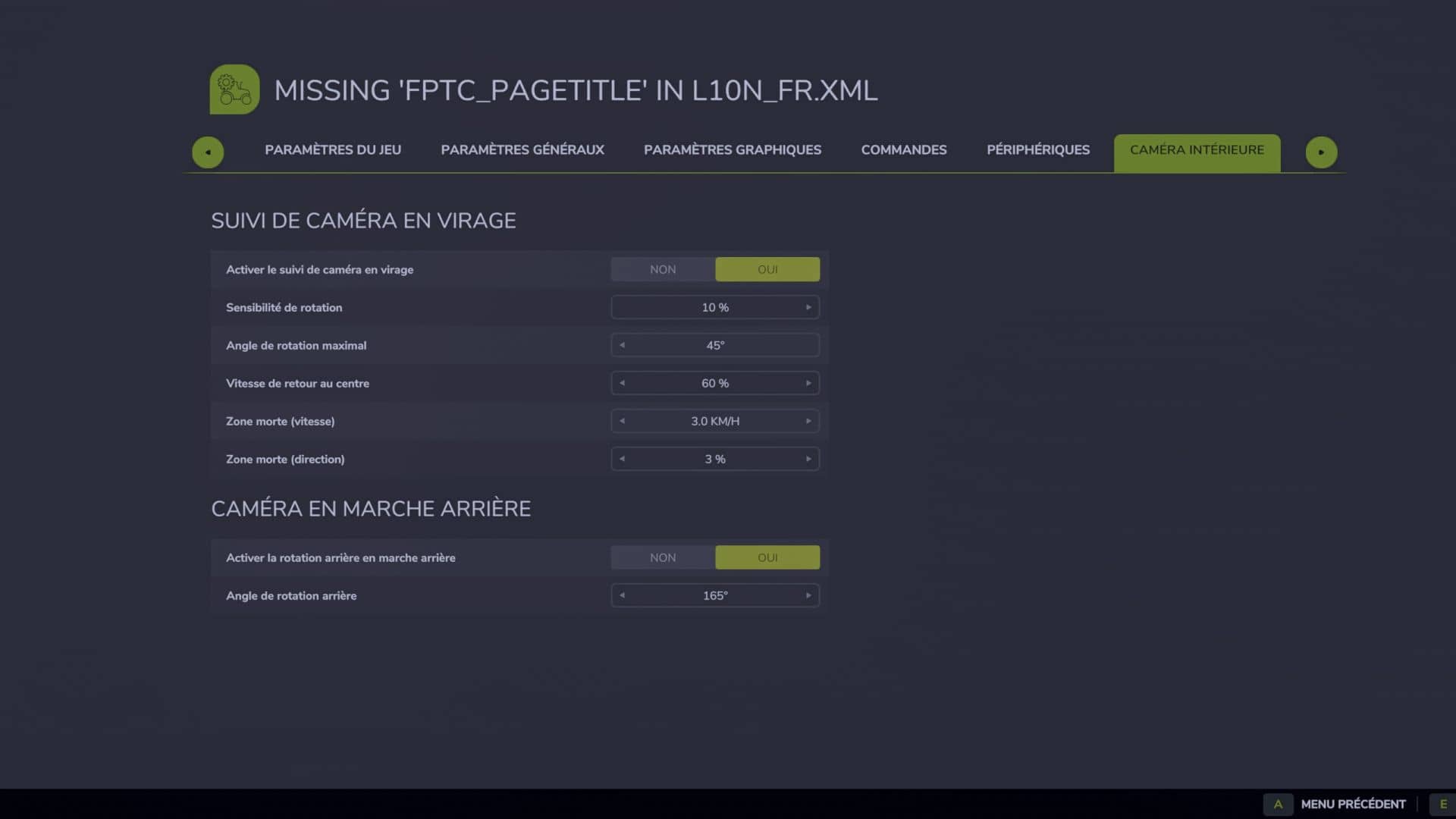
Dynamic interior camera when turning v1.3 | FS25 Mod Download Home Upload Mod Featured Mods FS25 Universal Autoload FS25 Courseplay FS25 Autodrive FS25 Super Strength FS25 Vehicle Explorer FS25 Enhanced Vehicle Installing Mods Modding Info FS25 Modding Guide FS25 Modding Tool How to Start Modding How to edit a Tractor? Convert FS22 to FS25 Mods Testing Your FS25 Mods FS25 Cheats FS25 Guides FS25 FAQ About FS25 FS25 News Giants Editor FS25 FS25 Ground Deformation FS25 Release Date FS25 Mods on Consoles FS25 System Requirements FS25 Console Commands Download FS25 Game Landwirtschafts Simulator 25 Mods Best Mods Help Contacts Maps Cars Trucks Tractors Trailers Vehicles Excavators Implements Harvesters Headers Buildings Objects Gameplay Prefab Textures Packs Gameplay / Other Dynamic interior camera when turning v1.3 FS25 Mods | 25 Jul, 2026 Operation: – active only in interior view; – the camera reacts to the actual rotation of the vehicle; – no reaction if the steering wheel turns while the vehicle remains stationary; – the tighter the turn, the more the camera looks around the turn; – gradual return to the center; – automatic switch to rear view as soon as reverse gear is selected; – reversing to the right: camera 165° to the right rear; – reversing to the left: camera 165° towards the left rear; – by moving straight back, the camera keeps the last side detected; – the left/right change is done around the rear without going back to the front; – progressive return to the front when forward gear is selected; – the mouse and joystick continue to move the camera normally; – multiplayer compatible, because the effect is only local and visual. Advanced settings: – The values are at the beginning of the file: – src/FirstPersonTurnCamera.lua – MAX_ANGLE_DEG = maximum forward camera angle. – MIN_SPEED_KMH = minimum speed before activation. – YAW_SAMPLE_TIME = duration of the average which stabilizes the rotation. – YAW_FILTER_RESPONSE = smoothing of the actual vehicle rotation. – FOLLOW_RESPONSE = speed of movement towards the turn. – RETURN_RESPONSE = speed of return to center. – REVERSE_RIGHT_ANGLE_DEG = right rear angle (-165°). – REVERSE_LEFT_ANGLE_DEG = rear left angle (+165°). – REVERSE_SIDE_SWITCH_YAW_DEG = rotation required to switch sides when moving backwards. – REVERSE_SIDE_MIN_SPEED_KMH = minimum speed to detect reversing side. – REVERSE_FOLLOW_RESPONSE = speed of pivoting backwards. – REVERSE_RETURN_RESPONSE = speed of return after reversing. – Version 1.0.1.0: Removed stuttering caused by irregular physics updates. – Version 1.1.0.0: Added automatic camera rotation when switching to reverse. – Version 1.2.0.0: Added rear left and rear right views depending on the actual direction of recoil. Installation: – Place the ZIP file directly in: – Documents/My Games/FarmingSimulator2025/mods – Then activate the mod in the save. V1.3.0.0 IN-GAME SETTINGS 1. Open the pause menu with ESC. 2. Open the SETTINGS page of the game. 3. Select the INDOOR CAMERA subcategory. – Settings now use the native FS25 layout. – No separate pages or blank panels are created. OPTIONS – Activate turn tracking – Sensitivity – Maximum angle – Speed of return to center – Minimum activation speed – Steering dead zone – Enable automatic rear view – Rear corner The automatic rear view remains disabled on harvesting machines provided by the mod. Author: Zarthars Tags: ESC OPTIONS SETTINGS ZIP Having problems with the mod? Check the comments for possible solutions, and report any new bugs you discover. Download Useful Information: How to install FS25 Mods | Farming Simulator 25 FAQ | Farming Simulator 25 News | FS25 System Requirements | Download FS25 Game | Giants Editor FS25 | FS25 Modding Guide | FS25 Cheats | FS25 Guides ... --> Auto Turn Off For Turn Lights v1.0.1.0 Gameplay / Other 24 Jun, 2025 Pallet delivery contracts v1.0.3.0 Gameplay / Other 9 Aug, 2026 Universal Forage Headers v1.0 Gameplay / Other 29 Jul, 2026 Leave a Reply Cancel reply Your email address will not be published. Required fields are marked * Comment Name * Email * I have read and accepted the Privacy Policy * Categories Maps Cars Trucks Combine / Harvesters Tractors Trailers Forestry Forklifts / Excavators Vehicles Headers Buildings Implements / Tools Objects Gameplay Seasons Prefab Textures Packs Trending Mods Strumyk Grom Pack v1.0 17 Aug, 2026 Kuhn GA 15131 Rust Edition v1.4 16 Aug, 2026 Kuhn DC 401 plow v1.5 16 Aug, 2026 Kuhn GMD 4411 Rust Edition v1.5 16 Aug, 2026 Kuhn HR 4040 + VENTA 4030 Rust Edition v1.4 16 Aug, 2026 Kuhn GF 8712 Rust Edition v1.6 16 Aug, 2026 Recent Comments Stas Halus says: The mod is very rough, the dimensions are larger than normal,... Petrica says: that is cool without errors, but pl
Dynamic interior camera when turning v1. 3 | FS25 Mod Download Home Upload Mod Featured Mods FS25 Universal Autoload FS25 Courseplay FS25 Autodrive FS25 Super Strength FS25 Vehicle Explorer FS25 Enhanced Vehicle Installing Mods Modding Info FS25 Modding Guide FS25 Modding Tool How to Start Modding How to edit a Tractor? Convert FS22 to FS25 Mods Testing Your FS25 Mods FS25 Cheats FS25 Guides FS25 FAQ About FS25 FS25 News Giants Editor FS25 FS25 Ground Deformation FS25 Release Date FS25 Mods on Consoles FS25 System Requirements FS25 Console Commands Download FS25 Game Landwirtschafts Simulator 25 Mods Best Mods Help Contacts Maps Cars Trucks Tractors Trailers Vehicles Excavators Implements Harvesters Headers Buildings Objects Gameplay Prefab Textures Packs Gameplay / Other Dynamic interior camera when turning v1. 3 FS25 Mods | 25 Jul, 2026 Operation: – active only in interior view; – the camera reacts to the actual rotation of the vehicle; – no reaction if the steering wheel turns while the vehicle remains stationary; – the tighter the turn, the more the camera looks around the turn; – gradual return to the center; – automatic switch to rear view as soon as reverse gear is selected; – reversing to the right: camera 165° to the right rear; – reversing to the left: camera 165° towards the left rear; – by moving straight back, the camera keeps the last side detected; – the left/right change is done around the rear without going back to the front; – progressive return to the front when forward gear is selected; – the mouse and joystick continue to move the camera normally; – multiplayer compatible, because the effect is only local and visual. Advanced settings: – The values are at the beginning of the file: – src/FirstPersonTurnCamera.lua – MAX_ANGLE_DEG = maximum forward camera angle. – MIN_SPEED_KMH = minimum speed before activation. – YAW_SAMPLE_TIME = duration of the average which stabilizes the rotation. – YAW_FILTER_RESPONSE = smoothing of the actual vehicle rotation. – FOLLOW_RESPONSE = speed of movement towards the turn. – RETURN_RESPONSE = speed of return to center. – REVERSE_RIGHT_ANGLE_DEG = right rear angle (-165°). – REVERSE_LEFT_ANGLE_DEG = rear left angle (+165°). – REVERSE_SIDE_SWITCH_YAW_DEG = rotation required to switch sides when moving backwards. – REVERSE_SIDE_MIN_SPEED_KMH = minimum speed to detect reversing side. – REVERSE_FOLLOW_RESPONSE = speed of pivoting backwards. – REVERSE_RETURN_RESPONSE = speed of return after reversing. – Version 1. 0. 1. 0: Removed stuttering caused by irregular physics updates. – Version 1. 1. 0. 0: Added automatic camera rotation when switching to reverse. – Version 1. 2. 0. 0: Added rear left and rear right views depending on the actual direction of recoil. Installation: – Place the ZIP file directly in: – Documents/My Games/FarmingSimulator2025/mods – Then activate the mod in the save. V1. 3. 0. 0 IN-GAME SETTINGS 1. Open the pause menu with ESC. 2. Open the SETTINGS page of the game. 3. Select the INDOOR CAMERA subcategory. – Settings now use the native FS25 layout. – No separate pages or blank panels are created. OPTIONS – Activate turn tracking – Sensitivity – Maximum angle – Speed of return to center – Minimum activation speed – Steering dead zone – Enable automatic rear view – Rear corner The automatic rear view remains disabled on harvesting machines provided by the mod. Author: Zarthars Tags: ESC OPTIONS SETTINGS ZIP Having problems with the mod? Check the comments for possible solutions, and report any new bugs you discover. Download Useful Information: How to install FS25 Mods | Farming Simulator 25 FAQ | Farming Simulator 25 News | FS25 System Requirements | Download FS25 Game | Giants Editor FS25 | FS25 Modding Guide | FS25 Cheats | FS25 Guides ... --> Auto Turn Off For Turn Lights v1. 0. 1. 0 Gameplay / Other 24 Jun, 2025 Pallet delivery contracts v1. 0. 3. 0 Gameplay / Other 9 Aug, 2026 Universal Forage Headers v1. 0 Gameplay / Other 29 Jul, 2026 Leave a Reply Cancel reply Your email address will not be published. Required fields are marked Comment Name Email I have read and accepted the Privacy Policy Categories Maps Cars Trucks Combine / Harvesters Tractors Trailers Forestry Forklifts / Excavators Vehicles Headers Buildings Implements / Tools Objects Gameplay Seasons Prefab Textures Packs Trending Mods Strumyk Grom Pack v1. 0 17 Aug, 2026 Kuhn GA 15131 Rust Edition v1. 4 16 Aug, 2026 Kuhn DC 401 plow v1. 5 16 Aug, 2026 Kuhn GMD 4411 Rust Edition v1. 5 16 Aug, 2026 Kuhn HR 4040 + VENTA 4030 Rust Edition v1. 4 16 Aug, 2026 Kuhn GF 8712 Rust Edition v1. 6 16 Aug, 2026 Recent Comments Stas Halus says: The mod is very rough, the dimensions are larger than normal,... Petrica says: that is cool without errors, but pl
📊 Mod Details
- Game
- Fs25 Hub Mods
- Author
- fs25modhub.com
- Version
- 1.3
- Downloads
- 0
- Endorsements
- 0
- Category
- Other
- Created
- 7/25/2026
- Updated
- 7/25/2026
🔧 How to Install Farming Simulator 25 Mods
Download from https://www.fs25modhub.com.
📖 Full step-by-step install guide for Farming Simulator 25 →
Visit the official mod page for specific installation instructions for this mod.
🎮 Need cheat codes or console commands? Check ur gaming wiki for Farming Simulator 25 commands, item IDs, and more.
Keep browsing — more Farming Simulator 25 mods await