Compass Heading Display v1.1
🟡 Updated this yearPreview
🔍 Analysis
- 🏆 #259 of 2245 Other mods in this game by downloads
📋 About This Mod
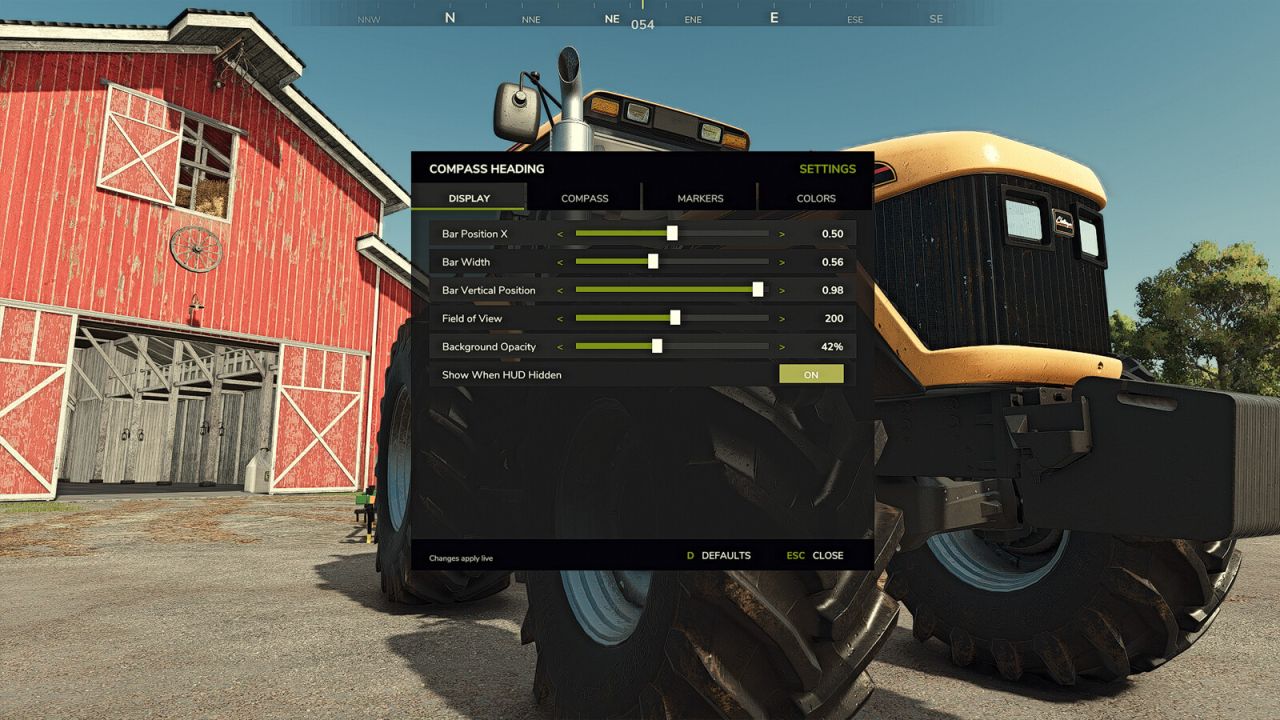
Compass Heading Display v1. 1 | FS25 Mod Download Home Upload Mod Featured Mods FS25 Universal Autoload FS25 Courseplay FS25 Autodrive FS25 Super Strength FS25 Vehicle Explorer FS25 Enhanced Vehicle Installing Mods Modding Info FS25 Modding Guide FS25 Modding Tool How to Start Modding How to edit a Tractor? Convert FS22 to FS25 Mods Testing Your FS25 Mods FS25 Cheats FS25 Guides FS25 FAQ About FS25 FS25 News Giants Editor FS25 FS25 Ground Deformation FS25 Release Date FS25 Mods on Consoles FS25 System Requirements FS25 Console Commands Download FS25 Game Landwirtschafts Simulator 25 Mods Best Mods Help Contacts Maps Cars Trucks Tractors Trailers Vehicles Excavators Implements Harvesters Headers Buildings Objects Gameplay Prefab Textures Packs Gameplay / Other Compass Heading Display v1. 1 FS25 Mods | 6 Aug, 2026 Compass Heading Display adds a smooth, scrolling horizontal compass bar to the top of your screen, now with a full in-game settings menu, a heading lock with an optional steering and walking lock, wild boar alerts for the GIANTS Vredo Pack DLC, and a dispatch marker for the GIANTS Emergency Pack DLC. COMPASS A full 16-point compass rose with tick marks every 10 degrees and a gold centre indicator showing your live numeric heading. Waypoint tracking with distance, tornado tracking with a flashing red marker, multiplayer player tracking with farm colours, and AI helper tracking with blocked-helper alerts. Filter players and helpers by farm. IN-GAME SETTINGS MENU (default F6) Configure everything without editing files, across four tabs: Display (bar position, width, field of view, background opacity), Compass (labels, tick marks, centre indicator, degree readout), Markers, and Colours (per-marker colour presets). A DEFAULTS button restores the original settings, and everything still saves to settings.xml. HEADING LOCK (default the [ key) Pin your current bearing on the compass with a live steer-correction cue and an on-line indicator, ideal for driving dead-straight passes or hand-working fields on foot. Turn on the optional Steering / Walk Lock to hold your line automatically: while locked, your vehicle drives straight and, uniquely, on foot with hand tools you keep walking dead-straight too, not just in vehicles. A thin guidance line runs along the ground ahead of you so you can see the exact row you are holding. Toggle it off any time. WILD BOAR ALERTS (VREDO PACK DLC) Wild boar come with the official GIANTS Vredo Pack DLC, and they can trample and ruin your crops. If you own that DLC, the compass adds a flashing marker whenever a boar herd wanders onto land your own farm owns, pointing straight to it so you can track it down and clear it before it damages the field. The alert only ever covers fields your own farm owns. EMERGENCY PACK DLC If you own the official GIANTS Emergency Pack DLC, the compass adds a flashing emergency marker that points to your active dispatch, so you always know which way the call is, on foot or in any vehicle. All keybinds are rebindable in Options > Controls. Works in singleplayer and multiplayer. No performance impact. No dependencies required (the Emergency Pack marker appears only if you own that DLC). For a link to our latest release, Help page and GitHub page where you can find more information, help, and report issues please visit our Compass Heading Website or go directly to our GitHub page. Many thanks to our translators and to our community for reporting bugs, giving us feedback and great ideas. V1. 1. 0. 0 – Added a full in-game settings menu (default F6) with Display, Compass, Markers and Colours tabs. – Added Heading Lock (default the [ key) with an optional Steering / Walk Lock and a ground guidance line. – Added Wild Boar Alerts for the GIANTS Vredo Pack DLC. – Added a dispatch marker for the GIANTS Emergency Pack DLC. – Fixes and stability improvements. Author: RocklandUSA Gaming Tags: AI Compass Heading Display DLC Steering Walk Lock Having problems with the mod? Check the comments for possible solutions, and report any new bugs you discover. Download Useful Information: How to install FS25 Mods | Farming Simulator 25 FAQ | Farming Simulator 25 News | FS25 System Requirements | Download FS25 Game | Giants Editor FS25 | FS25 Modding Guide | FS25 Cheats | FS25 Guides ... --> Realistic Reshade v1. 0 Gameplay / Other 28 Jun, 2025 Enhanced Mod Menu v1. 6 Gameplay / Other 10 May, 2026 Free Labour V1. 0. 0. 0 Gameplay / Other 25 Dec, 2024 Leave a Reply Cancel reply Your email address will not be published. Required fields are marked Comment Name Email I have read and accepted the Privacy Policy Categories Maps Cars Trucks Combine / Harvesters Tractors Trailers Forestry Forklifts / Excavators Vehicles Headers Buildings Implements / Tools Objects Gameplay Seasons Prefab Textures Packs Trending Mods Strumyk Grom Pack v1. 0 17 Aug, 2026 Kuhn GA 15131 Rust Edition v1. 4 16 Aug, 2026 Kuhn DC 401 plow v1. 5 16 Aug, 2026 Kuhn GMD 4411 Rust Editio
Compass Heading Display adds a smooth, scrolling horizontal compass bar to the top of the screen in Farming Simulator 25. It includes an in-game settings menu, a heading lock with optional steering and walking lock, and more. This is a UI enhancement mod for players who want better navigation.
✨ Key Features
📊 Pros & Cons
✅ Pros
- Fresh mod with no endorsements yet, but it's brand new (updated August 2026) so you can get in early.
- The heading lock with steering and walking lock sounds handy for keeping your vehicle or character on a set course.
- Smooth scrolling compass bar is a nice QoL touch for navigation.
⚠️ Cons
- Zero endorsements and downloads means it's untested by the community — you're the guinea pig.
- No screenshots or detailed feature list in the description, so you're flying blind on what it actually looks like.
- Last updated just recently, but no version history or patch notes, so unclear if it's stable.
For Farming Simulator 25 players who want a cleaner way to navigate without constantly opening the map. If you're into precision farming or just like having a compass on screen, this is for you. Skip if you're happy with the vanilla map and don't need extra UI elements.
💡 Beginner Tips
- Since it's a UI mod, make sure to place the folder in your mods directory and enable it in the in-game mod manager.
- Check the in-game settings menu after installing to customize the compass bar and heading lock to your liking.
- If you use other UI mods, test for conflicts by enabling this one first and then adding others.
📊 Mod Details
- Game
- Fs25 Hub Mods
- Author
- fs25modhub.com
- Version
- 1.1
- Downloads
- 0
- Endorsements
- 0
- Category
- Other
- Created
- 8/6/2026
- Updated
- 8/6/2026
🔧 How to Install Farming Simulator 25 Mods
Download from https://www.fs25modhub.com.
📖 Full step-by-step install guide for Farming Simulator 25 →
Visit the official mod page for specific installation instructions for this mod.
🎮 Need cheat codes or console commands? Check ur gaming wiki for Farming Simulator 25 commands, item IDs, and more.
Keep browsing — more Farming Simulator 25 mods await