BXR Mod Manager v1.1.0.2
🟡 Updated this yearPreview
🔍 Analysis
- 🏆 #124 of 2245 Other mods in this game by downloads
📋 About This Mod
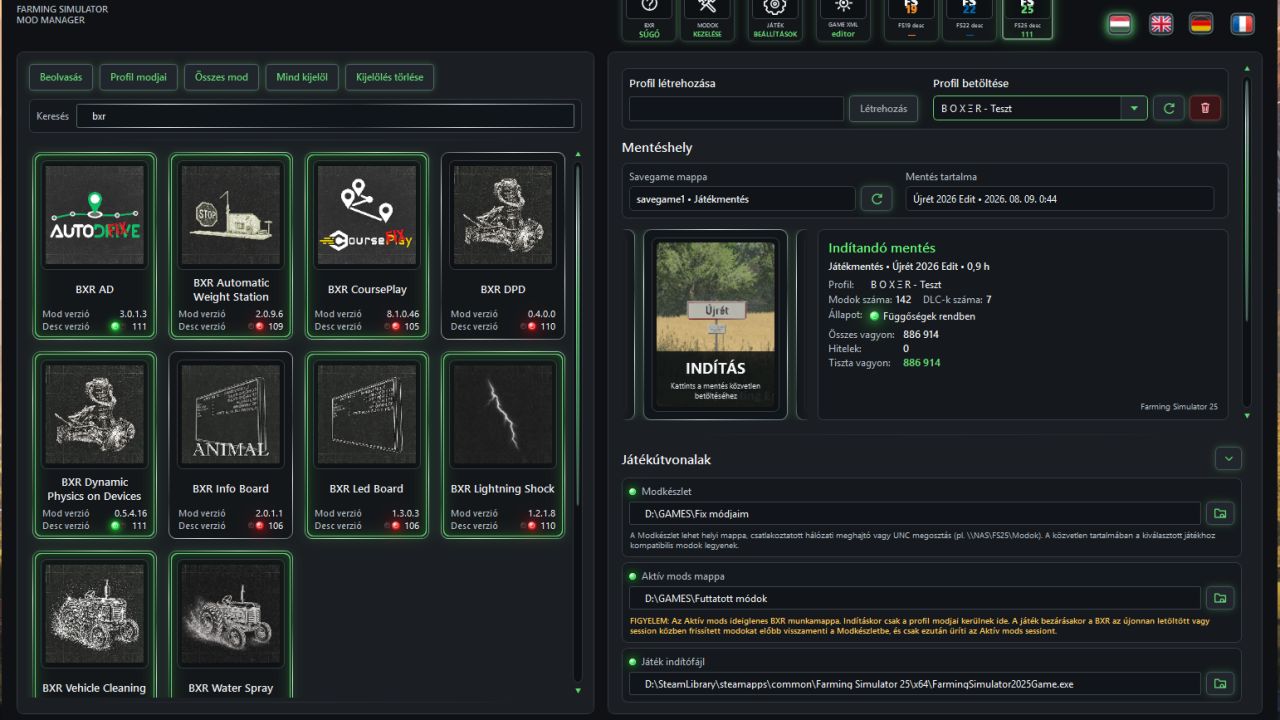
BXR Mod Manager v1. 1. 0. 2 | FS25 Mod Download Home Upload Mod Featured Mods FS25 Universal Autoload FS25 Courseplay FS25 Autodrive FS25 Super Strength FS25 Vehicle Explorer FS25 Enhanced Vehicle Installing Mods Modding Info FS25 Modding Guide FS25 Modding Tool How to Start Modding How to edit a Tractor? Convert FS22 to FS25 Mods Testing Your FS25 Mods FS25 Cheats FS25 Guides FS25 FAQ About FS25 FS25 News Giants Editor FS25 FS25 Ground Deformation FS25 Release Date FS25 Mods on Consoles FS25 System Requirements FS25 Console Commands Download FS25 Game Landwirtschafts Simulator 25 Mods Best Mods Help Contacts Maps Cars Trucks Tractors Trailers Vehicles Excavators Implements Harvesters Headers Buildings Objects Gameplay Prefab Textures Packs Gameplay / Other BXR Mod Manager v1. 1. 0. 2 FS25 Mods | 10 Aug, 2026 BXR Mod Manager – one click, and everything falls into place Hundreds of mods. Multiple maps. Multiple careers. Different dependencies, versions and savegames. Eventually, you are no longer choosing what to play—you are simply hoping the game will start. That is where BXR Mod Manager takes control. It does not merely organize mods. It connects everything that should always have belonged together: the game, the map, the mods, their dependencies, the profile and the savegame. Your entire collection on standby. Only the required mods in the game. Your permanent collection remains safely stored in the Mod Set. At launch, BXR selects the content required by the chosen profile, builds the Active mods environment, configures the correct paths and starts the game directly with its assigned savegame. No constant folder swapping. No more wondering which mod belonged to which map. No more forcing four hundred ZIP files into a single active directory. FS19, FS22 and FS25 are managed from the same application, while each retains its own completely separated environment. A profile that remembers everything for you A BXR profile is not just a mod list. It is the complete identity of your career: – the Farming Simulator generation; – the map being played; – the required mods and dependencies; – the assigned savegame; – and the environment from which it must launch. For a new profile, select the map and mods, enter a name, and you are ready. The profile becomes active immediately, receives a new save slot and is permanently associated with the career after its first direct save. For an existing profile, select its name. BXR already knows the rest. Savegame and profile mod lists no longer drift apart When you change a profile’s mods, BXR compares the new selection with the mod list stored inside the savegame. – Do they differ? It tells you. – Want to synchronize them? BXR creates a backup and actually rewrites the mod list inside `careerSavegame.xml`. – It does not merely assume that everything is fine. It checks, reports, protects and synchronizes. A complete pre-launch inspection Before the game even moves, BXR validates the entire profile. Missing dependency? Faulty mod? Lost map component? Instead of sending you away with a vague error message, BXR identifies the affected items and displays their mod icons wherever possible. If a required mod exists neither locally nor in your collection, BXR can request permission to download it automatically from the official ModHub during the game session. Permission applies only to missing content—it does not authorize updates to mods already installed. You decide. BXR handles the rest. Behind the Start tile is an entire launch chain – Pressing Start does far more than open an executable. BXR: 1. validates the profile and savegame; 2. resolves the required dependency chain; 3. prepares the Active mods environment; 4. configures the game’s mod path; 5. builds discoverable map data for a new career when required; 6. launches the correct game; 7. follows the Steam hand-off and the real game process; 8. monitors lengthy initialization; 9. locks dangerous changes while the game is running; 10. saves back newly downloaded or updated mods after shutdown; 11. and safely cleans the temporary environment. All while showing you exactly what is happening. If a map needs several minutes to construct its first savegame, BXR does not leave you staring at the screen and guessing. It shows that the process is still working, so a long initialization is never mistaken for a crash. Your career comes alive before the game even starts Profiles move through a continuous, uninterrupted tile carousel. No jumping, no image replacement halfway through, no animation falling apart between profiles. As the selected tile overshoots and rolls back into its resting position, the information panel comes alive with it: – profile and map; – assigned savegame; – mod and DLC counts; – assets, loans and net worth; – current work; – upcoming tasks. By the time the tile stops, you know not only what you are about to launch—you know exac
BXR Mod Manager is a tool for Farming Simulator 25 that organizes mods, maps, careers, dependencies, versions, and savegames with one-click setup. It aims to simplify managing large mod collections, though it has no endorsements or downloads yet.
✨ Key Features
📊 Pros & Cons
✅ Pros
- Solves a real pain point for mod-heavy players
- One-click setup sounds convenient
- Fresh release (August 2026) – potential for updates
⚠️ Cons
- Zero endorsements and downloads – unproven in the community
- Brand new tool – may have bugs or missing features
For Farming Simulator 25 players who juggle hundreds of mods and multiple savegames. If you're tired of manual mod management, this could be a time-saver. Skip if you only use a few mods or prefer manual control.
💡 Beginner Tips
- Since it's a mod manager, make sure to run it as administrator to avoid permission issues.
- Start with a backup of your mod folder before using the manager for the first time.
- Check for a readme or online guide – the description is incomplete.
📊 Mod Details
- Game
- Fs25 Hub Mods
- Author
- fs25modhub.com
- Version
- 1.1.0.2
- Downloads
- 0
- Endorsements
- 0
- Category
- Other
- Created
- 8/10/2026
- Updated
- 8/10/2026
🔧 How to Install Farming Simulator 25 Mods
Download from https://www.fs25modhub.com.
📖 Full step-by-step install guide for Farming Simulator 25 →
Visit the official mod page for specific installation instructions for this mod.
🎮 Need cheat codes or console commands? Check ur gaming wiki for Farming Simulator 25 commands, item IDs, and more.
Keep browsing — more Farming Simulator 25 mods await