BXR Mod Manager v1.0
🟡 Updated this yearPreview
🔍 Analysis
- 🏆 #175 of 2245 Other mods in this game by downloads
📋 About This Mod
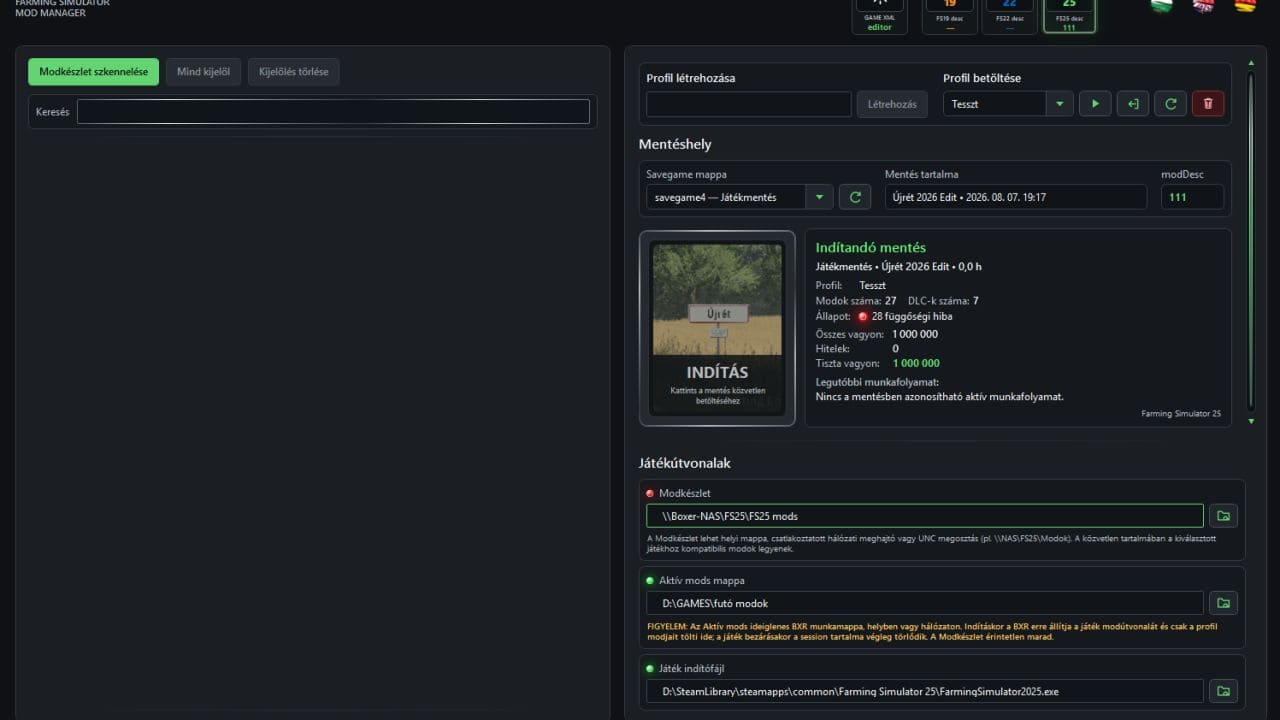
BXR Mod Manager v1. 0 | FS25 Mod Download Home Upload Mod Featured Mods FS25 Universal Autoload FS25 Courseplay FS25 Autodrive FS25 Super Strength FS25 Vehicle Explorer FS25 Enhanced Vehicle Installing Mods Modding Info FS25 Modding Guide FS25 Modding Tool How to Start Modding How to edit a Tractor? Convert FS22 to FS25 Mods Testing Your FS25 Mods FS25 Cheats FS25 Guides FS25 FAQ About FS25 FS25 News Giants Editor FS25 FS25 Ground Deformation FS25 Release Date FS25 Mods on Consoles FS25 System Requirements FS25 Console Commands Download FS25 Game Landwirtschafts Simulator 25 Mods Best Mods Help Contacts Maps Cars Trucks Tractors Trailers Vehicles Excavators Implements Harvesters Headers Buildings Objects Gameplay Prefab Textures Packs Gameplay / Other BXR Mod Manager v1. 0 FS25 Mods | 8 Aug, 2026 For a long time, one question kept bothering me: why should we have to adapt to Farming Simulator's mods folder? Why should hundreds, or even thousands, of mods have to live in a single directory, constantly being moved around by hand for different maps and savegames, while we keep track of dependencies and hope that only the right mods are active for the game we're about to play? So I decided to approach it differently. And now… I am proud to present to the world… wait… wait… let me savor that for a moment… the world's first truly functional Farming Simulator Mod Manager: B O X Ξ R MOD MANAGER. This isn't another application that simply lists the contents of your mods folder, nor is it just a prettier interface wrapped around a handful of file operations. The idea behind BXR Mod Manager is fundamentally different: your game's mods folder should no longer dictate how and where you store and use your mods. Your entire mod collection can be stored wherever it makes sense for you: in another folder, on another drive, on a network drive, or even on a NAS. BXR works from this central Mod Collection. You decide which mods belong to a particular map, save that setup as a profile, assign the appropriate savegame, and from that point on the Manager makes sure that the environment required by that profile is ready when the game starts. But it doesn't stop at moving files. It checks mod dependencies and their transitive dependencies, recognizes official DLC/pDLC content, handles the map mod separately, manages profiles and savegames, prepares the BXR session and launches the game. And just as importantly, it doesn't assume the game has ended simply because a launcher process disappeared. It waits until Farming Simulator has actually closed, and only then cleans up the temporary session. The result is exactly what I wanted from the beginning: I no longer serve the mods folder — the Mod Manager serves the game. One map, one profile, its corresponding mods and the correct savegame. Another map? Another profile. A different setup? Just a few clicks. Meanwhile, your massive mod collection doesn't need to sit inside the active mods directory, unnecessarily slowing down the game's startup. There's even a GAME XML Editor, allowing important game configuration files such as game.xml, gameSettings.xml and inputBinding.xml to be managed from the same environment, complete with XML validation and backup support. Farming Simulator 25 is currently the primary target platform, while support for FS22 and FS19 is also part of the system. Author: B O X E R Tags: BXR DLC Farming Simulator XML Having problems with the mod? Check the comments for possible solutions, and report any new bugs you discover. Download Useful Information: How to install FS25 Mods | Farming Simulator 25 FAQ | Farming Simulator 25 News | FS25 System Requirements | Download FS25 Game | Giants Editor FS25 | FS25 Modding Guide | FS25 Cheats | FS25 Guides ... --> Manure Steam v1. 0 Gameplay / Other 19 Jun, 2026 Smart Crop Control v1. 2 Gameplay / Other 11 Aug, 2026 Thunder FST990 Edit v1. 0 Gameplay / Other 9 May, 2026 Leave a Reply Cancel reply Your email address will not be published. Required fields are marked Comment Name Email I have read and accepted the Privacy Policy Categories Maps Cars Trucks Combine / Harvesters Tractors Trailers Forestry Forklifts / Excavators Vehicles Headers Buildings Implements / Tools Objects Gameplay Seasons Prefab Textures Packs Trending Mods Strumyk Grom Pack v1. 0 17 Aug, 2026 Kuhn GA 15131 Rust Edition v1. 4 16 Aug, 2026 Kuhn DC 401 plow v1. 5 16 Aug, 2026 Kuhn GMD 4411 Rust Edition v1. 5 16 Aug, 2026 Kuhn HR 4040 + VENTA 4030 Rust Edition v1. 4 16 Aug, 2026 Kuhn GF 8712 Rust Edition v1. 6 16 Aug, 2026 Recent Comments Stas Halus says: The mod is very rough, the dimensions are larger than normal,... Petrica says: that is cool without errors, but please in the future updates,... josef says: good game Andrew Reichling says: hi..ive been liking your mod but i can't seem to find... MadDogg says: Ugh why don't people put the specs on the equipment Martin says: How does a coffee operation like this make you load alread
BXR Mod Manager v1.0 is a utility mod for Farming Simulator 25 that aims to solve the problem of managing a large number of mods in the game's default folder. It is a fresh release with no endorsements or downloads yet, so its functionality is unproven.
✨ Key Features
📊 Pros & Cons
✅ Pros
- Addresses a real pain point for mod-heavy players who struggle with the default folder structure.
- Fresh release (August 2026) means it's built for the current Farming Simulator 25 version.
- Zero endorsements yet – you could be an early adopter and help shape its development.
⚠️ Cons
- No endorsements or downloads – completely unproven, could be buggy or unfinished.
- No user feedback to confirm it actually works as described.
For Farming Simulator 25 players who have hundreds of mods and are tired of the default folder management. If you're a mod hoarder looking for a better way to organize, this might be worth a try. Skip if you only use a handful of mods – the problem it solves doesn't apply to you.
💡 Beginner Tips
- Since it's a mod manager, you'll likely need to run it as an administrator to avoid permission issues with the game's mod folder.
- Back up your existing mods folder before using the manager, just in case it reorganizes files unexpectedly.
- Check the mod's page on fs25modhub.com for any updates or user comments after installation.
📊 Mod Details
- Game
- Fs25 Hub Mods
- Author
- fs25modhub.com
- Version
- 1.0
- Downloads
- 0
- Endorsements
- 0
- Category
- Other
- Created
- 8/8/2026
- Updated
- 8/8/2026
🔧 How to Install Farming Simulator 25 Mods
Download from https://www.fs25modhub.com.
📖 Full step-by-step install guide for Farming Simulator 25 →
Visit the official mod page for specific installation instructions for this mod.
🎮 Need cheat codes or console commands? Check ur gaming wiki for Farming Simulator 25 commands, item IDs, and more.
Keep browsing — more Farming Simulator 25 mods await