AVA Mod Manager BETA v1.0
🟡 Updated this yearPreview
🔍 Analysis
- 🏆 #109 of 2245 Other mods in this game by downloads
📋 About This Mod
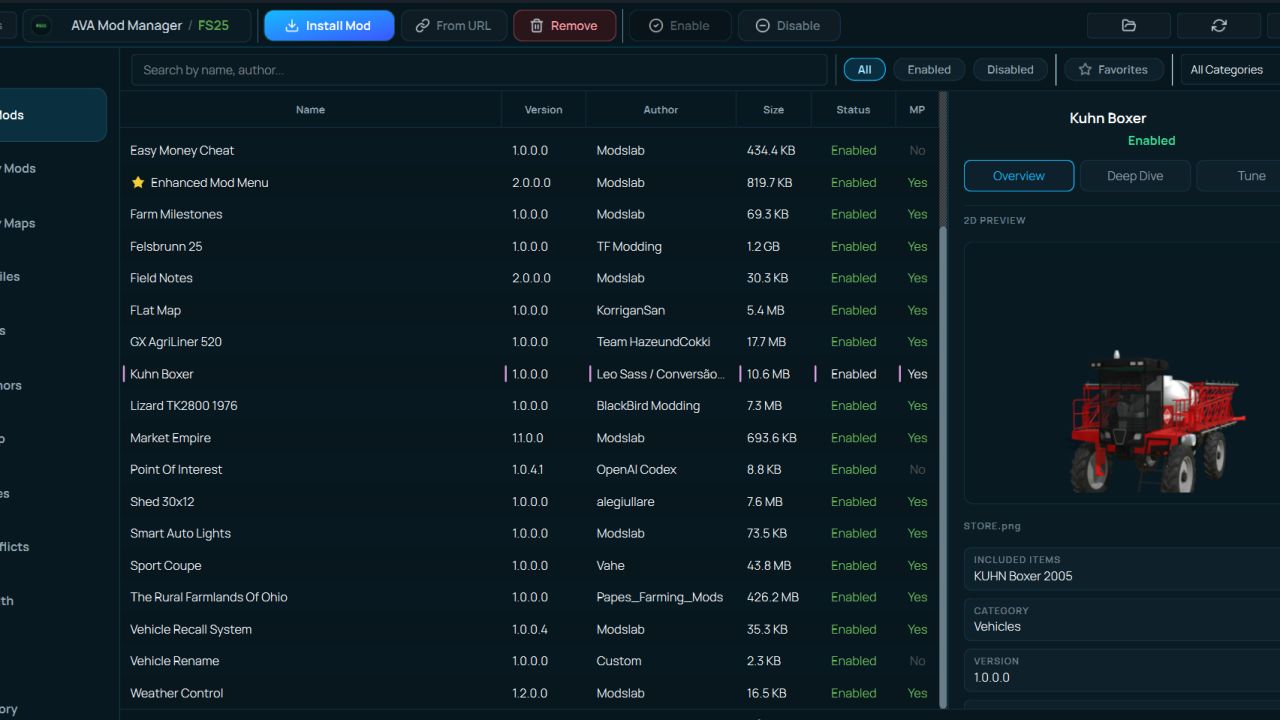
AVA Mod Manager BETA v1. 0 | FS25 Mod Download Home Upload Mod Featured Mods FS25 Universal Autoload FS25 Courseplay FS25 Autodrive FS25 Super Strength FS25 Vehicle Explorer FS25 Enhanced Vehicle Installing Mods Modding Info FS25 Modding Guide FS25 Modding Tool How to Start Modding How to edit a Tractor? Convert FS22 to FS25 Mods Testing Your FS25 Mods FS25 Cheats FS25 Guides FS25 FAQ About FS25 FS25 News Giants Editor FS25 FS25 Ground Deformation FS25 Release Date FS25 Mods on Consoles FS25 System Requirements FS25 Console Commands Download FS25 Game Landwirtschafts Simulator 25 Mods Best Mods Help Contacts Maps Cars Trucks Tractors Trailers Vehicles Excavators Implements Harvesters Headers Buildings Objects Gameplay Prefab Textures Packs Gameplay / Other AVA Mod Manager BETA v1. 0 FS25 Mods | 10 Aug, 2026 A mod manager for Farming Simulator 25. It installs and removes mods, keeps your mods folder tidy, finds conflicts before they stop the game from loading, reads the game log, edits savegames, and shows you exactly what every mod adds to the in-game shop. Free, no ads, no bundled third-party software. Why you would want it Anyone running more than twenty mods knows the stories. The game stopped loading and there is no telling which mod did it. Two mods added the same fill type and now the shop is a mess. You updated a mod, the old one was better, and the old one is gone. You want to switch half your mods off for one savegame and switch them all back afterwards. The manager solves this by reading the same files the game reads and telling you what is in them in plain language. General features – Installing mods. Drop an archive on the window or pick a file. It handles zip, 7z and rar, and works out where the mod belongs on its own. – Enable and disable. Disabled mods are not deleted. They move to a separate folder and come back with one click. The game does not see them, you do not lose them. – Mod profiles. Named sets of mods you can switch between. One set for multiplayer, another for singleplayer, another for a specific map. Switching swaps the contents of the mods folder as a whole. – Version archive. When you update a mod, the old version is kept rather than overwritten. If the new one turns out worse, rolling back takes two clicks, and the version you are replacing is archived too, so the rollback is itself reversible. – History. What was installed, enabled, disabled or removed, and when. When the game suddenly breaks, the first question is always "what did I change yesterday", and now there is an answer. – One-click install from ModsFire. Press the button on the site and the mod arrives in the manager. For now, several authors are supported, but going forward it'll be easy to auto-install almost any mods from this file-sharing service. – Seven interface languages: English, Russian, Ukrainian, German, French, Spanish and Portuguese. – Several games in one window. Besides FS25 it supports FS22, FS19, BeamNG.drive, Euro Truck Simulator 2 and American Truck Simulator, each with its own folder and its own settings. What it does specifically for FS25 This is where most of the work went. Everything below reads the game's real files rather than guessing. 1)Conflict detection Finds the things that make mods fight each other, and explains what each one will actually break: – The same fill type (`fillType`) declared by two different mods – The same vehicle type (`vehicleType`) registered twice, where the second registration overrides the first and the displaced mod's vehicles fail to load – Two shop items with the same name, which leaves you two near-identical entries in the store – Key binding clashes, with the exact list of which mod bound which action to that key – The same script file loaded by more than one mod – Duplicates and older copies of the same mod 2) Mod health checks Separately, it finds mods that are broken on their own: – An archive inside an archive, which the game cannot unpack – A missing or corrupt `modDesc.xml` – Files wrapped in an extra folder, so the game never sees the mod at all – DescVersion problems, including mods built for a newer game version – Internal paths too long to extract, which is why vehicles or textures later go missing in game – Corrupt archives and leftover junk files 3) Log analysis Reads the game's log.txt and turns it into a readable list: what the error is, which mod caused it, and what to do about it. Repeated errors collapse into a single entry with a counter, so one message repeated two hundred times does not bury everything else. It recognises missing files and textures, Lua errors with their call stacks, missing translations, uncompressed textures, vehicles that fell through the map, and rejected mod filenames. 4) Shop browser Shows everything your installed mods add to the in-game store, in one list. Search, filters by brand, category and typ
AVA Mod Manager BETA v1.0 is a utility tool for Farming Simulator 25 that installs and removes mods, organizes the mods folder, detects conflicts, reads game logs, and edits savegames. It's a brand-new tool with no endorsements or downloads yet, so its reliability is unproven.
✨ Key Features
📊 Pros & Cons
✅ Pros
- All-in-one tool: handles mod installation, conflict detection, log reading, and savegame editing
- Conflict detection before game load could save you from frustrating crashes
- Savegame editing is a handy extra for tweaking your farm
⚠️ Cons
- Zero endorsements and downloads — this is a brand-new beta, so expect bugs
- Beta status means features may change or break; use with caution
For Farming Simulator 25 players who juggle lots of mods and want a central tool to manage them. Also for tinkerers who like editing savegames. Skip if you prefer manual mod management or want a proven, stable tool.
💡 Beginner Tips
- Since it's a beta, back up your mods folder and savegames before using it
- Run the conflict detection feature after installing new mods to catch issues early
- Check the game log after a crash to see if the mod manager's log reading helps pinpoint the problem
📊 Mod Details
- Game
- Fs25 Hub Mods
- Author
- fs25modhub.com
- Version
- 1.0
- Downloads
- 0
- Endorsements
- 0
- Category
- Other
- Created
- 8/10/2026
- Updated
- 8/10/2026
🔧 How to Install Farming Simulator 25 Mods
Download from https://www.fs25modhub.com.
📖 Full step-by-step install guide for Farming Simulator 25 →
Visit the official mod page for specific installation instructions for this mod.
🎮 Need cheat codes or console commands? Check ur gaming wiki for Farming Simulator 25 commands, item IDs, and more.
Keep browsing — more Farming Simulator 25 mods await