AutoDrive Navi AddOn v1.0.1.0
🟡 Updated this yearPreview
🔍 Analysis
- 🏆 #3 of 65 Scripts mods in this game by downloads
📋 About This Mod
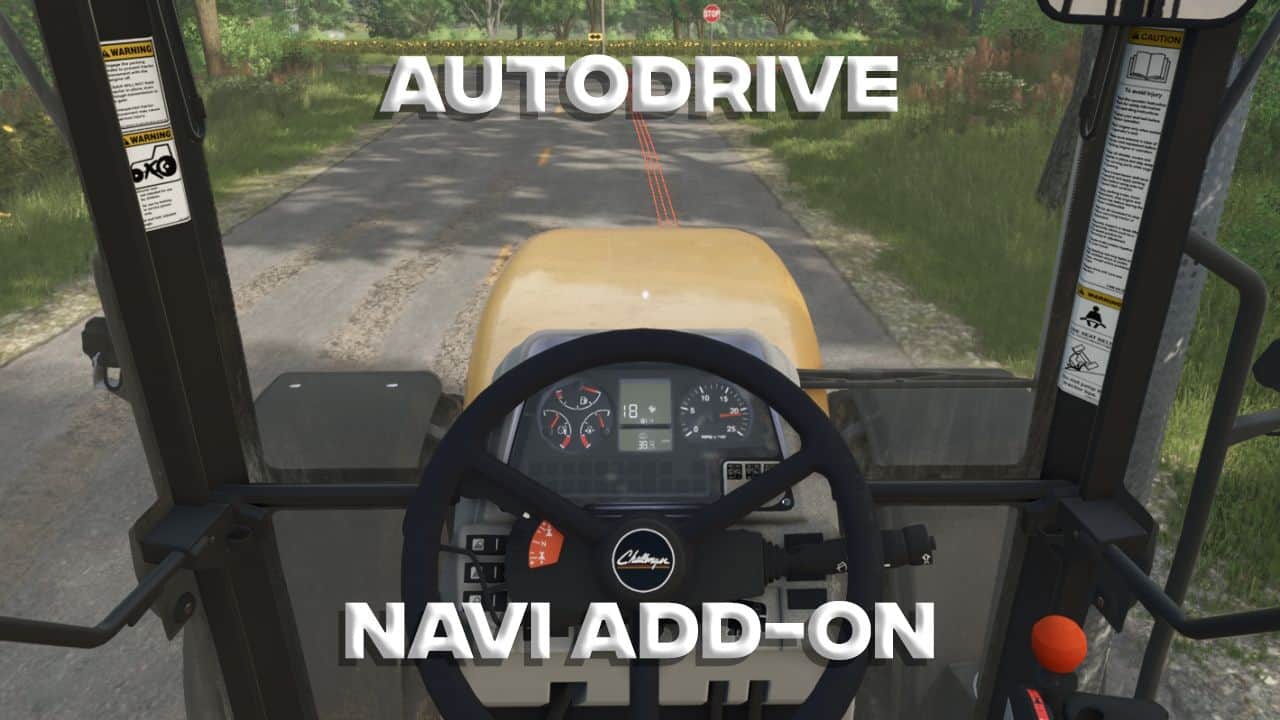
AutoDrive Navi AddOn v1.0.1.0 | FS25 Mod Download Home Upload Mod Featured Mods FS25 Universal Autoload FS25 Courseplay FS25 Autodrive FS25 Super Strength FS25 Vehicle Explorer FS25 Enhanced Vehicle Installing Mods Modding Info FS25 Modding Guide FS25 Modding Tool How to Start Modding How to edit a Tractor? Convert FS22 to FS25 Mods Testing Your FS25 Mods FS25 Cheats FS25 Guides FS25 FAQ About FS25 FS25 News Giants Editor FS25 FS25 Ground Deformation FS25 Release Date FS25 Mods on Consoles FS25 System Requirements FS25 Console Commands Download FS25 Game Landwirtschafts Simulator 25 Mods Best Mods Help Contacts Maps Cars Trucks Tractors Trailers Vehicles Excavators Implements Harvesters Headers Buildings Objects Gameplay Prefab Textures Packs Gameplay / Other AutoDrive Navi AddOn v1.0.1.0 FS25 Mods | 24 Apr, 2026 This mod transforms the AutoDrive mod into a navigation system. Get into your vehicle, select a destination from the AutoDrive menu, press RightShift+N , and the route will be displayed on the minimap and as a line on the road. Press Ctrl+RightShift+N to open the settings. Here you have two tabs: Minimap and Road, which you can switch between using Q and E. Use the up and down arrow keys to select an entry in the menu (or simply click with the mouse), and use A and D or the left and right arrow keys to cycle through the options. Minimap – Display: If you only want to see the lines on the road, you can disable them for the minimap here. – Color: Change the color of the displayed line. – Thickness: Change the thickness of the displayed line. – Visibility: Choose how long the line should be displayed on the minimap. The entire route is always displayed on the large minimap. Note that if the line is too long, it will be "stacked" at the edge of the minimap. – Show Road: If you only want to see the lines on the minimap, you can disable them for roads here. – Color: Change the color of the displayed lines. – Length: Adjust the length of the lines displayed in front of you. – Thickness: The thickness is defined by the number of thin lines displayed. – Start: Here you can select how far in front of you the displayed lines should begin. This mod may be freely modified and redistributed. It was tested with AutoDrive version 3.0.1.2 on the Riverbend Springs map. AutoDrive is required for obvious reasons. But you probably already use it, like every Farming Simulator player. Author: IM_Weazel Tags: Color Change Farming Simulator Riverbend Springs Show Road Having problems with the mod? Check the comments for possible solutions, and report any new bugs you discover. Download Useful Information: How to install FS25 Mods | Farming Simulator 25 FAQ | Farming Simulator 25 News | FS25 System Requirements | Download FS25 Game | Giants Editor FS25 | FS25 Modding Guide | FS25 Cheats | FS25 Guides ... --> Realistic Soil & Fertilizer V1.0.3 Gameplay / Other 14 Feb, 2026 Real Vehicle Breakdowns V0.9.1.1 Gameplay / Other 11 Feb, 2025 Random Events – Challenges and Chaos on the Farm v1.0 Gameplay / Other 14 Aug, 2026 Leave a Reply Cancel reply Your email address will not be published. Required fields are marked * Comment Name * Email * I have read and accepted the Privacy Policy * Categories Maps Cars Trucks Combine / Harvesters Tractors Trailers Forestry Forklifts / Excavators Vehicles Headers Buildings Implements / Tools Objects Gameplay Seasons Prefab Textures Packs Trending Mods Strumyk Grom Pack v1.0 17 Aug, 2026 New Holland Pack v1.1.2 16 Aug, 2026 CVT transmission for all vehicles v1.0 17 Aug, 2026 LodeKing Distinction Super-B Bulk v1.9 17 Aug, 2026 Peecon LR290 Roller Rust Edition v1.6 17 Aug, 2026 Landini Serie 7 Robo-Six Rust Edition v1.5 17 Aug, 2026 Recent Comments Stas Halus says: The mod is very rough, the dimensions are larger than normal,... Petrica says: that is cool without errors, but please in the future updates,... josef says: good game Andrew Reichling says: hi..ive been liking your mod but i can't seem to find... MadDogg says: Ugh why don't people put the specs on the equipment Martin says: How does a coffee operation like this make you load already... Tags AD AI Base Price BETA BGA BKT Brazil Category Miscellaneous Category Sheds Daily Upkeep DLC EU Farming Simulator Fendt Vario FS Germany GIANTS Giants Editor GPS HP HUD IC IMPORTANT Interactive Control JCB John Deere Key Features KPH LED Massey Ferguson Max Speed MF MTZ Needed Power New Holland NOTE PC PDA Poland Precision Farming PS PTO RP TMR US Vehicle Years Working Speed Working Width XML ZIP Partners: GTA 6 Wiki Farming Simulator 25 Mods | © 2026 🚜 Terms of Use | Privacy Policy | Advertising | Contact
AutoDrive Navi AddOn v1. 0. 1. 0 | FS25 Mod Download Home Upload Mod Featured Mods FS25 Universal Autoload FS25 Courseplay FS25 Autodrive FS25 Super Strength FS25 Vehicle Explorer FS25 Enhanced Vehicle Installing Mods Modding Info FS25 Modding Guide FS25 Modding Tool How to Start Modding How to edit a Tractor? Convert FS22 to FS25 Mods Testing Your FS25 Mods FS25 Cheats FS25 Guides FS25 FAQ About FS25 FS25 News Giants Editor FS25 FS25 Ground Deformation FS25 Release Date FS25 Mods on Consoles FS25 System Requirements FS25 Console Commands Download FS25 Game Landwirtschafts Simulator 25 Mods Best Mods Help Contacts Maps Cars Trucks Tractors Trailers Vehicles Excavators Implements Harvesters Headers Buildings Objects Gameplay Prefab Textures Packs Gameplay / Other AutoDrive Navi AddOn v1. 0. 1. 0 FS25 Mods | 24 Apr, 2026 This mod transforms the AutoDrive mod into a navigation system. Get into your vehicle, select a destination from the AutoDrive menu, press RightShift+N , and the route will be displayed on the minimap and as a line on the road. Press Ctrl+RightShift+N to open the settings. Here you have two tabs: Minimap and Road, which you can switch between using Q and E. Use the up and down arrow keys to select an entry in the menu (or simply click with the mouse), and use A and D or the left and right arrow keys to cycle through the options. Minimap – Display: If you only want to see the lines on the road, you can disable them for the minimap here. – Color: Change the color of the displayed line. – Thickness: Change the thickness of the displayed line. – Visibility: Choose how long the line should be displayed on the minimap. The entire route is always displayed on the large minimap. Note that if the line is too long, it will be "stacked" at the edge of the minimap. – Show Road: If you only want to see the lines on the minimap, you can disable them for roads here. – Color: Change the color of the displayed lines. – Length: Adjust the length of the lines displayed in front of you. – Thickness: The thickness is defined by the number of thin lines displayed. – Start: Here you can select how far in front of you the displayed lines should begin. This mod may be freely modified and redistributed. It was tested with AutoDrive version 3. 0. 1. 2 on the Riverbend Springs map. AutoDrive is required for obvious reasons. But you probably already use it, like every Farming Simulator player. Author: IM_Weazel Tags: Color Change Farming Simulator Riverbend Springs Show Road Having problems with the mod? Check the comments for possible solutions, and report any new bugs you discover. Download Useful Information: How to install FS25 Mods | Farming Simulator 25 FAQ | Farming Simulator 25 News | FS25 System Requirements | Download FS25 Game | Giants Editor FS25 | FS25 Modding Guide | FS25 Cheats | FS25 Guides ... --> Realistic Soil & Fertilizer V1. 0. 3 Gameplay / Other 14 Feb, 2026 Real Vehicle Breakdowns V0. 9. 1. 1 Gameplay / Other 11 Feb, 2025 Random Events – Challenges and Chaos on the Farm v1. 0 Gameplay / Other 14 Aug, 2026 Leave a Reply Cancel reply Your email address will not be published. Required fields are marked Comment Name Email I have read and accepted the Privacy Policy Categories Maps Cars Trucks Combine / Harvesters Tractors Trailers Forestry Forklifts / Excavators Vehicles Headers Buildings Implements / Tools Objects Gameplay Seasons Prefab Textures Packs Trending Mods Strumyk Grom Pack v1. 0 17 Aug, 2026 New Holland Pack v1. 1. 2 16 Aug, 2026 CVT transmission for all vehicles v1. 0 17 Aug, 2026 LodeKing Distinction Super-B Bulk v1. 9 17 Aug, 2026 Peecon LR290 Roller Rust Edition v1. 6 17 Aug, 2026 Landini Serie 7 Robo-Six Rust Edition v1. 5 17 Aug, 2026 Recent Comments Stas Halus says: The mod is very rough, the dimensions are larger than normal,... Petrica says: that is cool without errors, but please in the future updates,... josef says: good game Andrew Reichling says: hi..ive been liking your mod but i can't seem to find... MadDogg says: Ugh why don't people put the specs on the equipment Martin says: How does a coffee operation like this make you load already... Tags AD AI Base Price BETA BGA BKT Brazil Category Miscellaneous Category Sheds Daily Upkeep DLC EU Farming Simulator Fendt Vario FS Germany GIANTS Giants Editor GPS HP HUD IC IMPORTANT Interactive Control JCB John Deere Key Features KPH LED Massey Ferguson Max Speed MF MTZ Needed Power New Holland NOTE PC PDA Poland Precision Farming PS PTO RP TMR US Vehicle Years Working Speed Working Width XML ZIP Partners: GTA 6 Wiki Farming Simulator 25 Mods | © 2026 🚜 Terms of Use | Privacy Policy | Advertising | Contact
📊 Mod Details
- Game
- Fs25 Hub Mods
- Author
- fs25modhub.com
- Version
- 1.0.1.0
- Downloads
- 0
- Endorsements
- 0
- Category
- Scripts
- Created
- 4/24/2026
- Updated
- 4/24/2026
🔧 How to Install Farming Simulator 25 Mods
Download from https://www.fs25modhub.com.
📖 Full step-by-step install guide for Farming Simulator 25 →
Visit the official mod page for specific installation instructions for this mod.
🎮 Need cheat codes or console commands? Check ur gaming wiki for Farming Simulator 25 commands, item IDs, and more.
Keep browsing — more Farming Simulator 25 mods await