AI Farm Manager v2.2.1.0
🟡 Updated this yearPreview
🔍 Analysis
- 🏆 #986 of 2245 Other mods in this game by downloads
📋 About This Mod
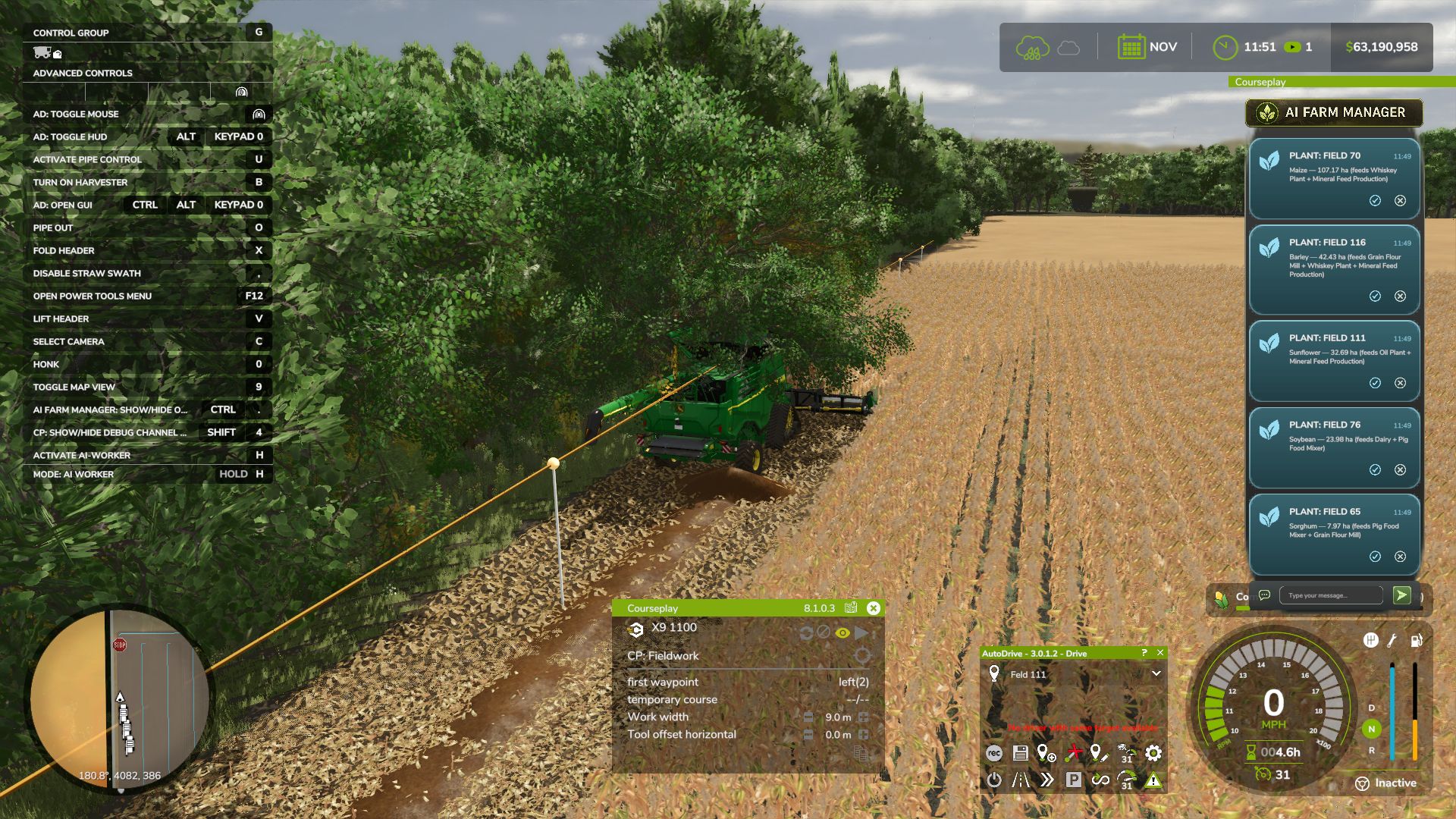
AI Farm Manager v2.2.1.0 | FS25 Mod Download Home Upload Mod Featured Mods FS25 Universal Autoload FS25 Courseplay FS25 Autodrive FS25 Super Strength FS25 Vehicle Explorer FS25 Enhanced Vehicle Installing Mods Modding Info FS25 Modding Guide FS25 Modding Tool How to Start Modding How to edit a Tractor? Convert FS22 to FS25 Mods Testing Your FS25 Mods FS25 Cheats FS25 Guides FS25 FAQ About FS25 FS25 News Giants Editor FS25 FS25 Ground Deformation FS25 Release Date FS25 Mods on Consoles FS25 System Requirements FS25 Console Commands Download FS25 Game Landwirtschafts Simulator 25 Mods Best Mods Help Contacts Maps Cars Trucks Tractors Trailers Vehicles Excavators Implements Harvesters Headers Buildings Objects Gameplay Prefab Textures Packs Gameplay / Other AI Farm Manager v2.2.1.0 FS25 Mods | 22 Jul, 2026 YOUR FARM FINALLY HAS A MANAGER — one that actually reads your save, watches the prices, and taps you on the shoulder when it matters. AI Farm Manager 25 gives your farm a real manager: an AI that reads your ACTUAL savegame — cash, fields, fleet, prices, weather, the clock — remembers your farm across sessions, and pops colour-coded cards onto your screen the moment something needs a decision. Answer right there in the game with a click or a typed reply, and it answers back. FIRST, THE HONEST BIT (READ THIS) This .zip is only HALF the mod — the part that lives in your game and puts messages on your screen. The other half is the brain: a free tool called Claude Code that runs on your PC and IS the manager. The two talk through tiny files on disk. Install only the .zip and nothing happens — you need the companion set up too (2-minute one-time setup, link below). The upside: you pick the AI. Point it at a cloud model, or run one 100% locally and free with Ollama — either way, your farm data never leaves your computer. HOW IT WORKS 1. You play. FS25 saves your farm to disk as usual. 2. The manager reads it — cash, land, fleet, crops, contracts, silos, prices, weather — straight from your save files. It reads; it never guesses, and it never writes your save. 3. When something actually matters, it drops a card on your screen mid-game — a ripe crop about to spoil, fertilizer at its annual low, a silo filling up. 4. You answer in the game — click /, acknowledge, dismiss, or type a free-text reply. Bring your mouse cursor up the way you already do for AutoDrive / Courseplay. 5. It reacts — reads your answer, remembers it, and follows up. Then it idles at basically zero cost until the next real event. WHAT IT DOES FOR YOU – Real memory — a per-farm history of decisions, plans, and YOUR house rules, so it starts every session already caught up. – Buy/sell price sense — grain flagged at its seasonal peak; seed / fertilizer / lime / herbicide flagged at their annual low — and only if you actually own the storage to stockpile. – Used-equipment reality check — "is this listing actually a bargain?" answered against real new prices. – Planning that respects timing — what to buy and WHEN, not just what. – Notifications you can trust — colour-coded cards (green ok / blue info / amber warn / red critical) with 31 context glyphs. It under-sends on purpose: silence is the default, and it only interrupts when it's worth your hands off the wheel. – Your overlay, your way — persistent panel or classic pop-ups (toggle Ctrl+Period), movable and restylable, and your unanswered cards survive a restart. – Two-way, for real — it reads your clicks and typed replies back; a double-click can't double-count. WHAT IT WILL NEVER DO – Never writes to your savegame — not once, not ever. 100% read-only against your game. – Never phones home — everything stays on your PC (run it on a local model and your farm data never touches the internet at all). – Client-side only, safe for singleplayer AND multiplayer; changes no gameplay system. WHAT YOU'LL NEED – Farming Simulator 25 + this mod (PC). – Claude Code installed on your PC — the free companion that runs the manager. – An AI model for it to use — your choice: a Claude / Anthropic account, an OpenRouter key, or a free local model via Ollama. – Python 3 (standard library only — nothing to pip-install). – A one-time 2-minute setup: start Claude Code in your farm folder and say "set up my farm manager." – Currently WSL / Linux-oriented on Windows (it uses /mnt/c/… paths). To click card buttons you need a mouse cursor on screen (AutoDrive's MMB, Courseplay's RMB, or any cursor mod). Author: therealparzival Tags: AI Claude Code FIRST PC Having problems with the mod? Check the comments for possible solutions, and report any new bugs you discover. Download Useful Information: How to install FS25 Mods | Farming Simulator 25 FAQ | Farming Simulator 25 News | FS25 System Requirements | Download FS25 Game | Giants Editor FS25 | FS25 Modding Guide | FS25 Cheats | FS25 Guides ... --> Factories 2x faster V1.0 Ga
AI Farm Manager v2. 2. 1. 0 | FS25 Mod Download Home Upload Mod Featured Mods FS25 Universal Autoload FS25 Courseplay FS25 Autodrive FS25 Super Strength FS25 Vehicle Explorer FS25 Enhanced Vehicle Installing Mods Modding Info FS25 Modding Guide FS25 Modding Tool How to Start Modding How to edit a Tractor? Convert FS22 to FS25 Mods Testing Your FS25 Mods FS25 Cheats FS25 Guides FS25 FAQ About FS25 FS25 News Giants Editor FS25 FS25 Ground Deformation FS25 Release Date FS25 Mods on Consoles FS25 System Requirements FS25 Console Commands Download FS25 Game Landwirtschafts Simulator 25 Mods Best Mods Help Contacts Maps Cars Trucks Tractors Trailers Vehicles Excavators Implements Harvesters Headers Buildings Objects Gameplay Prefab Textures Packs Gameplay / Other AI Farm Manager v2. 2. 1. 0 FS25 Mods | 22 Jul, 2026 YOUR FARM FINALLY HAS A MANAGER — one that actually reads your save, watches the prices, and taps you on the shoulder when it matters. AI Farm Manager 25 gives your farm a real manager: an AI that reads your ACTUAL savegame — cash, fields, fleet, prices, weather, the clock — remembers your farm across sessions, and pops colour-coded cards onto your screen the moment something needs a decision. Answer right there in the game with a click or a typed reply, and it answers back. FIRST, THE HONEST BIT (READ THIS) This .zip is only HALF the mod — the part that lives in your game and puts messages on your screen. The other half is the brain: a free tool called Claude Code that runs on your PC and IS the manager. The two talk through tiny files on disk. Install only the .zip and nothing happens — you need the companion set up too (2-minute one-time setup, link below). The upside: you pick the AI. Point it at a cloud model, or run one 100% locally and free with Ollama — either way, your farm data never leaves your computer. HOW IT WORKS 1. You play. FS25 saves your farm to disk as usual. 2. The manager reads it — cash, land, fleet, crops, contracts, silos, prices, weather — straight from your save files. It reads; it never guesses, and it never writes your save. 3. When something actually matters, it drops a card on your screen mid-game — a ripe crop about to spoil, fertilizer at its annual low, a silo filling up. 4. You answer in the game — click /, acknowledge, dismiss, or type a free-text reply. Bring your mouse cursor up the way you already do for AutoDrive / Courseplay. 5. It reacts — reads your answer, remembers it, and follows up. Then it idles at basically zero cost until the next real event. WHAT IT DOES FOR YOU – Real memory — a per-farm history of decisions, plans, and YOUR house rules, so it starts every session already caught up. – Buy/sell price sense — grain flagged at its seasonal peak; seed / fertilizer / lime / herbicide flagged at their annual low — and only if you actually own the storage to stockpile. – Used-equipment reality check — "is this listing actually a bargain?" answered against real new prices. – Planning that respects timing — what to buy and WHEN, not just what. – Notifications you can trust — colour-coded cards (green ok / blue info / amber warn / red critical) with 31 context glyphs. It under-sends on purpose: silence is the default, and it only interrupts when it's worth your hands off the wheel. – Your overlay, your way — persistent panel or classic pop-ups (toggle Ctrl+Period), movable and restylable, and your unanswered cards survive a restart. – Two-way, for real — it reads your clicks and typed replies back; a double-click can't double-count. WHAT IT WILL NEVER DO – Never writes to your savegame — not once, not ever. 100% read-only against your game. – Never phones home — everything stays on your PC (run it on a local model and your farm data never touches the internet at all). – Client-side only, safe for singleplayer AND multiplayer; changes no gameplay system. WHAT YOU'LL NEED – Farming Simulator 25 + this mod (PC). – Claude Code installed on your PC — the free companion that runs the manager. – An AI model for it to use — your choice: a Claude / Anthropic account, an OpenRouter key, or a free local model via Ollama. – Python 3 (standard library only — nothing to pip-install). – A one-time 2-minute setup: start Claude Code in your farm folder and say "set up my farm manager." – Currently WSL / Linux-oriented on Windows (it uses /mnt/c/… paths). To click card buttons you need a mouse cursor on screen (AutoDrive's MMB, Courseplay's RMB, or any cursor mod). Author: therealparzival Tags: AI Claude Code FIRST PC Having problems with the mod? Check the comments for possible solutions, and report any new bugs you discover. Download Useful Information: How to install FS25 Mods | Farming Simulator 25 FAQ | Farming Simulator 25 News | FS25 System Requirements | Download FS25 Game | Giants Editor FS25 | FS25 Modding Guide | FS25 Cheats | FS25 Guides ... --> Factories 2x faster V1. 0 Ga
📊 Mod Details
- Game
- Fs25 Hub Mods
- Author
- fs25modhub.com
- Version
- 2.2.1.0
- Downloads
- 0
- Endorsements
- 0
- Category
- Other
- Created
- 7/22/2026
- Updated
- 7/22/2026
🔧 How to Install Farming Simulator 25 Mods
Download from https://www.fs25modhub.com.
📖 Full step-by-step install guide for Farming Simulator 25 →
Visit the official mod page for specific installation instructions for this mod.
🎮 Need cheat codes or console commands? Check ur gaming wiki for Farming Simulator 25 commands, item IDs, and more.
Keep browsing — more Farming Simulator 25 mods await