Stuttering fix - DXVK method
⚪ Last updated 2021Preview
🔍 Analysis
- 👍 4.0% endorsement rate — high engagement, a strong quality signal
- 🏆 #9 of 139 Visuals mods in this game by downloads
📋 About This Mod
This method will make your game feel buttery smooth as it will fix both frame pacing issues and (some of!) the asset loading stutter.
Odyssey, Days Gone, Star Wars Jedi: Fallen Order, and many other games.]
1) Make your game run in DX11 mode, otherwise this won't work. There are two options to do this:
a) add "-dx11" in your epic store launch options for the game
b) open epic_emu.ini from Final Fantasy VII Remake -> Engines -> Binaries -> ThirdParty -> EOS and add " -dx11" after AppName=FFVIIRemakeIntergrade -> so it looks like AppName=FFVIIRemakeIntergrade -dx11, save the .ini file.
How to add DXVK async to your game ( DXVK is a DX11->Vulkan wrapper that bypasses the shader compilation of the game and allows asynchronous, stutter-free shaders to work)
1) Go to : DXVK async github
2) Download the dxvk-async-1. 9. 3.tar.gz file
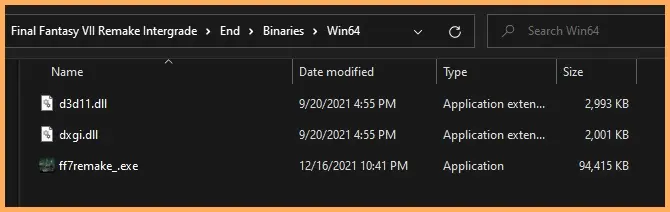
3) You need to copy the files d3d11.dll and dxgi.dll from x64 folder into Final Fantasy VII Remake -> End -> Binaries -> Win64
4) Run the game!
IF YOUR GAME CRASHES
This method involves a dx11->Vulkan wrapper, if your game runs in direct x 12 it's gonna crash 100%. Please make sure, before following STEP 2, that your game is running in directx 11 mode. Run the game with RTSS overlay on and make sure you see D3D11 in the top left corner like in this screenshot. Only after confirming this you should proceed and copy d3d11.dll and dxgi.dll.
Optional: Download the config file I have uploaded and drop it in the folder with the other two new files and the game executable. It can help alleviating stuttering even further.
Extra advice: since the game doesn't run in exclusive fullscreen, that means the desktop refresh rate will match the game's refresh rate. So make sure your framerate has the same value as the refresh rate of your monitor, or exactly half or even third of it.
if your refresh rate is 144hz - set the in-game limiter at 120, but cap the fps with RTSS (RivaTuner Statistics Server) at 72, 48, 36 fps
if your refresh rate is 120hz - set the in-game limiter at 120, but cap the fps with RTSS (RivaTuner Statistics Server) at 60, 40, 30 fps
if your refresh rate is 60hz - set the in-game limiter at 120, but cap the fps with RTSS (RivaTuner Statistics Server) at 60, 30 fps
Always set the in-game limiter at 120 fps. A. L. W. A. Y. S. That settings is
📊 Mod Details
- Game
- Ff7 Remake Mods
- Author
- Mary333
- Version
- 1.0
- Downloads
- 44,840
- Endorsements
- 1,784
- Category
- Visuals
- Created
- 12/20/2021
- Updated
- 12/21/2021
🔧 How to Install FF7 Remake Mods
Use FFVIIHook.
📖 Full step-by-step install guide for FF7 Remake →
Visit the official mod page for specific installation instructions for this mod.
🎮 Need cheat codes or console commands? Check ur gaming wiki for FF7 Remake commands, item IDs, and more.
Keep browsing — more FF7 Remake mods await