Motion Blur and Depth of Field Modular
⚪ Last updated 2009Preview
🔍 Analysis
- 👍 2.5% endorsement rate — high engagement, a strong quality signal
- 🏆 #45 of 217 Miscellaneous mods in this game by downloads
📋 About This Mod
✅ ---------------
✅ VERSION 1. 1b
✅ ---------------
✅ More FPS (from V1. 1a)
✅ V1. 1b: Indoor optimization ESPs have better FPS in exterior cells (Outdoors).
✅ Details of files:
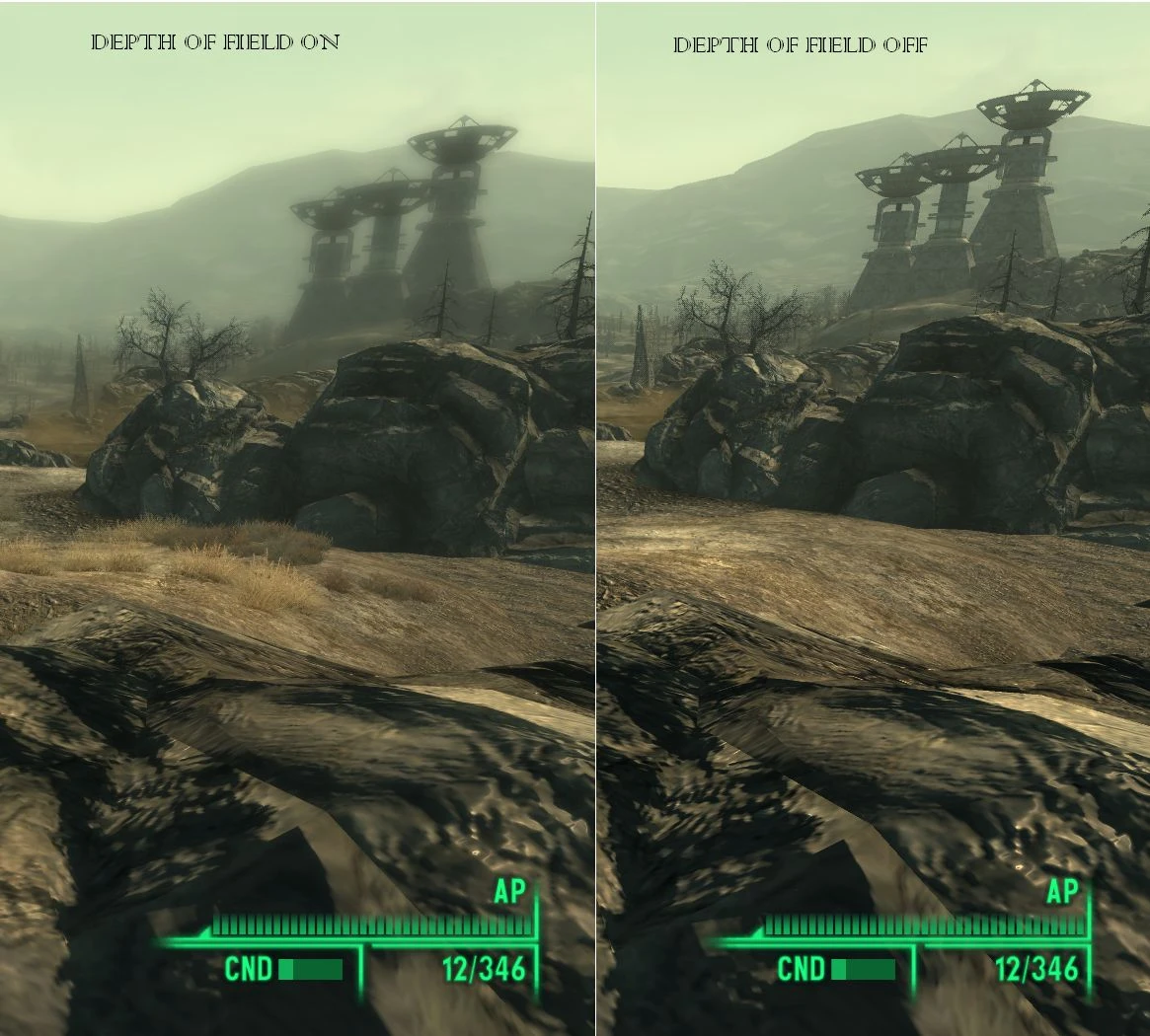
A similar mod to StapleNinja\'s, this mod adds either Depth of Field, Motion Blur, or both to Fallout 3... You can choose from different .esp files to suit your needs.
- ---------------
- VERSION 1. 1b
- ---------------
- More FPS (from V1. 1a)
- V1. 1b: Indoor optimization ESPs have better FPS in exterior cells (Outdoors).
- Details of files:
- ------------
- DEPTH OF FIELD
- ------------
- 5 different levels of strength, going upwards:
- Subtle
- Medium
- Strong
- Extreme
- Insane
- 3 different levels of distance:
- Close
- Far
- Very Far
- 2 different folders:
- Without Indoor Optimization:
- This contains the files that do not change or turn off the DOF effect in interiors in any way,
- only recommended for PCs that don\'t get a slow down because of the effect indoors, you will have to test that yourself.
- With Indoor Optimization (RECOMMENDED)
- This completely turns off the DOF effect indoors, speeding up FPS.
- NOTE: Insane Esps are not intended to work perfectly, no complaining if you see a visual glitch!
- ------------
- MOTION BLUR
- ------------
- 5 different levels of strength, going upwards:
- Subtle
- Medium
- Strong
- Extreme
- Insane
- That\'s it. They have been optimized and should NOT reduced FPS by more than 1-2, if any...
- ------------
- INSTRUCTIONS
- ------------
- Installation:
- 1. Open the .rar file you downloaded
- 2. Drag, or extract the file you would like to use to your data folder(you can also extract all of them, and then pick one later).
- 3. Repeat with other .rar file if you downloaded one.
- 4. Open Fallout 3 Launcher, or FOMM, go to Data Files, and tick the checkbox next to the 2 files you choose.
- 5. Run the game...
- Uninstallation:
- Either-
- 1. Uncheck the 2 files you chose in Data Files
- OR
- 2. Go to your data folder, usually C:\\Program Files\\Bethesda softworks\\Fallout 3\\Data and delete the 2 files you chose before.
- -------------
- INCOMPATIBILITY
- -------------
- Motion Blur-
- None.
- Depth Of Field-
- StapleNinja\'s DOF(Why would you combine them?)
- -------------
- FUTURE PLANS IN ORDER
- -------------
- Option to automatically turn off Motion Blur indoors (just in case)
- Optional file:
- Drug Effects-
- Visuals activate when taking certain drugs, i.e. More saturation for Jet, Inverted(Almost) colours for Psycho, Double Vision for any alcohol, etc.
- Include a menu, for only 1 ESP file
- ------------------
- CHANGELOG
- ------------------
- V1. 1b:
- Interior optimization ESPS (in the folder Depth of Field-With Indoor Optimization) should no longer be slower than the other ESPs outdoors (Depth of Field-WithOUT Indoor Optimization). I FULLY recommend these.
- V1. 1:
- Subtle Motion Blur FPS Drop Fixed (If other Motion Blur files gave you any slowdowns then these are fixed too).
- Depth Of Field With no Indoor optimization now available, for people where it runs smooth indoors anyways.
- Motion blur option Insane added.
- Motion blur reduced in general.
- New Optional file added:-V. A. T. S. DOF effect.
- There should be less FPS redcution!
- V1. 0:
- Distances Adjusted correctly.
- Added Insane option for DOF. Causes graphical anomalies!
- 0. 75 Bet
📊 Mod Details
- Game
- Fallout3 Mods
- Author
- FuzzySlash
- Version
- 1.1b
- Downloads
- 23,751
- Endorsements
- 604
- Category
- Miscellaneous
- Created
- 6/18/2009
- Updated
- 6/20/2009
🔧 How to Install Fallout 3 Mods
Download from Nexus Mods.
📖 Full step-by-step install guide for Fallout 3 →
Visit the official mod page for specific installation instructions for this mod.
🎮 Need cheat codes or console commands? Check ur gaming wiki for Fallout 3 commands, item IDs, and more.
Keep browsing — more Fallout 3 mods await