Customizable Message Menu
⚪ Last updated 2009Preview
🔍 Analysis
- 👍 3.7% endorsement rate — high engagement, a strong quality signal
- 🏆 #4 of 43 User Interface mods in this game by downloads
📋 About This Mod
Customize colors in the FO3 Message Menu
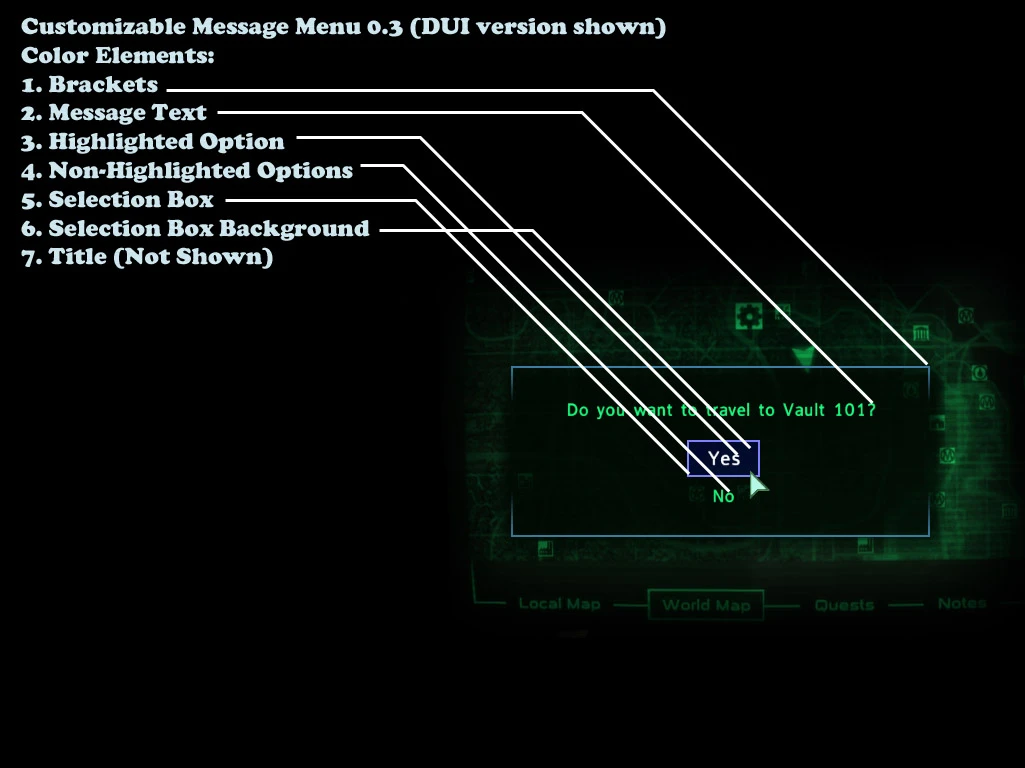
Name: Customizable Message Menu Version: 0. 3 Author(s): Drayk ============ Description: ============ Lets you customize colors in Fallout 3\'s plain old Message Menu. Available in DUI (for DarNified User Interface) and Non-DUI versions. Follow instructions for installation and then open CMMSettings.txt (this file is found in your \"Fallout 3\\Data\\Menus\\Prefabs\" directory) ============= Installation: ============= Use 7-Zip (widely available) 1. Extract \"Menus\" to your \"Fallout 3\\Data\" directory Always: 1. Make sure your \"Fallout.ini\" file contains \"bInvalidateOlderFiles=1\" ======== Removal: ======== 1. Delete menus\\globals.xml 2. Delete menus\\message_menu.xml 3. Delete menus\\prefabs\\CMMSettings.txt 4. If you use DarNified User Interface, Re-Install it. ========= Elements: ========= Elements of the Message Menu that you can change colors: - Brackets - Message Title - Message Text - Box that appears around highlighted text - Box background color - Highlighted menu option text - Non-highlighted menu option text ====== Usage: ====== 1. After extracting desired files, open CMMSettings.txt with Notepad or similar text editor. (This is found in your \"Fallout 3\\Data\\Menus\\Prefabs\\\" directory) 2. Change desired options (Read on to find out how) 3. Save, Launch Fallout 3, and enjoy! 4. Do NOT edit globals.xml or message_menu.xml unless you know what you\'re doing. ======= Colors: ======= OPTION 1 (CHOOSE FROM FALLOUT 3 COLORS): Fallout 3 colors are limited, but you do have a few options: &hudmain - your HUD color. Can be Green, \"White\", Blue, or Amber, depending on in-game setting &hudalt - red &mainmenu - yellowish-greenish white &nosystemcolor - bright white &pipboy - your Pip-Boy menu color, depending on in-game setting &system - green &terminal - not discernably different Green OPTION 2 (MAKE YOUR OWN MESSAGE MENU COLORS): Every element is customizable, except for the scrollbar. With DUI there is no need for a scrollbar in this menu! <_MMCustomColors> must be set to 1 (default). Change it to 0 to use OPTION 1 method. Example element: <_MMBracketRed> 128 - (Affects the amount of RED in the element) <_MMBracketGreen> 128 - (Affects the amount of GREEN in the element) <_MMBracketBlue> 128 - (Affects the amount of BLUE in the element) =============================== DarNified User Interface users: =============================== Font is \"1\" on non-highlighted menu options Font is \"2\" on highlighted menu option (This basically just means bigger text size of highlighted items) ============================================ How to use RGB values to pick desired color: ============================================ Read this if you don\'t know much about RGB values: General Rules: A value of \"0\" means that the color will NOT be present A value of \"255\" m
📊 Mod Details
- Game
- Fallout3 Mods
- Author
- Drayk Cannon
- Version
- 0.3
- Downloads
- 752
- Endorsements
- 28
- Category
- User Interface
- Created
- 5/28/2009
- Updated
- 7/17/2009
🔧 How to Install Fallout 3 Mods
Download from Nexus Mods.
📖 Full step-by-step install guide for Fallout 3 →
Visit the official mod page for specific installation instructions for this mod.
🎮 Need cheat codes or console commands? Check ur gaming wiki for Fallout 3 commands, item IDs, and more.
Keep browsing — more Fallout 3 mods await