CatMeat
⚪ Last updated 2014Preview
🔍 Analysis
- 👍 5.5% endorsement rate — high engagement, a strong quality signal
- 🏆 #164 of 170 Companions mods in this game by downloads
📋 About This Mod
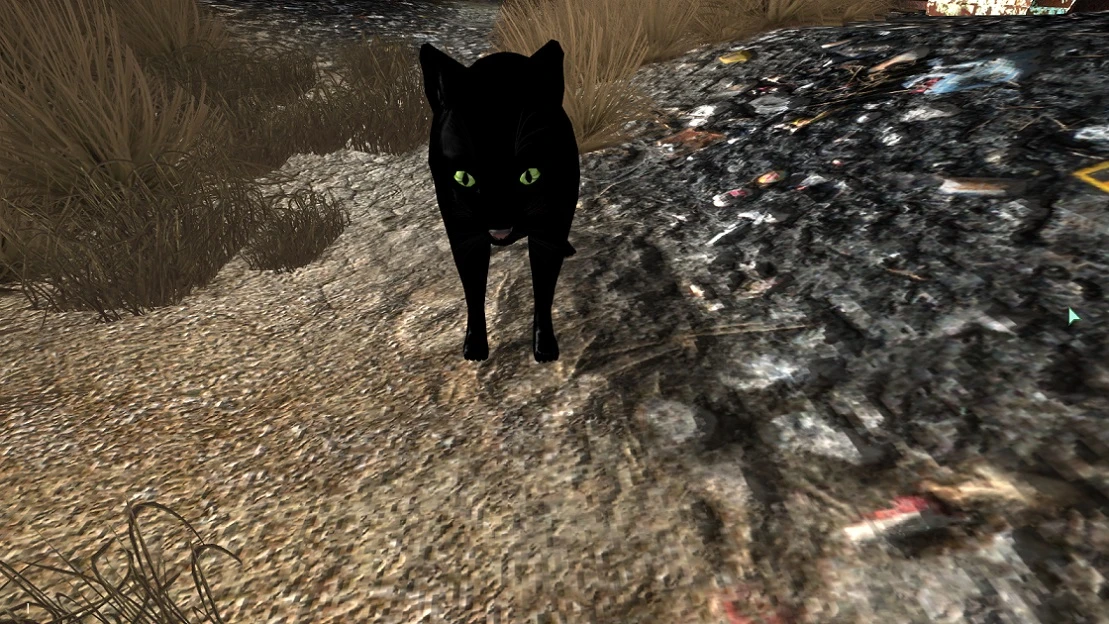
Turn Dogmeat into an oversized Cat.
UPDATE: Alright, I uploaded versions of the esps with Catmeat scaled down to . 50, which is roughly half the size of the main version. There is a minor problem with the size though. I only encountered it once, and it may have been a mod conflict with enhanced camera, but "Gwen", my version of Catmeat, sank into the ground when I had her wait for me outside of Minefield. It may be prudent to have a mod to summon Catmeat to your side, just in case he sinks through the ground and gets lost. All non-cosmetic dogmeat mods should work with this (CBO, Dogmeat doesn't Die, Dogmeat whistle). If you want him smaller, just replace the esp from the main files with whichever optional file matches your version.
Description
This is a quick mod to change Dogmeat into "Catmeat", a largerly oversized feline to aid you in your adventures. All of his basic behavior and scripting has been retained, so the behaviors that made Dogmeat so fun to have around are still present in Catmeat.
Also, I am not very good at getting awesome screenshots, so if anybody uses this and would like to upload some much, much better ones, please feel free to do so! I will be very grateful.
Installation
Drop your chosen Catmeat.esp, meshes and textures folders into the Data files. Check the esp in FOMM.
Issues and Oddities
Catmeat is supposed to have no sounds at all. The mod I got the basic cat animal from does have sound, I'm simply too ignorant to be able to get them to work in game. Now, I did say "supposed", since, right now, if you talk to Catmeat he will happily bark and pant at you. I don't know how to make that not happen. Also, his name is not changed in dialogue in this version. This is a pretty quick mod. I apologize for any inconvenience this causes.
Personalization
Changing Catmeat's Name -
Click on Catmeat.
Press the ` button. (It is on the upper left corner of your keyboard.)
Type in "SetActorFullName _____"
Press Enter.
Load Up Catmeat.esp
On the Object Window to the left of the screen, click on the plus sign by "Actors".
Click the plus sign by "Creature".
Click the Plus sign by "Animal".
Click the "cat" line.
Double click on "FFEU255Dogmeat".
On the upper left corner of the window that popped up, find the word name and the space there currently filled with "Catmeat".
Alter it to your liking.
At the lower left corner of that window, click OK.
Editing the Cat's Size
Click on Catmeat.
Press the ` button. (It is on the upper left corner of your keyboard.)
Type in "Setscale ____" (Insert any number here. Everything below 1. 00 (E. G 0. 5) will make Catmeat smaller. Any above 1. 00 (E. G 1. 10) will make him bigger.)
Press Enter.
📊 Mod Details
- Game
- Fallout3 Mods
- Author
- Lord Dlichnum
- Version
- 0.5a
- Downloads
- 1,739
- Endorsements
- 95
- Category
- Companions
- Created
- 5/3/2014
- Updated
- 5/7/2014
🔧 How to Install Fallout 3 Mods
Download from Nexus Mods.
📖 Full step-by-step install guide for Fallout 3 →
Visit the official mod page for specific installation instructions for this mod.
🎮 Need cheat codes or console commands? Check ur gaming wiki for Fallout 3 commands, item IDs, and more.
Keep browsing — more Fallout 3 mods await