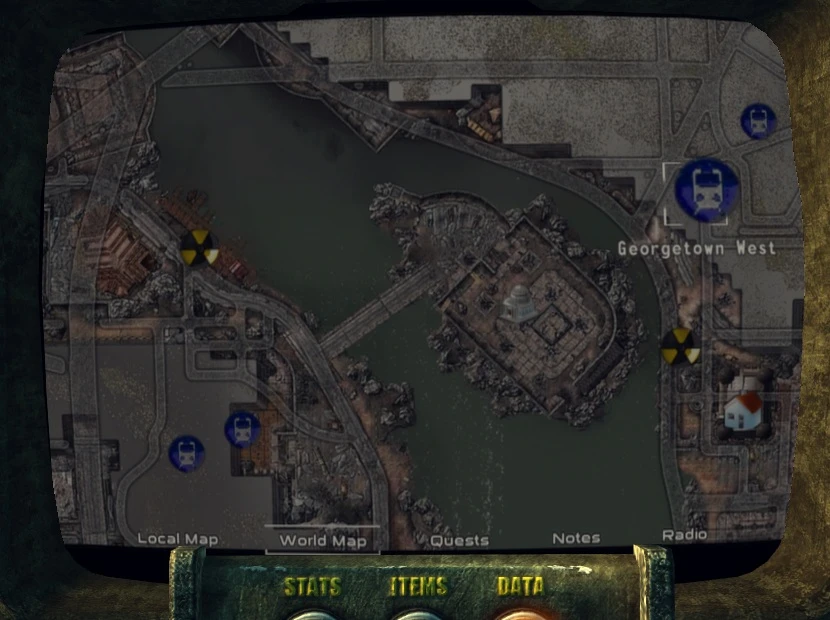
High res maps based on worm82075\'s ORWIC texture & optional road overlay from Renegade Titan\'s
Vector maps. Two sizes 4096 and 8192 & two versions of each depending if you want the overlay
2. 2 update
the maps havent changed much, theyre slightly sharper, and the city layers not transparent anymore, more sandy and metalic
the bug with the 2. 1 maps freezing the screen when opening is sorted
adds new icons, replacing the 15 standard types, plus new place marker, quest marker, some temporary pc markers, (lack of anything better atm) replacement mouse cursors, and clean pipboy screens replacement. The new place and quest markers also show on the hud and local map
new xml tweaks, adding bigger map screen configured for each device, and brightness settings remove the header details (date, time, location) on the worldmap, but keep it on the local map if needed - theres 5 brightness settings, default (0), 25, 50, 75 and 100%.
fomod script with visibility tags checks if the 2500 or Readius are installed and if neither, assumes you use the 3000, useful for the bigger map screen settings and matching screenshots
Its also possible to use the tweaks included with the 2. 2 install with the 2. 0 maps instead if you prefered that less saturated look, main difference between them is 2. 0 used more contrast to bring out details, and for most part, theyre equally detailed, but the 2. 0 maps are rougher in places and have more obvious roads overaly (see the panoramic screenshot)
Notes
the menus at the bottom of the screen have a problem being activated cause they occupy a lower layer than the map itself which I lowered right to the bottom cause it looks better, but can make them hard to click on if not relying on the sounds to hear it blink, cause all thats left is 3 or 5 pixels of activatable area, so if you wanto raise the bottom edge of the map to have more room to click the menus, just need to open the map_menu.xml in Data/menus/main using Notepad++ (or similar) & scroll to lines 149, 268, 393 (for the standard darnified tweaks) or 142, 261, 382 (for non darnified tweaks) & lower that common number say 5 to 20 points depending how much extra room you want, the lower you set it, the higher the map textures raised
If your map screen seems stuck on the green color, its because the default pipboy font color is green, and my screenshots are showing a custom pipboy font color instead. Its easy to set the custom color by opening your FalloutPrefs.ini in C:\\Users\\\"your computer\"\\Documents\\My Games\\Fallout3 changing the uPipboyColor value to 2930678016 but if you wanto use FICC to set your own custom color, that numbers equivalent to RGB 174, 174, 153 for reference
And heres full size previews uploaded as cropped jpgs at 6550x6550, 10MB each, but load in web browsers like a