Better Crosshair - FPS Style
⚪ Last updated 2011Preview
🔍 Analysis
- 👍 3.6% endorsement rate — high engagement, a strong quality signal
- 🏆 #24 of 82 User Interface mods in this game by downloads
📋 About This Mod
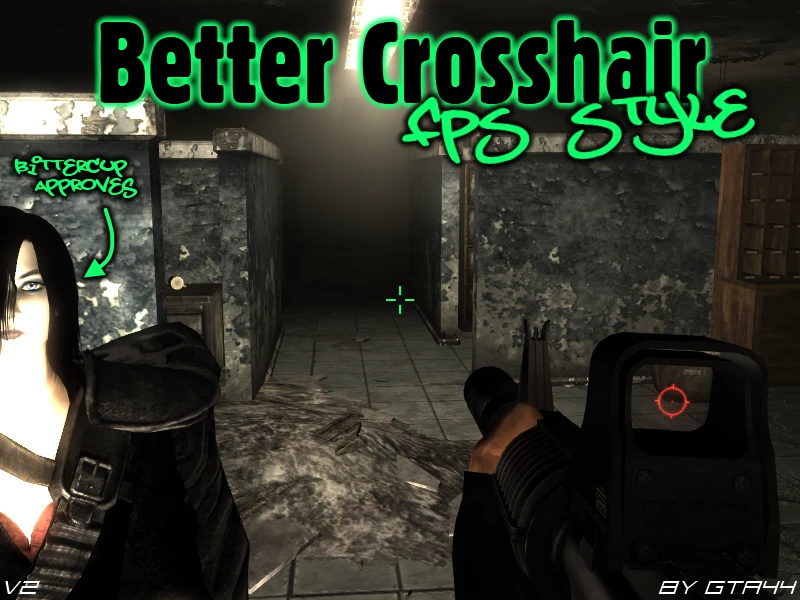
New Vegas version: http://www.newvegasnexus.com/downloads/file.php?id=36789 Description & Details Changes the default crosshair into a typical FPS style crosshair (four lines around an open center point). It was designed to be used with DUI, but will work just as well in Vanilla, however it might be a bit big. Idle Crosshair: Four lines around an open center point. (Centre-less Plus Sign - Alt w/ Center-Dot) Interact Crosshair: Four lines around an open center point, with corner brackets around it. (Centre-less Plus Sign with Square - Alt w/ Center-Dot) Install ---Make sure you have some form of ArchiveInvalidation!--- Copy \'interfaceshared0.dds\' into \'\\Fallout 3\\Data\\Textures\\Interface\'. Overwrite if necessary. Uninstall Delete \'interfaceshared0.dds\' from \'\\Fallout 3\\Data\\Textures\\Interface\'. Incompatibility This mod will be incompatible with any mods that change \'interfaceshared0.dds\', i.e. Crosshair mods, cursor mods etc. Credits Myself, GTA44. Permissions You can upload this mod to other Fallout modding sites, but you must credit me as the creator. If you want to edit and re-upload this mod, you must contact me first and get permission. However if you want to include this in your own mod without modifying it, you can do so, but still must credit me as the creator.
📊 Mod Details
- Game
- Fallout3 Mods
- Author
- GTA44
- Version
- v2
- Downloads
- 34,228
- Endorsements
- 1,222
- Category
- User Interface
- Created
- 7/5/2009
- Updated
- 5/29/2011
🔧 How to Install Fallout 3 Mods
Download from Nexus Mods.
📖 Full step-by-step install guide for Fallout 3 →
Visit the official mod page for specific installation instructions for this mod.
🎮 Need cheat codes or console commands? Check ur gaming wiki for Fallout 3 commands, item IDs, and more.
Keep browsing — more Fallout 3 mods await